
Level 2
January 23, 2025
Question

reCAPTCHA issue

  • January 23, 2025
  • 5 replies
  • 25 views

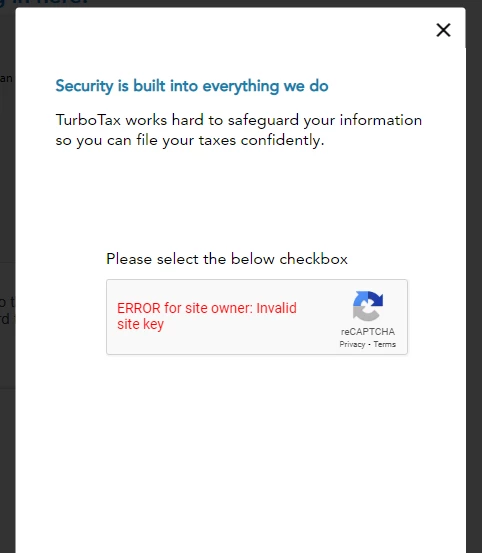
When I attempt to import a 1099, I'm getting an error with the reCAPTCHA service.  The error is:  ERROR for site owner: Invalid site key.


I have attempted to call the support phone number several times, but they have not been able to assist.
5 replies

MarilynG
Level 15
January 24, 2025

Some financial institutions don't have their documents ready yet to import.  If you have verified that yours is ready to import, and are receiving an error, there are a couple of things you can try.


If you can download your 1099 as a PDF, and are using TurboTax Online, you can import your PDF into your return (screenshot).  Choose 'Sales Section Totals' .


Or, here's How to Enter a Summary in Lieu of Individual Transactions.


Entering your 1099 manually is an option if your transactions are not too numerous.


**Say "Thanks" by clicking the thumb icon in a post. **Mark the post that answers your question by clicking on "Mark as Best Answer"
Level 2
January 24, 2025

Appreciate the response.  I'm using the desktop version, so there's no option to import.  When I use the online version and pull from both Ally and Marcus, the 1099's import in with no issues.  The issue lies directly with the desktop version.


As for entering transactions by hand, I have far too many entries on my 1099-B's to enter by hand.  Given the lackluster support, I'm likely just going to switch products for a different vendor.

Level 2
January 30, 2025

There  is a duplicate thread on this topic:


https://ttlc.intuit.com/community/taxes/discussion/recaptcha-error-on-import/00/3425291


Suggest using that thread going forward as it has more content..


Latest update (01.30.2025) stated TTax is working toward on a fix.

Level 2
February 1, 2025

I turned off my EERO WiFi router Ad blocking option per suggestions in the other thread and was then able to download Vanguard 1099 forms without issue (I'm using  TTax Premier on a Windows 10 desktop).  


MarilynG
Level 15
February 8, 2025

If you're still having Import issues, since everyone's computer configurations are different, here's how to Contact TurboTax Support and let a tech into your computer.  Not everyone is having a problem importing.


As one user above suggested, open TurboTax Online, import your transactions, then transfer your file to TurboTax Desktop.   Here's instructions on How to Transfer from TurboTax Online to TurboTax Desktop.


If you have a new computer (with a new name) another user suggested setting up a new Windows account and using TurboTax in that account. 


Here's more on Troubleshooting TurboTax Desktop Issues and from Microsoft, How to Switch Out of 'S' Mode for Windows 11.


@Oy_vey_TT 

@mbsmith33 

@bobwilson1 


**Say "Thanks" by clicking the thumb icon in a post. **Mark the post that answers your question by clicking on "Mark as Best Answer"
Level 3
February 1, 2025

Turning off VPN allowed the downloads to proceed. Sigh.


And, I am using the Intuit / Norton VPN. They should already know about this. Sigh

Level 2
February 4, 2025

I am having this same issue; I tried importing from several different brokerages, with the same problem across the board. I am using Win10, no VPN, Google Chrome as default browser everything running on latest version. I use standard Windows Security, also with the latest updates. I do not have any other issues with internet or captchas on any other site, except when trying to import in TT Desktop. WTF?!??? Intuit needs to fix this ASAP!!!!!!!!


p.S.: I did have my router set to AdGuard DNS, but switching that setting to auto-DNS did not make any difference, so that cannot be the underlying issue. My router/modem is a Zyxel C3510XZ, in case that matters (which I highly doubt).


Level 2
February 13, 2025

I had same issue but I disabled my adblocker on my laptop and eero internet modem and it worked fine.




