


- Community
- Topics
Turn on suggestions
Auto-suggest helps you quickly narrow down your search results by suggesting possible matches as you type.
Showing results for
- Community
- :
- Discussions
- :
- Taxes
- :
- Get your taxes done
- :
- Re: Schwab import fails

Connect with an expert

Do you have an Intuit account?
You'll need to sign in or create an account to connect with an expert.


- Mark as New
- Bookmark
- Subscribe
- Subscribe to RSS Feed
- Permalink
- Report Inappropriate Content
Schwab import fails
@BEE66 Other users have reported resolving this type of problem by using the Mozilla Firefox web browser.
February 15, 2026
1:30 PM

- Mark as New
- Bookmark
- Subscribe
- Subscribe to RSS Feed
- Permalink
- Report Inappropriate Content
Schwab import fails
Same here. It says that This import was unsuccessful.
February 15, 2026
3:39 PM

- Mark as New
- Bookmark
- Subscribe
- Subscribe to RSS Feed
- Permalink
- Report Inappropriate Content
Schwab import fails
Same problem with Schwab/Premier. TurboTax Desktop Partner Connection says Success but TurboTax 2025 says import unsuccessful.
February 15, 2026
4:00 PM

- Mark as New
- Bookmark
- Subscribe
- Subscribe to RSS Feed
- Permalink
- Report Inappropriate Content
Schwab import fails
@ Smithy wrote:Same problem with Schwab/Premier. TurboTax Desktop Partner Connection says Success but TurboTax 2025 says import unsuccessful.
and @ RoxanneChen and @ BEE66
Here's something to try:
Other users have said in other threads they have to allow Intuit a specific browser permission for "local network access." Some browsers will popup a prompt if a website (such as Intuit) asks for "local network access" (or similar words.) Some of users had said "no" if they got that prompt to allow Intuit local network access, and thus import failed. Users who have allowed Intuit "local network access" in the browser settings were able to import (at least from Vanguard or Fidelity, but I presume it would be from any brokerage.) Once you have successfully imported, you can go back and switch back that "local network access" that you gave to Intuit.
Of course, you also have to allow Schwab third-party permission in your Schwab account, which you may already have done.
February 15, 2026
5:01 PM


- Mark as New
- Bookmark
- Subscribe
- Subscribe to RSS Feed
- Permalink
- Report Inappropriate Content
Schwab import fails
If you received a "Success" message but your data hasn't appeared in TurboTax, it is likely due to recent browser security updates regarding Local Network Access.
To fix this you need to allow TurboTax to securely retrieve your data through your browser settings:
- Locate the View Site Information icon (the "tune" or "lock" icon) on the far left of your address bar, just before the URL.
- Find Local Network Access in the dropdown menu.
- Toggle the switch to ON.
- Refresh the page and attempt your import again.
If permissions aren't the issue, one of the following factors may be at play:
- Brokerage Delays: While most forms arrive by January 31, many brokerages delay Consolidated 1099s (like the 1099-B) until mid-February due to complex reporting requirements.
- Availability: Your brokerage must specifically "release" the import file to TurboTax. If it isn’t ready, we recommend checking back.
- Connection Blocks: Active VPNs or aggressive Anti-Virus software can occasionally block the import feature between your bank and TurboTax. Try disabling them temporarily or switching to a different browser.
Helpful TurboTax Articles:
- What if I can't import my 1099?
- How can I fix my 1099 import issue?
- How do I import my 1099s?
- How do I enter a large number of stock transactions in TurboTax?
**Say "Thanks" by clicking the thumb icon in a post
**Mark the post that answers your question by clicking on "Mark as Best Answer"
**Mark the post that answers your question by clicking on "Mark as Best Answer"
February 16, 2026
7:26 AM

- Mark as New
- Bookmark
- Subscribe
- Subscribe to RSS Feed
- Permalink
- Report Inappropriate Content
Schwab import fails
The issue was the local network access protection. I fixed that and things work out. There probably should be a help item which explains this failure on the import page. This would be a common failure point, and having to go through the community to get an answer is kind of poor programming architecture. This would be something that could be detected and warned about.
February 16, 2026
7:52 AM
- Mark as New
- Bookmark
- Subscribe
- Subscribe to RSS Feed
- Permalink
- Report Inappropriate Content
Schwab import fails
They are working on adding a message along with a FAQ. It should appear by the end of the month.
**Say "Thanks" by clicking the thumb icon in a post
**Mark the post that answers your question by clicking on "Mark as Best Answer"
**Mark the post that answers your question by clicking on "Mark as Best Answer"
February 16, 2026
8:53 AM
- Mark as New
- Bookmark
- Subscribe
- Subscribe to RSS Feed
- Permalink
- Report Inappropriate Content
Schwab import fails
that does not make a difference, I can see in my Schwab account that it is linked to Intuit. However the handoff from the browser to the Intuit app does not work or complete. Web page says "we have the data". Going to the
Intuit app, the only options are "skip import" which does exactly that or "continue" which opens the web page again.......................
February 16, 2026
11:43 AM
- Mark as New
- Bookmark
- Subscribe
- Subscribe to RSS Feed
- Permalink
- Report Inappropriate Content
Schwab import fails
that does not make a difference, I can see in my Schwab account that it is linked to Intuit. However the handoff from the browser to the Intuit app does not work or complete. Web page says "we have the data". Going to the
Intuit app, the only options are "skip import" which does exactly that or "continue" which goes back to the webpage to finish the linking that you just did
February 16, 2026
11:48 AM

- Mark as New
- Bookmark
- Subscribe
- Subscribe to RSS Feed
- Permalink
- Report Inappropriate Content
Schwab import fails
After the 'import successful' message, don't click on either 'Skip Import' or 'Continue'. Click on Wages & Income at the top, 'choose what I work on' and look at the Import Summary.
If there are no documents shown, you may have connected to your broker, but nothing was imported. This may be because the import forms are not yet ready, your broker account settings don't allow 'third party access', your anti-virus programs need to be disabled, or your browser settings need to allow local network access.
Be sure to clear your Cache and Cookies between attempts.
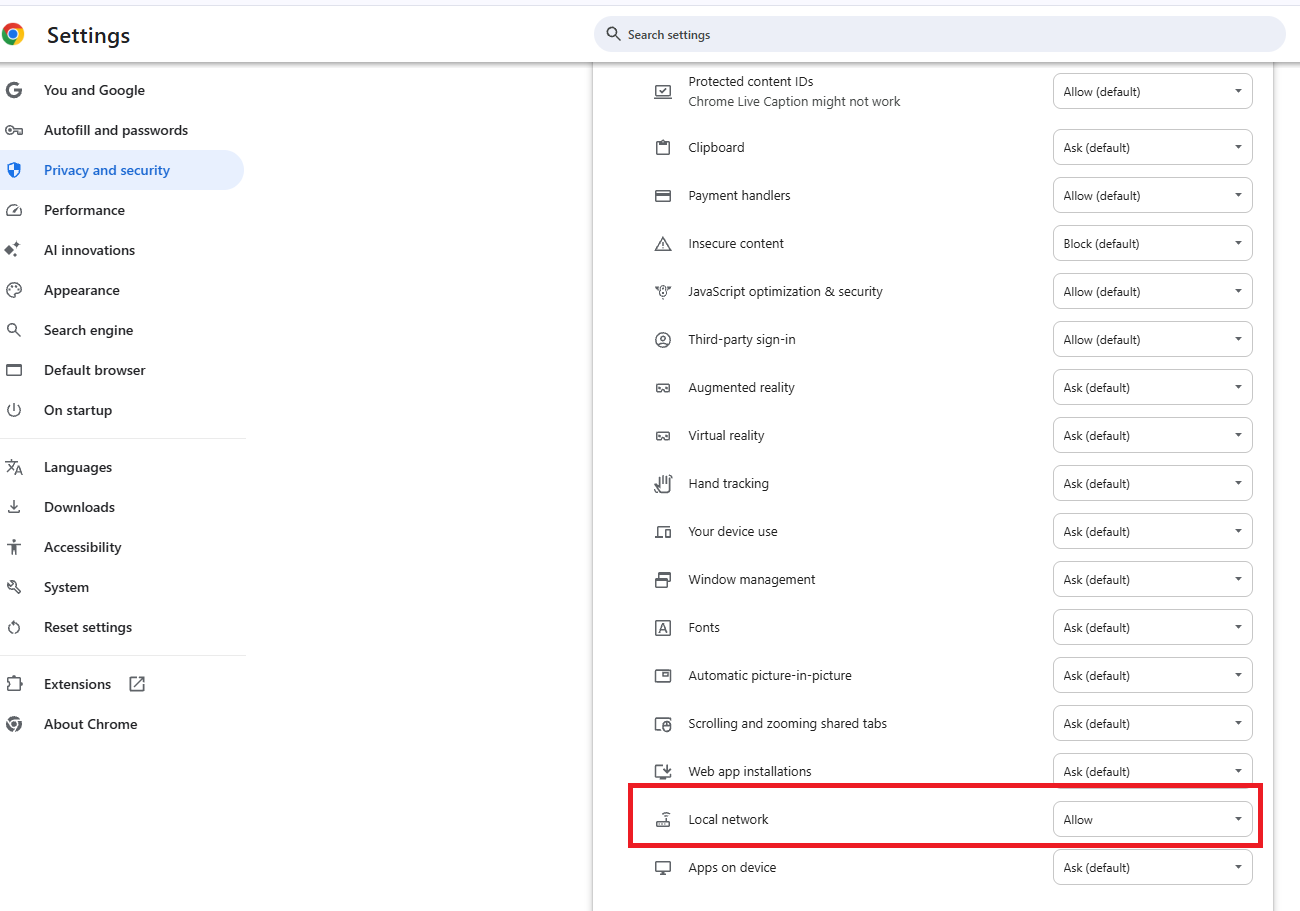
**Say "Thanks" by clicking the thumb icon in a post
**Mark the post that answers your question by clicking on "Mark as Best Answer"
**Mark the post that answers your question by clicking on "Mark as Best Answer"
February 17, 2026
11:44 AM

- Mark as New
- Bookmark
- Subscribe
- Subscribe to RSS Feed
- Permalink
- Report Inappropriate Content
Schwab import fails
I'm having the same issue. I don't get why Intuit broke something which was working
February 17, 2026
12:36 PM

- Mark as New
- Bookmark
- Subscribe
- Subscribe to RSS Feed
- Permalink
- Report Inappropriate Content
Schwab import fails
I was attempting to import my financial investment data from Charles Schwab, but I was having the same issues for days where the data would not import even though I would receive a message saying it was successful. I did the following steps for several attempts:
- I confirmed that my Charles Schwab files were available on or after 2/13
- I enabled Third Party access on my Charles Schwab account
- In Turbo Tax I performed Import from Charles Schwab account to my Turbo Tax Desktop application
- I Was taken to a website, in Google Chrome, my default browser, that asked for login information.
- It showed that it was connected and downloading data, then said successfully completed and to go back to my Turbo Tax desktop software application to continue
- When I went back to Turbo Tax, it didn’t show any data and only allowed me the option to skip import or try to import again.
I did this for several days.
I then cleared my Google Chrome cache/browsing history and it finally worked.
February 17, 2026
1:22 PM
- Mark as New
- Bookmark
- Subscribe
- Subscribe to RSS Feed
- Permalink
- Report Inappropriate Content
Schwab import fails
Some have received a message from Charles Schwab saying downloads would be enabled on Feb 27th.
This is not an Intuit issue, this is due to changes in browser(Chrome, Edge, Firefox) security updates.
If you received a "Success" message but your data hasn't appeared in TurboTax, it is likely due to recent browser security updates regarding Local Network Access.
To fix this you need to allow TurboTax to securely retrieve your data through your browser settings:
- Locate the View Site Information icon (the "tune" or "lock" icon) on the far left of your address bar, just before the URL.
- Find Local Network Access in the dropdown menu.
- Toggle the switch to ON.
- Refresh the page and attempt your import again.
If permissions aren't the issue, one of the following factors may be at play:
- Brokerage Delays: While most forms arrive by January 31, many brokerages delay Consolidated 1099s (like the 1099-B) until mid-February due to complex reporting requirements.
- Availability: Your brokerage must specifically "release" the import file to TurboTax. If it isn’t ready, we recommend checking back.
- Connection Blocks: Active VPNs or aggressive Anti-Virus software can occasionally block the import feature between your bank and TurboTax. Try disabling them temporarily or switching to a different browser.
Helpful TurboTax Articles:
- What if I can't import my 1099?
- How can I fix my 1099 import issue?
- How do I import my 1099s?
- How do I enter a large number of stock transactions in TurboTax?
**Say "Thanks" by clicking the thumb icon in a post
**Mark the post that answers your question by clicking on "Mark as Best Answer"
**Mark the post that answers your question by clicking on "Mark as Best Answer"
February 17, 2026
1:23 PM
- Mark as New
- Bookmark
- Subscribe
- Subscribe to RSS Feed
- Permalink
- Report Inappropriate Content
Schwab import fails
finally an answer that worked. thank you!!! taxes done!!
February 17, 2026
5:23 PM

- Mark as New
- Bookmark
- Subscribe
- Subscribe to RSS Feed
- Permalink
- Report Inappropriate Content
Schwab import fails
February 25, 2026
1:34 PM
Still have questions?
Questions are answered within a few hours on average.
Post a Question*Must create login to post


Unlock tailored help options in your account.


Get more help
Ask questions and learn more about your taxes and finances.
Related Content

olyolin
New Member

rvmeush
Level 2

jf4evr
Level 1
ksach
Level 1

blogan5291
New Member