


- Community
- Topics
Turn on suggestions
Auto-suggest helps you quickly narrow down your search results by suggesting possible matches as you type.
Showing results for
- Community
- :
- Discussions
- :
- Taxes
- :
- Get your taxes done
- :
- Re: Can't Import 1099 forms. It keeps on crashing.
Announcements


- Mark as New
- Bookmark
- Subscribe
- Subscribe to RSS Feed
- Permalink
- Report Inappropriate Content
Can't Import 1099 forms. It keeps on crashing.
Hi All, I'm having issues with TurboTax desktop for 2025 return year. There are several issues:
1. I connect to the institution and it finds documents, but when I click import nothing happens.
2. I try to import again after restarting the app, but this time I only select institution and click on Continue. The app crashes even before I can import anything.
3. It allows to import documents, but crashes afterwards. If I restart the app and try to view imported documents it crashes right after I click on a View button.
I've bought TurboTax about a month ago. There were many updates already install, but it didn't resolve these issues. I've been using TurboTax for many years, but this is the first time it's that bad.
posted
March 1, 2026
2:59 PM
last updated
March 01, 2026
2:59 PM
Connect with an expert

Do you have an Intuit account?
You'll need to sign in or create an account to connect with an expert.
13 Replies


- Mark as New
- Bookmark
- Subscribe
- Subscribe to RSS Feed
- Permalink
- Report Inappropriate Content
Can't Import 1099 forms. It keeps on crashing.
Are you running as Administrator? Have you disabled your anti-virus programs? These are the most common fixes. You may need to uninstall/re-install TurboTax.
Here's more info on Troubleshooting TurboTax Desktop Issues.
**Say "Thanks" by clicking the thumb icon in a post
**Mark the post that answers your question by clicking on "Mark as Best Answer"
**Mark the post that answers your question by clicking on "Mark as Best Answer"
March 6, 2026
11:41 AM
- Mark as New
- Bookmark
- Subscribe
- Subscribe to RSS Feed
- Permalink
- Report Inappropriate Content
Can't Import 1099 forms. It keeps on crashing.
Thanks for the suggestions, but it didn't help. I'm an admin, have Antiviruses disabled. Re-installed TurboTax with all the updates. The same issue.
I tried importing from different institutions. It only shows "Importing..." popup once, but nothing happens after that. I go to "Your 2025 Income summary", where it shows that there are actually few items in Import summary, but when I click on "View" - TurboTax crashes.
a month ago
- Mark as New
- Bookmark
- Subscribe
- Subscribe to RSS Feed
- Permalink
- Report Inappropriate Content
Can't Import 1099 forms. It keeps on crashing.
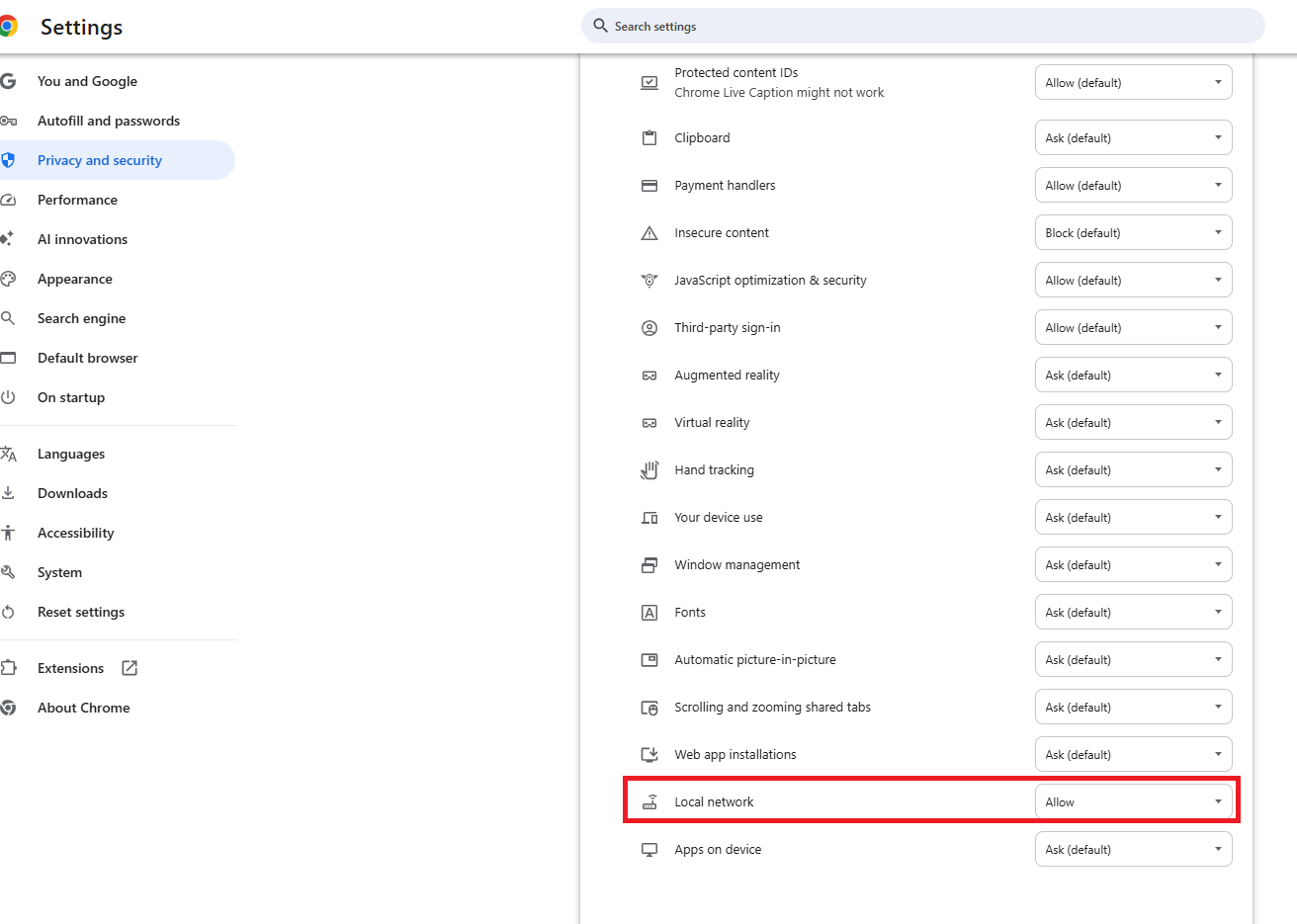
If TurboTax crashes during the import summary view it could be caused by excessive brokerage transactions, broken browser connections, or Local Network Access blocks. When your browser window opens for you to Sign In to your broker, click the icon in front of the URL to choose 'Allow' for LAN in the Settings. Be sure your broker account allows "third party access."
If you believe the crashing from 'View Import Summary' could be due to excessive transactions, here's How to Enter a Summary in Lieu of Individual Transactions.

**Say "Thanks" by clicking the thumb icon in a post
**Mark the post that answers your question by clicking on "Mark as Best Answer"
**Mark the post that answers your question by clicking on "Mark as Best Answer"
4 weeks ago
- Mark as New
- Bookmark
- Subscribe
- Subscribe to RSS Feed
- Permalink
- Report Inappropriate Content
Can't Import 1099 forms. It keeps on crashing.
I don't have many transactions in my accounts, but I still followed the steps you suggested. Unfortunately, it still crashes. I installed all the recent updates.
Again, when I go to import docs, from the TurboTax desktop it takes me to Web, then after entering required info, it shows "Connection established". I go back to TT desktop, documents appear there on the page with title "These Documents Are Now Ready for Import". I click on "Import Now", there appears a popup "Importing", then it disappears and nothing happens. It still on the same page.
I can still go to Wages & Income -> Your 2025 Income Summary. There in the "Import Summary" section it shows that there are 2 items, which looks like it did actually import docs, but when I click on "View" - it crashes with a popup "Looks like we've run into an error."
Please, advise. It's almost April and I haven't filed my taxes. I wanted to use TurboTax, because I used it last year and I can just import previous returns.
3 weeks ago

- Mark as New
- Bookmark
- Subscribe
- Subscribe to RSS Feed
- Permalink
- Report Inappropriate Content
Can't Import 1099 forms. It keeps on crashing.
You could also enter your information manually. To do this when you go back to the 1099-B, select Enter a different way, and on the How do you want to add your investment docs? , select Type it in myself.
Where do I enter or import a 1099-B?
2 weeks ago
- Mark as New
- Bookmark
- Subscribe
- Subscribe to RSS Feed
- Permalink
- Report Inappropriate Content
Can't Import 1099 forms. It keeps on crashing.
Thank you @LeticiaF1, that is what I probably have to do.
But I'm curious, why TurboTax can't fix it? There must some software support, it's not a free version. That's the reason I bought TurboTax, because I thought I'd be able to import and don't have to enter everything manually.
2 weeks ago

- Mark as New
- Bookmark
- Subscribe
- Subscribe to RSS Feed
- Permalink
- Report Inappropriate Content
Can't Import 1099 forms. It keeps on crashing.
Helpful TurboTax Articles:
- What if I can't import my 1099?
- How can I fix my 1099 import issue?
- How do I import my 1099s?
- How do I enter a large number of stock transactions in TurboTax?
If you received a "Success" message but your data hasn't appeared in TurboTax, it is likely due to recent browser security updates regarding Local Network Access.
To fix this you need to allow TurboTax to securely retrieve your data through your browser settings:
- Locate the View Site Information icon (the "tune" or "lock" icon) on the far left of your address bar, just before the URL.
- Find Local Network Access in the dropdown menu.
- Toggle the switch to ON.
- Refresh the page and attempt your import again.
What do I do when my data isn't imported into TurboTax Desktop even though it says successful import...
If permissions aren't the issue, one of the following factors may be at play:
- Brokerage Delays: While most forms arrive by January 31, many brokerages delay Consolidated 1099s (like the 1099-B) until mid-February due to complex reporting requirements.
- Availability: Your brokerage must specifically "release" the import file to TurboTax. If it isn’t ready, we recommend checking back.
- Connection Blocks: Active VPNs or aggressive Anti-Virus software can occasionally block the import feature between your bank and TurboTax. Try disabling them temporarily or switching to a different browser.
**Say "Thanks" by clicking the thumb icon in a post
**Mark the post that answers your question by clicking on "Mark as Best Answer"
**Mark the post that answers your question by clicking on "Mark as Best Answer"
2 weeks ago
- Mark as New
- Bookmark
- Subscribe
- Subscribe to RSS Feed
- Permalink
- Report Inappropriate Content
Can't Import 1099 forms. It keeps on crashing.
Thank you, CatinaT1.
Unfortunately I tried all you suggestion, but it still crashes. I tried different brokerages, I did double check that they already provided 1099 forms and they do. I don't use VPN and tried with antivirus OFF. I did check my browser and Local Network Access was already ON, but still I toggled it and tried few times - the same result in TurboTax. I have only one user on my machine and it is an admin, so no issues with permissions.
There are 6 transactions in my 1099, is that a lot? Last year I had more than that and didn't have issues importing it.
2 weeks ago
- Mark as New
- Bookmark
- Subscribe
- Subscribe to RSS Feed
- Permalink
- Report Inappropriate Content
Can't Import 1099 forms. It keeps on crashing.
That's not a lot of transactions. You may have to manually enter them.
**Say "Thanks" by clicking the thumb icon in a post
**Mark the post that answers your question by clicking on "Mark as Best Answer"
**Mark the post that answers your question by clicking on "Mark as Best Answer"
2 weeks ago
- Mark as New
- Bookmark
- Subscribe
- Subscribe to RSS Feed
- Permalink
- Report Inappropriate Content
Can't Import 1099 forms. It keeps on crashing.
That's true, but even separately each form does not have many transactions, I have more than 1 form. Also, that's not why I bought TurboTax to enter everything manually. Now, I'm also afraid that it may crash at some other stage too. Once it starts crashing, there is no way for me to restore app to the previous state, so that means if I enter many forms, then if it starts crashing I'll have to start everything over. Why it can't be fixed? I'm pretty sure TurboTax should be collecting crash reports, so it should be easy to fix.
2 weeks ago
- Mark as New
- Bookmark
- Subscribe
- Subscribe to RSS Feed
- Permalink
- Report Inappropriate Content
Can't Import 1099 forms. It keeps on crashing.
This is not common. It may be necessary to access your TurboTax Account on a different device. This is the best way to check to see if you continue with the same experience. Follow the instructions for manual entry of your income documents instead of trying to import.
Our tax expert @CatinaT1 has provided the guidance necessary to assist in your situation.
**Say "Thanks" by clicking the thumb icon in a post
**Mark the post that answers your question by clicking on "Mark as Best Answer"
**Mark the post that answers your question by clicking on "Mark as Best Answer"
2 weeks ago
- Mark as New
- Bookmark
- Subscribe
- Subscribe to RSS Feed
- Permalink
- Report Inappropriate Content
Can't Import 1099 forms. It keeps on crashing.
If you're saying something wrong with my device, but you can't say why, that means not necessary guidance provided. From my side, when it crashes and askes to send crash report to TurboTax, I did it. Has anyone looked at it? I've been sending it for more than a month already.
Will try on a Mac device, hope activation will work. Good that I have one, but curious for people who don't have a second one.
2 weeks ago
- Mark as New
- Bookmark
- Subscribe
- Subscribe to RSS Feed
- Permalink
- Report Inappropriate Content
Can't Import 1099 forms. It keeps on crashing.
I have a laptop with Windows 11 installed with all the latest updates. All drivers installed. Using Google Chrome browser, which is up to date. Followed all the instructions, which were suggested in this thread. Please, tell me what am I missing.
2 weeks ago
Still have questions?
Questions are answered within a few hours on average.
Post a Question*Must create login to post


Unlock tailored help options in your account.


Get more help
Ask questions and learn more about your taxes and finances.
Related Content

samasan57
New Member

gtprendiville
New Member

carson2246
Level 2

eastend19
Returning Member

sminla
New Member