


- Community
- Topics
Turn on suggestions
Auto-suggest helps you quickly narrow down your search results by suggesting possible matches as you type.
Showing results for
- Community
- :
- Discussions
- :
- Taxes
- :
- Get your taxes done
- :
- Re: Amend (change) button does nothing
Announcements

Connect with an expert

Do you have an Intuit account?
You'll need to sign in or create an account to connect with an expert.

- Mark as New
- Bookmark
- Subscribe
- Subscribe to RSS Feed
- Permalink
- Report Inappropriate Content
Amend (change) button does nothing
I am not on a browser, i am on the desktop version (thats the only option I have to amend 2023 return).
February 22, 2025
8:57 AM


- Mark as New
- Bookmark
- Subscribe
- Subscribe to RSS Feed
- Permalink
- Report Inappropriate Content
Amend (change) button does nothing
@aestrada1290 wrote:
I am not on a browser, i am on the desktop version (thats the only option I have to amend 2023 return).
To amend a 2023 tax return you have to use the TurboTax 2023 desktop edition installed on your personal computer.
Start the 2023 desktop program. Continue the 2023 tax return you want to amend.
Click on Federal Taxes (Personal using Home & Business)
Click on Other Tax Situations
Under Other Tax Forms
On Amend a return, click on the start button
February 22, 2025
9:06 AM
- Mark as New
- Bookmark
- Subscribe
- Subscribe to RSS Feed
- Permalink
- Report Inappropriate Content
Amend (change) button does nothing
Thats what I did, it is not letting me finish my amend since it gets stuck on the screen that I mentioned previously.
February 22, 2025
9:08 AM
- Mark as New
- Bookmark
- Subscribe
- Subscribe to RSS Feed
- Permalink
- Report Inappropriate Content
Amend (change) button does nothing
@aestrada1290 wrote:
Thats what I did, it is not letting me finish my amend since it gets stuck on the screen that I mentioned previously.
This may require you to either uninstall the program and then reinstall or it may require a manual update.
Contact TurboTax support for this problem
See this TurboTax support FAQ for contacting support - https://ttlc.intuit.com/turbotax-support/en-us/help-article/account-management/turbotax-phone-number...
Support can also be reached by messaging them on these pages https://www.facebook.com/turbotax/ and https://twitter.com/TeamTurboTax
February 22, 2025
9:11 AM

- Mark as New
- Bookmark
- Subscribe
- Subscribe to RSS Feed
- Permalink
- Report Inappropriate Content
Amend (change) button does nothing
Having a similar issue within the amended return where it wont let me submit. I hit comfirm after updating my incomes and it keeps cycling though to the form that i am trying to update rather than finalizing.
February 27, 2025
11:43 AM


- Mark as New
- Bookmark
- Subscribe
- Subscribe to RSS Feed
- Permalink
- Report Inappropriate Content
Amend (change) button does nothing
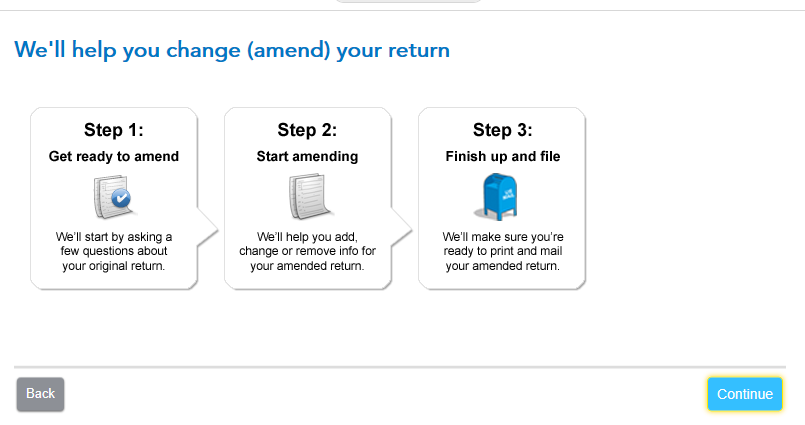
When you started the Amend process (under Other Tax Situations) in TurboTax Desktop, did you get a screen with Step 1, Step 2, etc.? Then did you indicate you already filed, and which year you are amending?
Then did the Refund Meter at the top change to $0? If you're not seeing these things, you may not actually be amending.
I added a W-2 in my test return and it let me continue to File.
Check your W-2 entries again, and be sure TurboTax is updated (File menu at the top).
**Say "Thanks" by clicking the thumb icon in a post
**Mark the post that answers your question by clicking on "Mark as Best Answer"
**Mark the post that answers your question by clicking on "Mark as Best Answer"
March 1, 2025
1:43 PM
- Mark as New
- Bookmark
- Subscribe
- Subscribe to RSS Feed
- Permalink
- Report Inappropriate Content
Amend (change) button does nothing
I'm having this same issue now, when trying to Amend a 2024 return.
My "TurboTax Amend 2024" program is up-to-date. Please help?
January 23, 2026
5:10 AM
- Mark as New
- Bookmark
- Subscribe
- Subscribe to RSS Feed
- Permalink
- Report Inappropriate Content
Amend (change) button does nothing
@cgenius80 With the 2024 desktop program started and the tax return that you want to amend Continued -
Click on Federal Taxes (Personal using Home and Business)
Click on Other Tax Situations
Scroll down to Other Tax Forms
On Amend a return, click the start button
January 23, 2026
5:41 AM
- Mark as New
- Bookmark
- Subscribe
- Subscribe to RSS Feed
- Permalink
- Report Inappropriate Content
Amend (change) button does nothing
@DoninGA I'm sorry, I don't think we are on the same page about the issue.
I have already completed the steps necessary to populate my Tax Return Amendment documents for both Federal And State. However, at the final step in the process (Under the REVIEW tab when you get to the part that says "Let's get ready to file your taxes", "Great Job you're almost done." "It's time to wrap up your 2024 taxes and file your returns.), I click Continue, expecting that the next page would allow me to electronically file my 2024 tax amendment with the state of California, but the Continue button does not respond. Nothing happens.
January 23, 2026
6:08 AM
- Mark as New
- Bookmark
- Subscribe
- Subscribe to RSS Feed
- Permalink
- Report Inappropriate Content
Amend (change) button does nothing
@cgenius80 The 2024 amended tax return cannot be e-filed using TurboTax. It can only be printed and mailed. In the File section of the program you need to select File by mail
January 23, 2026
6:33 AM

- Mark as New
- Bookmark
- Subscribe
- Subscribe to RSS Feed
- Permalink
- Report Inappropriate Content
Amend (change) button does nothing
I am currently experiencing this problem trying to amend 2024 taxes. When I click amend return online it does nothing.
February 12, 2026
12:20 PM
- Mark as New
- Bookmark
- Subscribe
- Subscribe to RSS Feed
- Permalink
- Report Inappropriate Content
Amend (change) button does nothing
If TurboTax freezes or does not respond when clicking "Continue" to e-file a 2024 amended return, it is likely a technical glitch, a browser issue, or the 1040-X form is not yet fully supported for e-file.
To fix, try clearing browser Cache and Cookies, using an incognito window, or, if on desktop, running a Manual Update.
**Say "Thanks" by clicking the thumb icon in a post
**Mark the post that answers your question by clicking on "Mark as Best Answer"
**Mark the post that answers your question by clicking on "Mark as Best Answer"
February 13, 2026
9:18 AM
- Mark as New
- Bookmark
- Subscribe
- Subscribe to RSS Feed
- Permalink
- Report Inappropriate Content
Amend (change) button does nothing
I am also having this issue. I am triyng to Amend my 2024 State return and it's not working. I click on "Amend using TurboTax Online" and nothing happens. And underneath that button it says, "You can amend your return using either TurboTax Online (recommended) or with the Turbotax Desktop product."
I have tried:
- clearing my cookies and history - doesn't fix issue.
- Using Microsoft Edge browser instead of Chrome - doesn't fix issue.
- Using my phone - doesn't fix issue.
I have been trying to reach an actual person for technical support for AN HOUR and have not been able to reach anyone, just a robot that directs me to this forum. This is very clearly a bug that needs to be fixed and it's insanely frustrating. I spent hundreds of dollars to use TurboTax and it's not working and I can't speak to a human for a simple tech gliche?!
February 18, 2026
12:31 PM
- Mark as New
- Bookmark
- Subscribe
- Subscribe to RSS Feed
- Permalink
- Report Inappropriate Content
Amend (change) button does nothing
To complete and file a 2024 amended tax return, started with the online editions, you will need to download the 2024 tax data file. Then you will need to purchase, download and install on a personal computer, Windows or Mac, one of the 2024 desktop editions. Once installed you need to open the 2024 tax data file you downloaded by clicking on File and then on Open Tax Return.
With the tax return opened -
Click on Federal Taxes (Personal using Home & Business)
Click on Other Tax Situation
Under Other Tax Forms
On Amend a return, click the start button.
To access your current or prior year online tax returns sign onto the TurboTax website with the User ID you used to create the account - https://myturbotax.intuit.com/
Scroll down to the bottom of the screen and on the section Your tax returns & documents. Click on the Year and Click on Download .tax file
To complete and file a 2024 amended tax return using TurboTax you would need to purchase, download and install on a personal computer one of the 2024 desktop editions from this website - https://turbotax.intuit.com/personal-taxes/past-years-products/
A 2024 amended tax return can only be printed and mailed, it cannot be e-filed using TurboTax.
February 18, 2026
12:38 PM

- Mark as New
- Bookmark
- Subscribe
- Subscribe to RSS Feed
- Permalink
- Report Inappropriate Content
Amend (change) button does nothing
This is UNACCEPTABLE!
Are you saying the Turbotax Online product that I purchased can't be used to amend my 2024 tax return by its own, after I filed my 2024 tax return with it??
Now I need to purchase the 2024 desktop version to have it ammended???
How regretable I am purchasing the ONLINE version!!!
We should have never used the ONLINE version !!!
February 18, 2026
1:15 PM
Still have questions?
Questions are answered within a few hours on average.
Post a Question*Must create login to post


Unlock tailored help options in your account.


Get more help
Ask questions and learn more about your taxes and finances.
Related Content

2025TXR
Level 2

user17751385021
New Member

JKNYC
New Member

melynda-roy14
New Member
Camilletime2
New Member