


- Community
- Topics
Turn on suggestions
Auto-suggest helps you quickly narrow down your search results by suggesting possible matches as you type.
Showing results for
- Community
- :
- Discussions
- :
- Taxes
- :
- Get your taxes done
- :
- Re: 2022 Minnesota Return can't E-File - Get the error message "E-File is not available because y...
Announcements


- Mark as New
- Bookmark
- Subscribe
- Subscribe to RSS Feed
- Permalink
- Report Inappropriate Content
2022 Minnesota Return can't E-File - Get the error message "E-File is not available because your tax return includes a tax situation that can't be e-filed."
I don't have CRP or MRP1 - I rent, but I don't qualify for the breaks, so I don't need to include them.
Topics:
posted
January 24, 2023
6:30 AM
last updated
January 24, 2023
6:30 AM
Connect with an expert

Do you have an Intuit account?
You'll need to sign in or create an account to connect with an expert.
17 Replies


- Mark as New
- Bookmark
- Subscribe
- Subscribe to RSS Feed
- Permalink
- Report Inappropriate Content
2022 Minnesota Return can't E-File - Get the error message "E-File is not available because your tax return includes a tax situation that can't be e-filed."
You need to delete that section completely. Return to the state:
- Go through until you reach Other Forms You May Need
- Property Tax refund box should be checked
- continue
- Renter checked
- continue
- Select NO
- Once it says you are not eligible, click the back button,
- deselect renter. Click back
- deselect the box for Property Tax Refund.
You need everything related to the rent to be blank.
The state did change the laws this year in several areas, including who qualifies for the renter's property tax refund. If you don't qualify, you may have gone into the program and it is waiting for information.
For TY22:
To qualify, all of these must be true:
- You have a valid Social Security Number or Individual Tax Identification Number
- You are a Minnesota resident or spent at least 183 days in the state
- You lived in and paid rent on a Minnesota building where the owner was assessed property tax or made payments in lieu of property tax
- Your household income for 2022 was less than $69,520
- You cannot be claimed as a dependent on someone else’s tax return
**Say "Thanks" by clicking the thumb icon in a post
**Mark the post that answers your question by clicking on "Mark as Best Answer"
**Mark the post that answers your question by clicking on "Mark as Best Answer"
January 24, 2023
12:46 PM
- Mark as New
- Bookmark
- Subscribe
- Subscribe to RSS Feed
- Permalink
- Report Inappropriate Content
2022 Minnesota Return can't E-File - Get the error message "E-File is not available because your tax return includes a tax situation that can't be e-filed."
This worked! Thank you so much!
January 25, 2023
9:49 AM

- Mark as New
- Bookmark
- Subscribe
- Subscribe to RSS Feed
- Permalink
- Report Inappropriate Content
2022 Minnesota Return can't E-File - Get the error message "E-File is not available because your tax return includes a tax situation that can't be e-filed."
I am getting the same error message only my M1PR can't be filed because we don't have our property tax statement yet. I tried to go back and do what you said but it won't let me unclick Property Tax Refund
February 14, 2023
3:32 PM
- Mark as New
- Bookmark
- Subscribe
- Subscribe to RSS Feed
- Permalink
- Report Inappropriate Content
2022 Minnesota Return can't E-File - Get the error message "E-File is not available because your tax return includes a tax situation that can't be e-filed."
You may have started Form M1PR. Try deleting it.
- Tap Tax Tools in the left column
- Tap Tools
- Select Delete a Form in Tools Center
- Scroll down to M1PR and delete
- Click Continue With My Return in the lower right when you are finished
**Say "Thanks" by clicking the thumb icon in a post
**Mark the post that answers your question by clicking on "Mark as Best Answer"
**Mark the post that answers your question by clicking on "Mark as Best Answer"
February 14, 2023
4:54 PM
- Mark as New
- Bookmark
- Subscribe
- Subscribe to RSS Feed
- Permalink
- Report Inappropriate Content
2022 Minnesota Return can't E-File - Get the error message "E-File is not available because your tax return includes a tax situation that can't be e-filed."
I see tool topic in top left column along with file, edit view, but when I click on on Tools tab there is no tool center to choose or anything that shows delete a form but I'm sure that's my issue because I've tried deleting the form in forms and it just keeps showing up even after I delete it
February 14, 2023
5:44 PM
- Mark as New
- Bookmark
- Subscribe
- Subscribe to RSS Feed
- Permalink
- Report Inappropriate Content
2022 Minnesota Return can't E-File - Get the error message "E-File is not available because your tax return includes a tax situation that can't be e-filed."
I've also tried to delete this form in forms and I've gone to worksheet and unclicked property tax refund but the program still will not let me uncheck the box in the questionnaire. It just still keeps popping up as wanting to file it.
February 14, 2023
5:54 PM

- Mark as New
- Bookmark
- Subscribe
- Subscribe to RSS Feed
- Permalink
- Report Inappropriate Content
2022 Minnesota Return can't E-File - Get the error message "E-File is not available because your tax return includes a tax situation that can't be e-filed."
If you tried deleting the form and it is not working, it would be helpful to have a TurboTax Token file that will allow us to see this issue.
You can send us a “diagnostic” file with your “numbers” but not your personal information. If you would like to do this, here are the instructions for TurboTax Online:
Go to the black panel on the left side of your program and select Tax Tools.
- Then select Tools below Tax Tools.
- A window will pop up which says Tools Center.
- On this screen, select Share my file with Agent.
- You will see a message explaining what the diagnostic copy is. Click okay through this screen, and you will get a Token number.
- Reply to this thread with your Token number. This will allow us to open a copy of your return without seeing any personal information.
Here are the instructions for TurboTax Desktop:
- Click Online
- Click Send Tax File to Agent
- Click Send on the prompt "Send a Diagnostic Copy of Your Return to an Agent."
- You will receive a token number; reply to this thread with your Token number. This will allow us to open a copy of your return without seeing any personal information.
Once we receive the token, we can see what is going on and provide a solution.
**Say "Thanks" by clicking the thumb icon in a post
**Mark the post that answers your question by clicking on "Mark as Best Answer"
**Mark the post that answers your question by clicking on "Mark as Best Answer"
February 15, 2023
8:02 AM
- Mark as New
- Bookmark
- Subscribe
- Subscribe to RSS Feed
- Permalink
- Report Inappropriate Content
2022 Minnesota Return can't E-File - Get the error message "E-File is not available because your tax return includes a tax situation that can't be e-filed."
As far as I can see there is no black panel on the left side of my program. Can you show me a picture?
Kim
February 15, 2023
3:28 PM
- Mark as New
- Bookmark
- Subscribe
- Subscribe to RSS Feed
- Permalink
- Report Inappropriate Content
2022 Minnesota Return can't E-File - Get the error message "E-File is not available because your tax return includes a tax situation that can't be e-filed."
I should state that I am on Turbo tax for my desktop not online. How do I delete form on my desktop not online. Obviously I was given directions for turbo tax online to delete form not directions to delete form on my desktop.
February 15, 2023
3:31 PM
- Mark as New
- Bookmark
- Subscribe
- Subscribe to RSS Feed
- Permalink
- Report Inappropriate Content
2022 Minnesota Return can't E-File - Get the error message "E-File is not available because your tax return includes a tax situation that can't be e-filed."
Also I know for a fact that I cannot file form M1PR at this time. It will not be available to file until March 15th 2023 per our Washington County website. If I cannot delete this form from my desktop turbo tax, the state will not let me electronically file.
February 15, 2023
3:56 PM
- Mark as New
- Bookmark
- Subscribe
- Subscribe to RSS Feed
- Permalink
- Report Inappropriate Content
2022 Minnesota Return can't E-File - Get the error message "E-File is not available because your tax return includes a tax situation that can't be e-filed."
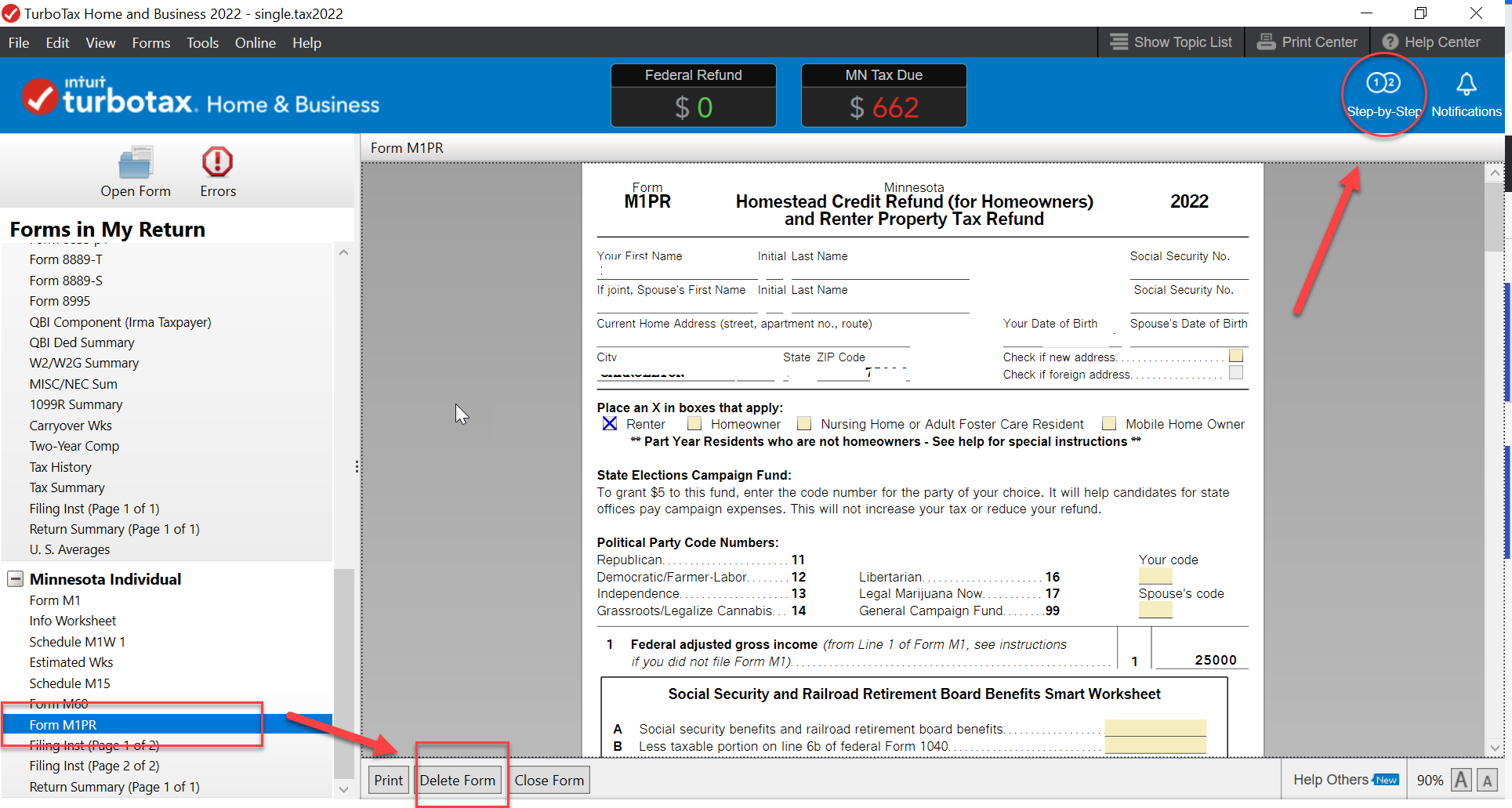
You can delete Form M1PR in the Forms mode in TurboTax CD/Download.
- Tap Forms in the top right
- In the left column, find Form M1PR
- In the center box, tap Delete Form
- Once you are done, tap Setp-by-Step to return to the interview
**Say "Thanks" by clicking the thumb icon in a post
**Mark the post that answers your question by clicking on "Mark as Best Answer"
**Mark the post that answers your question by clicking on "Mark as Best Answer"
February 15, 2023
4:02 PM
- Mark as New
- Bookmark
- Subscribe
- Subscribe to RSS Feed
- Permalink
- Report Inappropriate Content
2022 Minnesota Return can't E-File - Get the error message "E-File is not available because your tax return includes a tax situation that can't be e-filed."
Yep I've already done that numerous times. It just keeps coming back.
February 15, 2023
4:10 PM

- Mark as New
- Bookmark
- Subscribe
- Subscribe to RSS Feed
- Permalink
- Report Inappropriate Content
2022 Minnesota Return can't E-File - Get the error message "E-File is not available because your tax return includes a tax situation that can't be e-filed."
I believe there may be Property Tax information that transferred from a prior year return. Try this in desktop.
- Forms mode
- "Open Form" At the top of the forms list on the left hand side
- Scroll to "2022 Minnesota" Open the dropdown
- Scroll to "Form MIPR" Open the dropdown
- Find the "Property Tax Statement Worksheet" or Renter's Certificate if applicable Highlight and open form
- If there is one there highlight and open form
- Delete Form at the bottom of the page
- Again be sure to delete the MIPR form while there as well
**Say "Thanks" by clicking the thumb icon in a post
**Mark the post that answers your question by clicking on "Mark as Best Answer"
**Mark the post that answers your question by clicking on "Mark as Best Answer"
February 16, 2023
8:28 AM
- Mark as New
- Bookmark
- Subscribe
- Subscribe to RSS Feed
- Permalink
- Report Inappropriate Content
2022 Minnesota Return can't E-File - Get the error message "E-File is not available because your tax return includes a tax situation that can't be e-filed."
Okay I just did exactly what you stated to do and it still will not electronically file for the state of minnestoa. When I run the review it still takes me back to the M1PR form and asks me to enter homeowner so the form is still there.
February 16, 2023
2:01 PM
Still have questions?
Questions are answered within a few hours on average.
Post a Question*Must create login to post


Unlock tailored help options in your account.


Get more help
Ask questions and learn more about your taxes and finances.
Related Content

karenmahon920
New Member
irkedtaxpayer
New Member

Disasterpiece77
New Member

ssolfest
Level 2

user17522872699
New Member