
February 8, 2022
Question

State (SC) direct deposit info not accepted

  • February 8, 2022
  • 3 replies
  • 0 views

I'm trying to enter my direct deposit information into my South Carolina return to paper file.  After entering the data, I click the button and TurboTax says I didn't enter the account type or the routing number, and it sends me back to the screen where my info is deleted (SEE BELOW).  I know info is correct, I've entered it enough times.  How do I get around this? Also, why doesn't TurboTax get the info from my federal return?
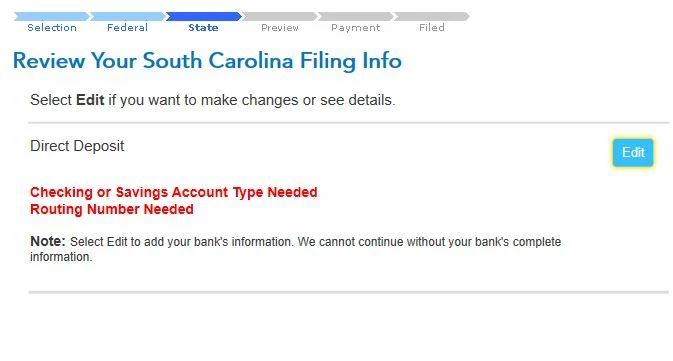
 

    3 replies

    Level 12
    February 8, 2022

    Please try deleting your cookies and clearing your cache then enter your banking information again. If this does not resolve this experience please respond to this thread for more help.

    **Say "Thanks" by clicking the thumb icon in a post. **Mark the post that answers your question by clicking on "Mark as Best Answer"
    February 8, 2022

    I dumped the cookies, cleared the cache, but I still get the same error as before.


    AkinaLO
    Level 15
    February 9, 2022

    You can contact support over the phone for help with this error. 

    What is the TurboTax phone number? - Intuit    

    **Say "Thanks" by clicking the thumb icon in a post. **Mark the post that answers your question by clicking on "Mark as Best Answer"
    February 11, 2022

    I gave up.  It was easier to print out a form to "pay by paper check", then white out the "pay by check" box and manually put in my direct deposit into.  I've used TTax for decades, since they bought out Parson's Tax software, and it just gets harder every year to get this stuff from doing what I want.  Between that and Intuit not letting me file my state for free, I'm pulling the plug.  Next year I'm using something else.


    Level 15
    February 16, 2022

    Please reach out to TurboTax Customer Support for assistance with this issue. 

    What is the TurboTax phone number?

    @ze1ddie

    **Say "Thanks" by clicking the thumb icon in a post. **Mark the post that answers your question by clicking on "Mark as Best Answer"




