


- Community
- Topics
Turn on suggestions
Auto-suggest helps you quickly narrow down your search results by suggesting possible matches as you type.
Showing results for
- Community
- :
- Discussions
- :
- Taxes
- :
- Get your taxes done
- :
- Unable to use the UI, its horrendous
Announcements


- Mark as New
- Bookmark
- Subscribe
- Subscribe to RSS Feed
- Permalink
- Report Inappropriate Content
Unable to use the UI, its horrendous
I’m unable to use the TurboTax UI anymore. Despite using this product successfully for several years, the drastic UI changes this year have made it completely unusable for me. Navigation is a nightmare, and the software team responsible for this redesign should honestly be let go.
The huge Intuit Assist AI panel takes up most of the screen—it’s incredibly annoying and makes actually filing taxes feel impossible. I have no idea why these ridiculous changes were made. Is this just a sneaky way to push people into paying for expert/live support?
Does anyone know how to opt out of this AI nonsense or revert to the previous interface? If there’s no way to disable the AI or get the old UI back, I’ll have no choice but to leave TurboTax after 10 loyal years.
Has anyone found a workaround that actually works?
posted
Tuesday
last updated
February 10, 2026
11:12 AM
Connect with an expert

Do you have an Intuit account?
You'll need to sign in or create an account to connect with an expert.
8 Replies


- Mark as New
- Bookmark
- Subscribe
- Subscribe to RSS Feed
- Permalink
- Report Inappropriate Content
Unable to use the UI, its horrendous
Thank you for using TurboTax.
Intuit Assist is an AI-powered capability that provides personalized, intelligent recommendations.
To avoid interacting with Intuit Assist in TurboTax, which currently lacks a direct "off" switch, users should avoid clicking the AI assistant icon, choose not to engage with its prompts, and opt out of data-sharing screens.
If you added TurboTax Live to your product this year, but don't plan to use it, it can be removed via the "Downgrade" option in the review section or by clearing and starting over if you use TurboTax Online. See this help article for more information.
Key Methods to Avoid/Manage Intuit Assist:
- Ignore the Feature: Do not click on the Intuit Assist icon or prompt, preventing it from auto-populating fields.
- Decline Data Sharing: When prompted, select "No thanks" or similar options to avoid sharing data for AI improvements.
- Remove TurboTax Live: If the AI upgrade was bundled with a live expert, go to the File section, select Review Your Order, and select Downgrade to remove it.
- Start Over: If the AI assistance is too intrusive, you can clear your return in TurboTax Online and start over to avoid triggering it again.
- Submit Feedback: Use the "Give us feedback" option within the AI window to request better control over the feature.
**Say "Thanks" by clicking the thumb icon in a post
**Mark the post that answers your question by clicking on "Mark as Best Answer"
**Mark the post that answers your question by clicking on "Mark as Best Answer"
Tuesday
- Mark as New
- Bookmark
- Subscribe
- Subscribe to RSS Feed
- Permalink
- Report Inappropriate Content
Unable to use the UI, its horrendous
Sorry but this doesnt answer my question or help to resolve my issue
Can someone on Turbotax maybe screenshare with me on this?
I never purchased any live product, since. i dont see any need for it
The AI bug is in the middle of the screen and takes up the whole screen, it is difficult to navigate. I do not intend use the AI now or in the future
THe side bars are horrendous there are scrolling bar within scrolling bar on the left
How can i revert to what has worked for 10 years, or a better UI and not this garbage? Unclear how to even file taxes
Tuesday

- Mark as New
- Bookmark
- Subscribe
- Subscribe to RSS Feed
- Permalink
- Report Inappropriate Content
Unable to use the UI, its horrendous
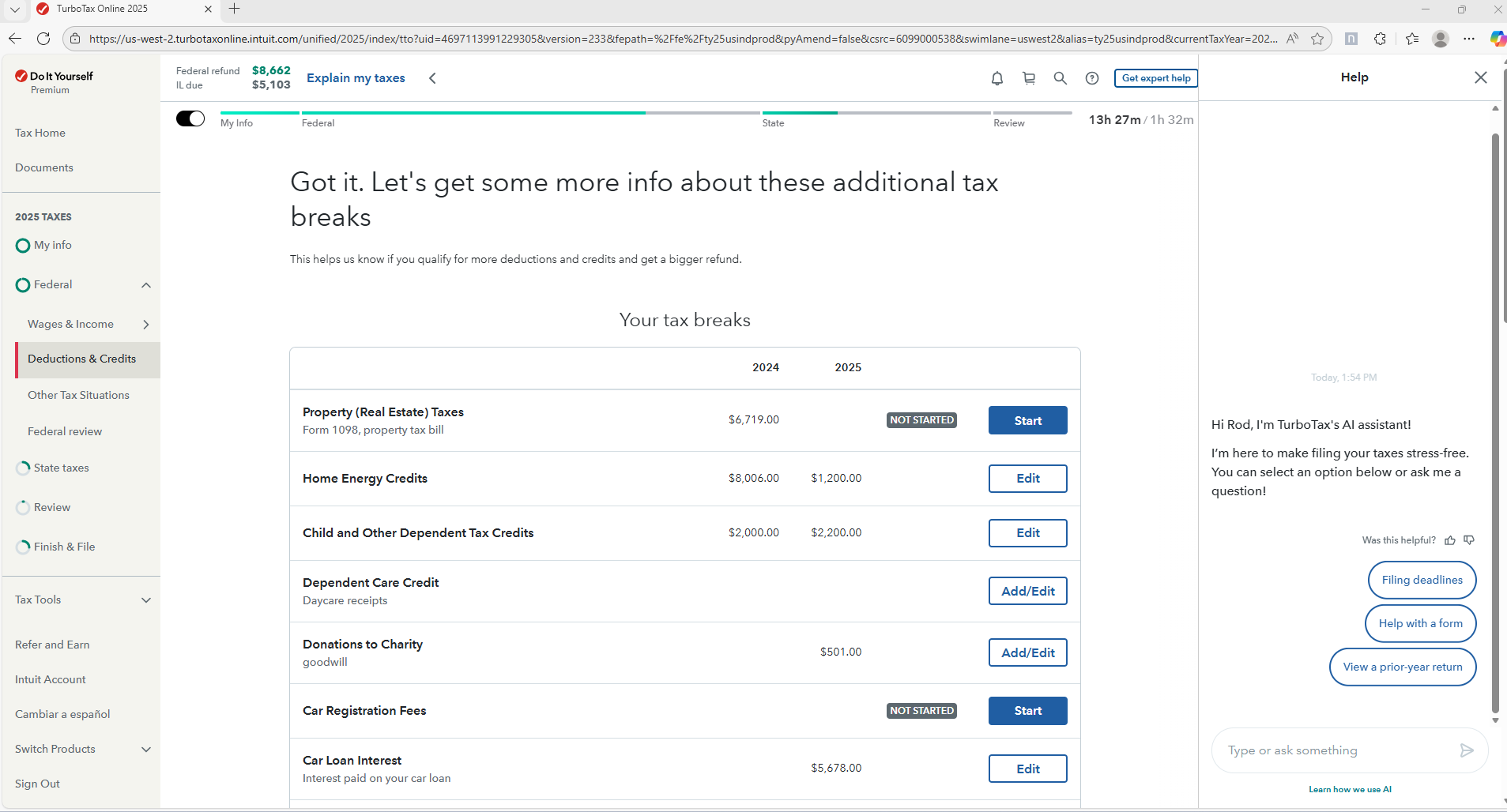
Here's what I see on my TurboTax Online Screen. The AI portion (if you click Help at the top) is on the right-third of the screen. If you could share a screenshot of what you're seeing, we'll try to help.
**Say "Thanks" by clicking the thumb icon in a post
**Mark the post that answers your question by clicking on "Mark as Best Answer"
**Mark the post that answers your question by clicking on "Mark as Best Answer"
Tuesday


- Mark as New
- Bookmark
- Subscribe
- Subscribe to RSS Feed
- Permalink
- Report Inappropriate Content
Unable to use the UI, its horrendous
The AI assist should only take up a small portion on the right side of the screen. And you can close the AI screen by clicking on the X in the top right of the AI window. Sounds like you need to change your web browser to either Google Chrome or Microsoft Edge.
This is what a normal online program screen looks like with the AI active.

Tuesday
- Mark as New
- Bookmark
- Subscribe
- Subscribe to RSS Feed
- Permalink
- Report Inappropriate Content
Unable to use the UI, its horrendous
@MarilynG1
Thanks for your reply here is my screenshot,
I dont have the left pane you have, instead i keep getting this giant thing in the middle of the screen that is making it extremely difficult to work and interrupting the workflow.
I am using Chrome, and the screenshot has blurred sections hence some white

Tuesday
- Mark as New
- Bookmark
- Subscribe
- Subscribe to RSS Feed
- Permalink
- Report Inappropriate Content
Unable to use the UI, its horrendous
@DoninGA
Thanks for sharing your screenshot but i don't see the X, and you can see my left navigation is also missing all the input workflow unless i scroll the bar within scrolling the bar.
is there a way to activate the X.
Here is my screenshot
I am using Chrome on Mac Version 144.0.7559.133 .

Tuesday
- Mark as New
- Bookmark
- Subscribe
- Subscribe to RSS Feed
- Permalink
- Report Inappropriate Content
Unable to use the UI, its horrendous
@moderatetaxfiler Since you are using a Mac, have you tried using Safari as the web browser for the TurboTax online editions?
I am using TurboTax for Windows with the Chrome browser and do not have any type of issue such as what you are reporting.
Have you tried to reduce the size of the AI window, either from the sides or top to bottom?
Wednesday
- Mark as New
- Bookmark
- Subscribe
- Subscribe to RSS Feed
- Permalink
- Report Inappropriate Content
Unable to use the UI, its horrendous
@DoninGA thanks for your reply, it is unclear if Turbotax made an update, i signed out and in. if it is now better because i am in a different section, the left pane has now expanded
I am entering 1099 MISC and i cant see the AI thing anymore, fingers crossed hopefully that fixes it. i also did have to adjust zoom resolution
WIll let you know if its permanently fixed once i go through other sections

Wednesday
Still have questions?
Questions are answered within a few hours on average.
Post a Question*Must create login to post


Unlock tailored help options in your account.


Get more help
Ask questions and learn more about your taxes and finances.
Related Content

jwatkins
New Member

cjohansen1953
New Member

teamdeutsch
Level 2

hegartyj
New Member
in Education
819018
New Member