
Level 2
February 25, 2020
Question

Tax Year Prior to 2020: Unable to File Due to Forms Not Ready? Anyone else?

  • February 25, 2020
  • 12 replies
  • 0 views

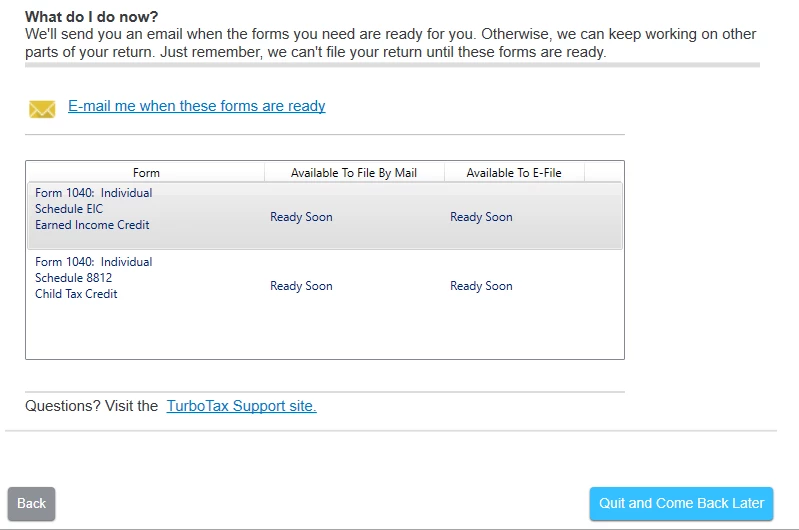
Form 1040: Individual Schedule EIC and Form 1040: Individual Schedule 8812 Child Tax Credit. It says they are ready soon according to the software. I clicked on the link where it says e-mail me when the forms are ready. I received the email today that they were ready. So, I checked for updates and it gives me a green check mark that says my software is up-to-date; but it still shows the same message when I try to file: forms will be ready soon.  Are they really not ready yet? Or, is there something wrong with my software? Has anyone else been experiencing this?


During the analysis stage, it gives me two errors (which both are related to the forms that are supposed to be ready).  Schedule 8812 and Schedule EIC-- that both state the following "the form has not been approved for use at this time.  You must obtain and update before you file your return."
 

12 replies

AkinaLO
Level 15
February 25, 2020

Are you using TurboTax Online or TurboTax CD/Download? 

If you have TurboTax Online you can clear your cash and delete cookies. Also, try refreshing your browser and even try using a different browser.

Here are two articles below that will show you how to clear your cache and delete cookies.

How to clear your cache - Community

How do I delete cookies? - Community


If you have TurboTax CD/Download, please check for updates within the program.

How do I update my TurboTax CD/Download software p ...


**Say "Thanks" by clicking the thumb icon in a post. **Mark the post that answers your question by clicking on "Mark as Best Answer"
Level 2
February 25, 2020

TurboTax CD/Download. I update it but it keeps displaying the same message. I'll try again tonight.

Level 2
March 4, 2020

@amos12 wrote:

upper left has tools but there is no search and no tax tools. I have home and business software if that makes a difference.


Using the TurboTax desktop software installed on a personal computer, click on Search in the upper right of the desktop program screen. 

Enter additional child tax credit

Click on Jump to additional child tax credit


ok i have finished all of that but the problem is i cannot  finish because it keeps telling me it needs to download the sch8812.

Level 2
March 1, 2020

Same issue with a State of Virginia Return.  Waiting for forms to be available.

Level 2
March 2, 2020

Same issue with several forms. Can't update the program

Level 2
April 14, 2020

Is there a fix for this yet? I am getting the same message. When I try and update it says that my file is up to date. I'm getting a "ready soon" for "Schedule EIC" and "Schedule 8812" and "Form 540 California Resident Income Tax Return". Pretty ridiculous that forms aren't ready when typically the deadline is 4/15 and today is 4/14.

Level 2
May 23, 2020

It’s 5/22 and still getting this annoying error even after updating. 

Level 2
July 9, 2020

It's now 07/09/2020 and the problem still exists!


No help at all from Intuit!


WTF

Level 2
February 7, 2021

I am using the CD version for 2020 Tax year.

I Can't file. The program says Form 4582 is not ready yet, but I get an email notification that it is ready:

"The wait is over! The tax forms we needed to finish up your taxes are ready.
Form 4852, Substitute Form W-2 or 1099R
Open TurboTax on your computer, install the updates when prompted, and your forms will be automatically included.
Having trouble? Make sure you're connected to the internet, then select
Check for updates from the TurboTax menu."

I tried updating couple of times in last 2 days, but I keep on getting the same message that form is not ready.

Level 15
February 7, 2021

The Form 4852 will be available to file on February 18th, which is a normal timeframe. Currently, it will be available for filing by mail only.


The IRS does not want this form used until the employer has had sufficient time to provide the W-2s and you have exhausted all avenues to obtain it.


Continue to check this link for availability date: When will federal forms be available?


**Say "Thanks" by clicking the thumb icon in a post. **Mark the post that answers your question by clicking on "Mark as Best Answer"
Level 2
February 8, 2021

THANK YOU VERY MUCH ... 

Level 2
February 24, 2021

Mine says I am missing form 4852 which "is not ready yet"--what is that one and is anyone else having this problem with that form?


Level 13
February 24, 2021

@Jjaxalpha1 Please take a look at the following link for details on form 4852: IRS Form 4852

**Say "Thanks" by clicking the thumb icon in a post. **Mark the post that answers your question by clicking on "Mark as Best Answer"
Level 2
February 26, 2021

2/26/21


Just loaded Turbo Premier from CD and having the same problem. Updates complete fine, but no state forms and only the 1040 form and 1040SR worksheet.  Repeating update does not change anything.  I checked IRS.GOV - all forms are there.


Anyone know someone at Intuit to address this issue?  Or should we start contacting local news outlets to raise the issue to managements attention?

DoninGA
Level 15
Level 15
February 26, 2021

@tirbowhat wrote:

2/26/21


Just loaded Turbo Premier from CD and having the same problem. Updates complete fine, but no state forms and only the 1040 form and 1040SR worksheet.  Repeating update does not change anything.  I checked IRS.GOV - all forms are there.


Anyone know someone at Intuit to address this issue?  Or should we start contacting local news outlets to raise the issue to managements attention?


Try a manual update if you are using a Windows based computer for the TurboTax program - https://ttlc.intuit.com/community/updating/help/manually-update-turbotax-for-windows-software-basic-deluxe-premier-home-business/01/26041


Level 2
February 26, 2021

I was able to finally get passed this by re-entering the license code that came with my CD I tried many other things and nothing worked. Customer service and support was absolutely no help at all. Try to re-enter the code and relaunch the software. 

AkinaLO
Level 15
January 31, 2022

Are you using Turbotax Desktop or TurboTax Online? If you are using a TurboTax desktop, try the steps in this article to help update your software. 

Manually Update TurboTax for Windows Software (Basic, Deluxe, Premier, Home & Business) 


If you are using TurboTax Online. Try clearing your cache and deleting your cookies if you are using TurboTax Online. Also, try refreshing your browser or use a different browser.    

Here are two articles below that will show you how to clear your cache and delete cookies.    

How to clear your cache - Community    

How do I delete cookies? - Community    


If you find you are having issues with it, please contact TurboTax support.  

What is the TurboTax phone number? - Intuit   

**Say "Thanks" by clicking the thumb icon in a post. **Mark the post that answers your question by clicking on "Mark as Best Answer"
Level 2
February 17, 2022

I have Mac version of CD based Premier software.  NO dependent children, but TTax keeps insisting that I enter a dependents name on 8812.  I don'ts need or want EIC.  What gives.


Level 2
January 31, 2022

I need to submit and pay my taxes by today, January 31 to avoid penalties.  Will there be an extension since the forms are not available?

DoninGA
Level 15
Level 15
January 31, 2022

@DKS43 wrote:

I need to submit and pay my taxes by today, January 31 to avoid penalties.  Will there be an extension since the forms are not available?


What penalties are you referring to?

If you have federal taxes owed on the 2021 federal tax return those taxes are not due until April 18, 2022.

Level 2
January 31, 2022

I did not pay all of my estimated taxes.  I understand that submitting the forms and full tax payment will avoid penalties.

Level 2
February 11, 2022

2/10/2022. TT Home & Business (2021).  For me, I was told by email that my 1040, Sch 1, Sch 2, Sch C, Sch SE, Form 8995 "Are Ready", but clicking Online Update didn't work! After deleting cache, deleting turbotax/intuit cookies, and clicking on Update umpteen times and receiving message to the effect that all forms are ready, they just weren't!

    But FINALLY something that worked: I closely followed the MANUAL UPDATE Instructions (for CD/Downloaded TT Programs) and when I reopened TT, all was working again!

Level 2
March 2, 2022

There are still 2 out of three IRS forms which are not approved yet on my tax return, [I received no notification of one being ready] what will happen if the IRS does not do compete their effort prior to filing deadline.

Level 15
March 2, 2022

@POedVTVagabond  If you are unable to file your return by the deadline for any reason the IRS provides a six month extension to anyone who requests it.  TurboTax is happy to help you file that.


Here's how to file your extension using TurboTax.

**Say "Thanks" by clicking the thumb icon in a post. **Mark the post that answers your question by clicking on "Mark as Best Answer"





