


- Community
- Topics
Turn on suggestions
Auto-suggest helps you quickly narrow down your search results by suggesting possible matches as you type.
Showing results for
- Community
- :
- Discussions
- :
- Taxes
- :
- Get your taxes done
- :
- Re: Issues with form 1098-t


- Mark as New
- Bookmark
- Subscribe
- Subscribe to RSS Feed
- Permalink
- Report Inappropriate Content
Issues with form 1098-t
I was filing my taxes for 2019 and was able to add in my W-2's and my form 1098-T. I was able to complete the federal part of my return but once I started to fill out the state part my form 1098T appeared as income and was asking for an employer and was being filed as a W-2. I have started over my return about 2 times thinking I was entering something wrong but I have been following the steps and making sure that I am filling out the write sections. I would just like some clarification into why it may be appearing as a W-2 towards the end.
Topics:
posted
February 15, 2020
1:17 PM
last updated
February 15, 2020
1:17 PM
Connect with an expert

Do you have an Intuit account?
You'll need to sign in or create an account to connect with an expert.
4 Best answer
Accepted Solutions

- Mark as New
- Bookmark
- Subscribe
- Subscribe to RSS Feed
- Permalink
- Report Inappropriate Content
Issues with form 1098-t
It should not show up as a W-2 Form at the end.
I noticed you are using the Free Edition of the software. The Free Edition only supports W-2 income and the Earned Income Credit.
To claim your education credits as reported on Form 1098-T, you need to upgrade to the Deluxe version. The Deluxe version will generate the forms you need to claim the education credit.
**Say "Thanks" by clicking the thumb icon in a post
**Mark the post that answers your question by clicking on "Mark as Best Answer"
**Mark the post that answers your question by clicking on "Mark as Best Answer"
February 15, 2020
1:42 PM
- Mark as New
- Bookmark
- Subscribe
- Subscribe to RSS Feed
- Permalink
- Report Inappropriate Content
Issues with form 1098-t
Go back into the federal section of the program.
- Select Income & expenses
- Select Job (W-2)
- Review the list of your W-2s here. If you see the 1098-T information listed here, delete that item by clicking on the trash can to the right of the applicable line.
This should ensure only your W-2 is being reported as income.
Next, proceed to the Deductions & Credits section.
Select Expenses and Scholarships (Form 1098-T).
I recommend deleting existing input which you will see under Your Education Expense Summary.
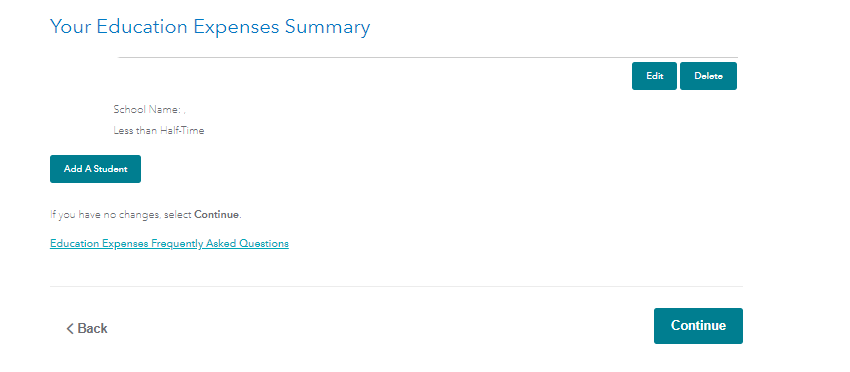
After you delete the existing input, go ahead and select "Add a student" and start the input again.
Please comment if you still have issues after doing this.
**Say "Thanks" by clicking the thumb icon in a post
**Mark the post that answers your question by clicking on "Mark as Best Answer"
**Mark the post that answers your question by clicking on "Mark as Best Answer"
February 15, 2020
4:58 PM
- Mark as New
- Bookmark
- Subscribe
- Subscribe to RSS Feed
- Permalink
- Report Inappropriate Content
Issues with form 1098-t
I apologize for the confusion!
Another situation that could potentially be causing this is if you received scholarships and part of the scholarships were taxable.
Scholarships can be taxable if they are used for the following items:
- Room & board
- Travel & incidental expenses
- Any fees, books & supplies not required for classes
Scholarships are not taxable if used at an eligible school for a degree if:
- Tuition & fees
- Fees, books, supplies needed for classes
- Scholarship or fellowship for services from:
- National Health Services Corps Scholarship Program
- Armed Forces Health Professions Scholarship & Financial Assistance program
If you do not have scholarships that are taxable, at this point I would recommend clearing your return and starting over. You can do this by selecting Tax Tools, Tools, Clear & Start over in the black panel on the left.
**Say "Thanks" by clicking the thumb icon in a post
**Mark the post that answers your question by clicking on "Mark as Best Answer"
**Mark the post that answers your question by clicking on "Mark as Best Answer"
February 16, 2020
11:21 AM
- Mark as New
- Bookmark
- Subscribe
- Subscribe to RSS Feed
- Permalink
- Report Inappropriate Content
Issues with form 1098-t
Thanks for the information, they would be taxable, but how would I fill them in since it is asking for employer number, start and end date of working, along with the address. Would I just put the same information that was given on the Form 1098-T? But once again thank you for the help, I have just been very confused.
February 16, 2020
12:37 PM
6 Replies
- Mark as New
- Bookmark
- Subscribe
- Subscribe to RSS Feed
- Permalink
- Report Inappropriate Content
Issues with form 1098-t
It should not show up as a W-2 Form at the end.
I noticed you are using the Free Edition of the software. The Free Edition only supports W-2 income and the Earned Income Credit.
To claim your education credits as reported on Form 1098-T, you need to upgrade to the Deluxe version. The Deluxe version will generate the forms you need to claim the education credit.
**Say "Thanks" by clicking the thumb icon in a post
**Mark the post that answers your question by clicking on "Mark as Best Answer"
**Mark the post that answers your question by clicking on "Mark as Best Answer"
February 15, 2020
1:42 PM
- Mark as New
- Bookmark
- Subscribe
- Subscribe to RSS Feed
- Permalink
- Report Inappropriate Content
Issues with form 1098-t
Thanks for the help, I upgraded to the deluxe version but I still happen to have the same issue. Once I get to the State taxes, both my jobs appear but there is also a scholarship and grant section. In that section, it has taken my form 1098-T and converted it to a W-2 and is requiring me to fill the rest out but I'm confused about how to do that or if I made a mistake along the way.
February 15, 2020
4:27 PM
- Mark as New
- Bookmark
- Subscribe
- Subscribe to RSS Feed
- Permalink
- Report Inappropriate Content
Issues with form 1098-t
Go back into the federal section of the program.
- Select Income & expenses
- Select Job (W-2)
- Review the list of your W-2s here. If you see the 1098-T information listed here, delete that item by clicking on the trash can to the right of the applicable line.
This should ensure only your W-2 is being reported as income.
Next, proceed to the Deductions & Credits section.
Select Expenses and Scholarships (Form 1098-T).
I recommend deleting existing input which you will see under Your Education Expense Summary.
After you delete the existing input, go ahead and select "Add a student" and start the input again.
Please comment if you still have issues after doing this.
**Say "Thanks" by clicking the thumb icon in a post
**Mark the post that answers your question by clicking on "Mark as Best Answer"
**Mark the post that answers your question by clicking on "Mark as Best Answer"
February 15, 2020
4:58 PM
- Mark as New
- Bookmark
- Subscribe
- Subscribe to RSS Feed
- Permalink
- Report Inappropriate Content
Issues with form 1098-t
Thank you for the help, I followed the steps that were provided below and still end up with the same problem. Under the federal section in jobs, it is not listed as a W-2 anymore, however, when filling out the state tax section I still get a section listed as scholarships and grants under the employers and when I go to edit it asks for employers number, address, and when I started wor
February 15, 2020
6:58 PM
- Mark as New
- Bookmark
- Subscribe
- Subscribe to RSS Feed
- Permalink
- Report Inappropriate Content
Issues with form 1098-t
I apologize for the confusion!
Another situation that could potentially be causing this is if you received scholarships and part of the scholarships were taxable.
Scholarships can be taxable if they are used for the following items:
- Room & board
- Travel & incidental expenses
- Any fees, books & supplies not required for classes
Scholarships are not taxable if used at an eligible school for a degree if:
- Tuition & fees
- Fees, books, supplies needed for classes
- Scholarship or fellowship for services from:
- National Health Services Corps Scholarship Program
- Armed Forces Health Professions Scholarship & Financial Assistance program
If you do not have scholarships that are taxable, at this point I would recommend clearing your return and starting over. You can do this by selecting Tax Tools, Tools, Clear & Start over in the black panel on the left.
**Say "Thanks" by clicking the thumb icon in a post
**Mark the post that answers your question by clicking on "Mark as Best Answer"
**Mark the post that answers your question by clicking on "Mark as Best Answer"
February 16, 2020
11:21 AM
- Mark as New
- Bookmark
- Subscribe
- Subscribe to RSS Feed
- Permalink
- Report Inappropriate Content
Issues with form 1098-t
Thanks for the information, they would be taxable, but how would I fill them in since it is asking for employer number, start and end date of working, along with the address. Would I just put the same information that was given on the Form 1098-T? But once again thank you for the help, I have just been very confused.
February 16, 2020
12:37 PM
Still have questions?
Questions are answered within a few hours on average.
Post a Question*Must create login to post


Unlock tailored help options in your account.


Get more help
Ask questions and learn more about your taxes and finances.
Related Content

reannaepplett257
New Member

Tanishia Gray
New Member
Reevesdaniel14
New Member
jcmjcm44
New Member
cranes2u
New Member