


- Community
- Topics
Turn on suggestions
Auto-suggest helps you quickly narrow down your search results by suggesting possible matches as you type.
Showing results for
- Community
- :
- Discussions
- :
- Taxes
- :
- Get your taxes done
- :
- Re: Incorrect Link: Cannot Enter 1099-Divs

Connect with an expert

Do you have an Intuit account?
You'll need to sign in or create an account to connect with an expert.

- Mark as New
- Bookmark
- Subscribe
- Subscribe to RSS Feed
- Permalink
- Report Inappropriate Content
THERE IS A BUG IN YOUR SOFTWARE. HOW DO I REPORT IT?
None of those instructions work for me. That is what I was doing, multiple times, and I could not edit or delete those sections. I am done with TurboTax forever! Wasted my money on TurboTax this year! Switching my efforts to a live tax preparer, locally, forever.
3 weeks ago

- Mark as New
- Bookmark
- Subscribe
- Subscribe to RSS Feed
- Permalink
- Report Inappropriate Content
THERE IS A BUG IN YOUR SOFTWARE. HOW DO I REPORT IT?
When I click on the button to enter 1099-DIV information, it takes me (every time) to the 1099-INT page. I already entered my interest payments received. I need to enter Dividends. When can we expect this problem to be corrected, please? I cannot mail my taxes until this is fixed. Thank you.
3 weeks ago
- Mark as New
- Bookmark
- Subscribe
- Subscribe to RSS Feed
- Permalink
- Report Inappropriate Content
THERE IS A BUG IN YOUR SOFTWARE. HOW DO I REPORT IT?
Am using Premiere, btw. On Windows 11.
3 weeks ago


- Mark as New
- Bookmark
- Subscribe
- Subscribe to RSS Feed
- Permalink
- Report Inappropriate Content
THERE IS A BUG IN YOUR SOFTWARE. HOW DO I REPORT IT?
The Interest and Dividend information appears on the same page. If you click Start or Update for Dividends on 1099-DIV, you'll get a screen "Let's finish pulling in your investment income". Your interest reporting will be on that page, but you can click the blue + Add investments button, where the next screen will allow you to import date. If you Skip Import, you'll get a screen to choose the type of investment using one of the five tiles for Interest, Dividends, Stocks, Bonds & Mutual, Funds, Digital Assets, or Other.
**Say "Thanks" by clicking the thumb icon in a post
**Mark the post that answers your question by clicking on "Mark as Best Answer"
**Mark the post that answers your question by clicking on "Mark as Best Answer"
3 weeks ago
516

- Mark as New
- Bookmark
- Subscribe
- Subscribe to RSS Feed
- Permalink
- Report Inappropriate Content
THERE IS A BUG IN YOUR SOFTWARE. HOW DO I REPORT IT?
When importing data from banks etc, there is what I think a final screen
that says connection establish and then says please verify info below. By mistake I clicked
Block instead of allow first time I saw it. When I try again the two buttons block and allow are missing and you get hung on screen (form) and can only get out by clicking on upper right x. It says that if those buttons are missing, it is ok. I have let it sit there for multiple minutes and nothing happens. It is stuck!
I think a bug perhaps not in code but in data used for form.
I really need this fixed since I have large amount of data to import from a broker,
Thanks
Stig W
[email address removed]
[phone number removed]
3 weeks ago

- Mark as New
- Bookmark
- Subscribe
- Subscribe to RSS Feed
- Permalink
- Report Inappropriate Content
THERE IS A BUG IN YOUR SOFTWARE. HOW DO I REPORT IT?
There seems to be a bug in the software. I have Intuit Turbotax Premier for desktop for tax year 2025. I have completed the taxes and want to apply 100% of my refund to next year's taxes. As I have been working on these taxes, my refund amount has varied several times. The amount that I want to apply towards next year's tax bill currently appears to be frozen at the previous amount of refund, and I am no longer able to change the exact value of the refund which I want to apply to next year's tax bill. Therefore, the additional refund is now being sent to me as a refund. Can you help me?
3 weeks ago
- Mark as New
- Bookmark
- Subscribe
- Subscribe to RSS Feed
- Permalink
- Report Inappropriate Content
THERE IS A BUG IN YOUR SOFTWARE. HOW DO I REPORT IT?
There seems to be a bug in the software: TurboTax Premier 2025 for desktop. I listed a distribution from an IRA on a 1099R as "none of the above" special circumstances. Turbotax decided to call it an inherited IRA from someone other than spouse. I had previously specifically answered NO, that was not the case earlier, but Turbotax did it anyway. I cannot seem to UNTAG this IRA from being inherited. Do you have any suggestions for me? Since the tax criteria is the same, I am letting it go, but it is still not correct.
3 weeks ago

- Mark as New
- Bookmark
- Subscribe
- Subscribe to RSS Feed
- Permalink
- Report Inappropriate Content
THERE IS A BUG IN YOUR SOFTWARE. HOW DO I REPORT IT?
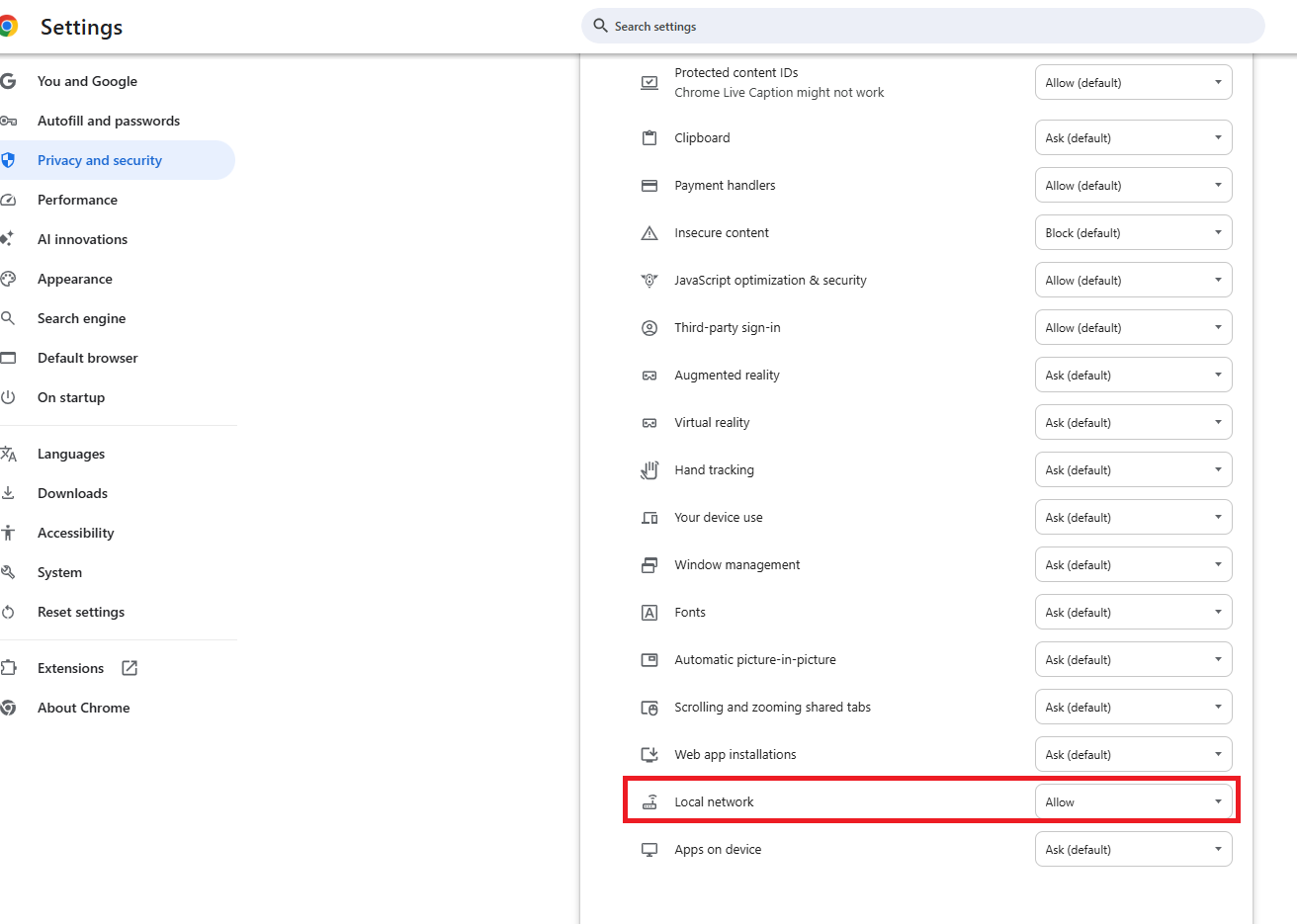
This may a connectivity issue. When the browser window opens for you to Sign In to your broker account, try clicking the icon in front of the URL address (may look like a lock or tuner, depending on browser). Then open the Settings and choose 'Allow' for LAN (local network).

**Say "Thanks" by clicking the thumb icon in a post
**Mark the post that answers your question by clicking on "Mark as Best Answer"
**Mark the post that answers your question by clicking on "Mark as Best Answer"
3 weeks ago
- Mark as New
- Bookmark
- Subscribe
- Subscribe to RSS Feed
- Permalink
- Report Inappropriate Content
THERE IS A BUG IN YOUR SOFTWARE. HOW DO I REPORT IT?
Using TurboTax Deluxe 2025 Updated April 4, 2026. I turned 61 years old in 2024. I entered $34,750 into the 401K contribution taking advantage of the super catch-up. But I am getting an error code saying I entered too much and it must be less than $23,500. When the IRS tax forms say the super catch up is eligible for those aged 60 to 63. How do I fix this issue? Thank you.
2 weeks ago
- Mark as New
- Bookmark
- Subscribe
- Subscribe to RSS Feed
- Permalink
- Report Inappropriate Content
THERE IS A BUG IN YOUR SOFTWARE. HOW DO I REPORT IT?
I did a mock return for a taxpayer with a W2 having $34,750 in 401(k) contributions (Box 12 Code D) aged 62 in 2025 and I did not get an alert that the contribution exceeded the upper limit. I changed the contribution amount to $35,000 and I got an alert that I was over the contribution limit by $250. Based on this, it appears that the software is applying the correct limits.
To be eligible for the super catch-up in 2025, your birthdate would need to be after January 1, 1962 and before January 2, 1966. You may want to check to see if you have your correct birthdate entered in in the My Info section of TurboTax as the limit of $23,500 applies to those under the age of 50 in 2025.
**Say "Thanks" by clicking the thumb icon in a post
**Mark the post that answers your question by clicking on "Mark as Best Answer"
**Mark the post that answers your question by clicking on "Mark as Best Answer"
2 weeks ago

- Mark as New
- Bookmark
- Subscribe
- Subscribe to RSS Feed
- Permalink
- Report Inappropriate Content
THERE IS A BUG IN YOUR SOFTWARE. HOW DO I REPORT IT?
Can not efile my 5th return after adding a 1095-A that was excluded
2 weeks ago
- Mark as New
- Bookmark
- Subscribe
- Subscribe to RSS Feed
- Permalink
- Report Inappropriate Content
THERE IS A BUG IN YOUR SOFTWARE. HOW DO I REPORT IT?
You will need to print and mail your return. You have reached the IRS imposed limit of 5 submissions that a software company is allowed to allow an user as per the IRS.
**Say "Thanks" by clicking the thumb icon in a post
**Mark the post that answers your question by clicking on "Mark as Best Answer"
**Mark the post that answers your question by clicking on "Mark as Best Answer"
2 weeks ago
- Mark as New
- Bookmark
- Subscribe
- Subscribe to RSS Feed
- Permalink
- Report Inappropriate Content
THERE IS A BUG IN YOUR SOFTWARE. HOW DO I REPORT IT?
TurboTax Deluxe 2025; desktop version; OS: Mac: Sequoia 15.7.4
TurboTax: Application: 2025.r27.046; Build: Apr 6, 2026 at 11:23:56 PM
Problem:
I have foreign income with RIC source; I have to do a form 1116. On the desktop application section "Federal" -> "Estimated and other taxes paid" -> "Foreign Taxes", only one of the RIC named source items is showing up when there are two distinct separate named sources. I see one RIC name/source entry on review one time, and sometimes, the other name on a second review. I should see both name/source entries as RIC sources.
It is intermittent for what names I see and clearly a bug.
The name of the RIC source names is alternating showing up one time then disappearing next time
This is a bug
2 weeks ago
- Mark as New
- Bookmark
- Subscribe
- Subscribe to RSS Feed
- Permalink
- Report Inappropriate Content
THERE IS A BUG IN YOUR SOFTWARE. HOW DO I REPORT IT?
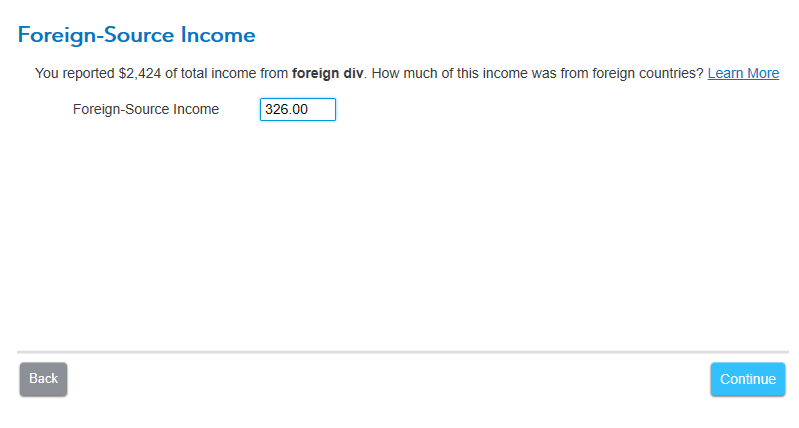
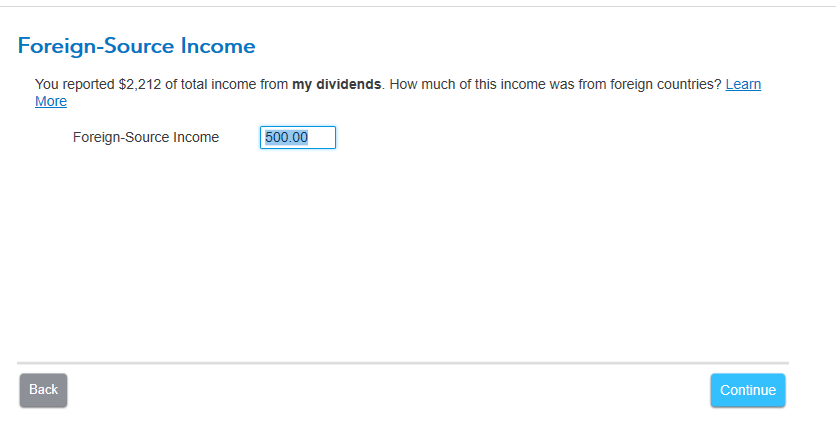
When entering your 1099-Div's, the amount of Foreign Tax from Box 7 is transferred automatically to the Foreign Tax Credit section, under Federal > Deductions > Foreign Tax Credit. In this section, all you need to do is enter the amount of Foreign Income associated with the 1099-Div's.
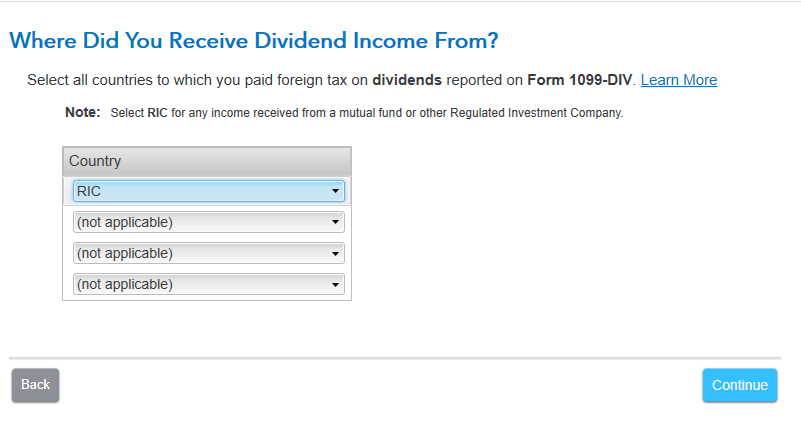
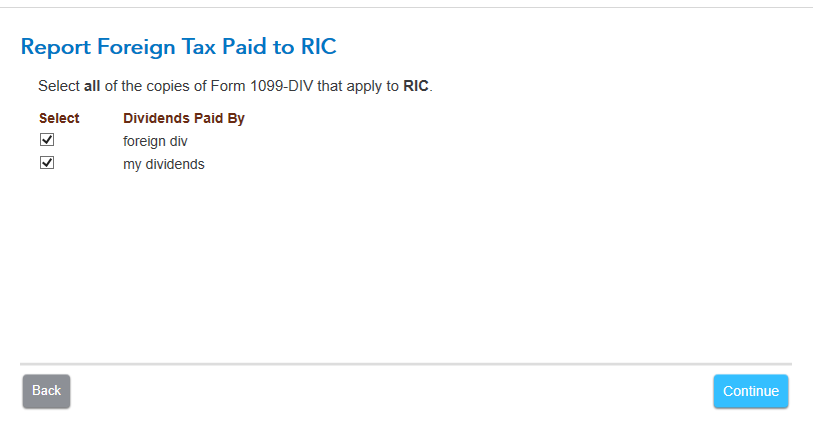
When you choose Country 'RIC' and 'Report Income', the next page should show all your 1099-DIV entries where Foreign Tax was included. If you entered two, both should show up so you can check them to indicate you're reporting income for both. You should then be asked for the income for each, one at a time.
If you're not seeing this, and you imported your 1099-DIVs, you could delete them and re-enter manually. If that doesn't apply, you could delete Form 1116 and step through the FTC section again. If this doesn't resolve, you may need to uninstall/re-install TurboTax.
**Say "Thanks" by clicking the thumb icon in a post
**Mark the post that answers your question by clicking on "Mark as Best Answer"
**Mark the post that answers your question by clicking on "Mark as Best Answer"
2 weeks ago
- Mark as New
- Bookmark
- Subscribe
- Subscribe to RSS Feed
- Permalink
- Report Inappropriate Content
THERE IS A BUG IN YOUR SOFTWARE. HOW DO I REPORT IT?
TWO GLITCHES I CAN NOT GET PAST under the "Wages and Income" header and in the "Retirement Plans and Social Security" section.
The first: I entered my wife's 2025 1099-R pension information from a private company pension. As I progressed forward, a question arose asking "who did your spouse inherit this IRA from? Choice was her spouse or someone else." She did not inherit this pension! It is a pension from the hospital she worked for and is payed in monthly installments by BNY Mellon Disbursement Agent for the Sparrow Health System A2 as shown on her 1099-R. The software will not enter a number the accumulated 1099-R section, just gives me a "NEEDS REVIEW".
The second glitch showed up at the end of the "Retirement Plans and Social Security" section when an entry for "CANADIAN PENSION INFORMATION". I was asked to "Enter the name you want to use to identify this Canadian registered retirement savings plan or registered retirement income fund". I DO NOT HAVE A CANADIAN PENSION! so am unable to enter a name. So I clicked on the continue button and it will not let me proceed without the entry of a "nonexistent" name.
CAN YOU HELP ME PLEASE? RICKS
a week ago
Still have questions?
Questions are answered within a few hours on average.
Post a Question*Must create login to post


Unlock tailored help options in your account.


Get more help
Ask questions and learn more about your taxes and finances.
Related Content

sherp
New Member

brummalmurphy
New Member

glocom
Level 2
mredi1
New Member

NewDawn
Level 2