Are you still experiencing this problem? Here are the steps to delete a form. Be sure to delete the form and any associated worksheets.
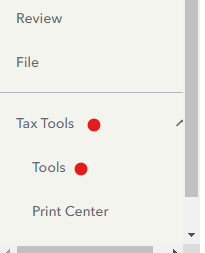
- Select Tax Tools
- On the drop-down select Tools
- On the Pop-Up menu select Delete a Form
- This will give you all of the forms in your return
- Scroll down to the form you want to delete
- Select the Form
- Click on Delete.
Always use extreme caution when deleting information from your tax return. There could be unintended consequences.
If you still are not able to solve this, please call TurboTax Customer service. Here is a link: Turbo Tax Customer Service On the menu bar on the left that shows.
**Say "Thanks" by clicking the thumb icon in a post
**Mark the post that answers your question by clicking on "Mark as Best Answer"






