


- Community
- Topics
Turn on suggestions
Auto-suggest helps you quickly narrow down your search results by suggesting possible matches as you type.
Showing results for
- Community
- :
- Discussions
- :
- Taxes
- :
- Deductions & credits
- :
- SOLAR CARRY FORWARD 2023


- Mark as New
- Bookmark
- Subscribe
- Subscribe to RSS Feed
- Permalink
- Report Inappropriate Content
SOLAR CARRY FORWARD 2023
I am adding in all the information for my solar credit carry forward from 2022 and it shows a credit of $5k but when complete it and go to the overview it shows $0 and does not change my refund. Does anyone see this or know what causes it? Tech support was no help. I have done all the usual delete the form and redo it, clear cash, and try different browsers.
Topics:
posted
February 18, 2024
8:02 PM
last updated
February 10, 2026
3:18 AM
Connect with an expert

Do you have an Intuit account?
You'll need to sign in or create an account to connect with an expert.
24 Replies


- Mark as New
- Bookmark
- Subscribe
- Subscribe to RSS Feed
- Permalink
- Report Inappropriate Content
SOLAR CARRY FORWARD 2023
Do you have a tax liability? The energy credits are Non-Refundable credits
A nonrefundable credit is limited in how much it helps you when you have no tax liability or less liability than your credit. This would be the reason you have a carry over from last year. You did not have enough tax liability to fully use the credit. Look at line 16 on your 1040, then also look at line 24. If the amount on line 16 is less than the full credit, then this is the maximum amount of the credit you use this year will be that number. If you have other credits, that may also reduce the tax liability, this may also reduce the amount of the credit you receive.
Then look at line 24. If this line is $0, then you received one of more credits that brought your taxes down to $0. If this is the case, and you had multiple nonrefundable credits, you may not get the full credit for one or more of the credits.
Also, look at form 5695 line 16. This will tell you if the credit was acknowledged and is being carried forward to 2024.
**Say "Thanks" by clicking the thumb icon in a post
**Mark the post that answers your question by clicking on "Mark as Best Answer"
**Mark the post that answers your question by clicking on "Mark as Best Answer"
February 18, 2024
8:10 PM
- Mark as New
- Bookmark
- Subscribe
- Subscribe to RSS Feed
- Permalink
- Report Inappropriate Content
SOLAR CARRY FORWARD 2023
Is there a way to look at any of those lines on the online system? It does not show me anything line by line, nor will it let me view the tax forms while I am still filling them out.
February 18, 2024
9:01 PM
- Mark as New
- Bookmark
- Subscribe
- Subscribe to RSS Feed
- Permalink
- Report Inappropriate Content
SOLAR CARRY FORWARD 2023
Very concerned with the accuracy of the online forms. I have done my tax on three other sets of online tax preparation (not filing just verifying) and all gave me the credit. This shows that Turbo Tax was cutting my refund down by over $4000. Looks like there is a technical issue with your software and the solar credit.
February 18, 2024
11:14 PM
- Mark as New
- Bookmark
- Subscribe
- Subscribe to RSS Feed
- Permalink
- Report Inappropriate Content
SOLAR CARRY FORWARD 2023
You can preview your Form 1040 while working on your return using TurboTax Online. Use the steps below and then take a look at Form 1040 Schedule 3 line 5a. That is where you should see the energy credit from Form 5695.
On the menu bar on the left that shows.
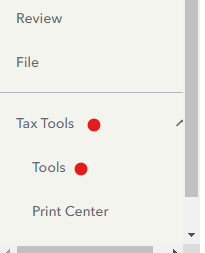
- Select Tax Tools
- On the drop-down select Tools
- On the pop-up menu
- Select View Tax Summary
- On the left sidebar, select Preview my 1040
IF you find that the carryover credit from 2022 is not being applied to your return, consider sharing a diagnostic version of your tax file with us so that we can look into this further and request a correction if needed.
The diagnostic file will not contain personally identifiable information, only numbers related to your tax forms. If you would like to provide us with the diagnostic file, follow the instructions below and post the token number along with which version of TurboTax Online you are using and what states you are filing in a follow-up thread.
Use these steps if you are using TurboTax Online:
- Sign in to your account and be sure you are in your tax return.
- Select Tax Tools in the menu to the left.
- Select Tools.
- Select Share my file with agent.
- A pop-up message will appear, select OK to send the sanitized diagnostic copy to us.
- Post the token number here.
**Say "Thanks" by clicking the thumb icon in a post
**Mark the post that answers your question by clicking on "Mark as Best Answer"
**Mark the post that answers your question by clicking on "Mark as Best Answer"
February 19, 2024
5:20 AM
- Mark as New
- Bookmark
- Subscribe
- Subscribe to RSS Feed
- Permalink
- Report Inappropriate Content
SOLAR CARRY FORWARD 2023
@AnnetteB6 The carryover credit is NOT being applied and two of your technical support specialists have tried to connect me with someone who could help and neither could transfer me anyone due to other technical issues. Here is the token 1187067.
February 19, 2024
7:36 AM
- Mark as New
- Bookmark
- Subscribe
- Subscribe to RSS Feed
- Permalink
- Report Inappropriate Content
SOLAR CARRY FORWARD 2023
Thank you for providing your token number. I have taken a closer look at your return and I see that the carryover energy credit from 2022 is being applied to your return.
I will not include actual numbers here for your privacy, but your Form 1040 line 20 has a number that comes from Form 1040 Schedule 3. This amount is used to reduce your income tax. Looking at Form 1040 Schedule 3, there are two numbers from Form 5695 Residential Energy Credits. Schedule 3 line 5a shows the amount that was entered into your return as a carryover from 2022. Schedule 3 line 5b shows the amount of energy credits based on things you did in 2023 to claim a credit.
You can see anything that is reported on the Form 1040 and 1040 Schedules 1, 2, and 3 by using the steps in my answer above. From what I am seeing in your tax data file, everything is correct and the carryover credit is being applied even though some of the TurboTax summary screens imply that it is not.
**Say "Thanks" by clicking the thumb icon in a post
**Mark the post that answers your question by clicking on "Mark as Best Answer"
**Mark the post that answers your question by clicking on "Mark as Best Answer"
February 19, 2024
8:29 AM
- Mark as New
- Bookmark
- Subscribe
- Subscribe to RSS Feed
- Permalink
- Report Inappropriate Content
SOLAR CARRY FORWARD 2023
@AnnetteB6 so you are saying that in all that, even though I paid out more tax than what my liability is that the solar carryover will not come back to me? Even though doing the form manually and in other software it shows that my return should be over $4000 large than what Turbo Tax is giving me? Also, I saw that 3 days ago it was reported that the carryover was mor working in your tech forums. Is this a resolved issue or still open?
February 19, 2024
8:36 AM
- Mark as New
- Bookmark
- Subscribe
- Subscribe to RSS Feed
- Permalink
- Report Inappropriate Content
SOLAR CARRY FORWARD 2023
Based on what I see in your tax return, there is not an issue. You are getting credit for the 2022 carryover. To verify this, go back through that section of your return and remove the carryover amount. Your refund will turn into a balance due without that credit.
There are no open issues addressing energy credit carryovers that I can see in the system.
**Say "Thanks" by clicking the thumb icon in a post
**Mark the post that answers your question by clicking on "Mark as Best Answer"
**Mark the post that answers your question by clicking on "Mark as Best Answer"
February 19, 2024
8:47 AM
- Mark as New
- Bookmark
- Subscribe
- Subscribe to RSS Feed
- Permalink
- Report Inappropriate Content
SOLAR CARRY FORWARD 2023
@AnnetteB6 I have done that and the return amount does not change. I even deleted the solar form from my return and it did not change the amount of my return. Did this today and twice last night with two different techsupport people at Intuit last night. There is an issue.
February 19, 2024
8:56 AM
- Mark as New
- Bookmark
- Subscribe
- Subscribe to RSS Feed
- Permalink
- Report Inappropriate Content
SOLAR CARRY FORWARD 2023
What version of TurboTax Online are you using?
**Say "Thanks" by clicking the thumb icon in a post
**Mark the post that answers your question by clicking on "Mark as Best Answer"
**Mark the post that answers your question by clicking on "Mark as Best Answer"
February 19, 2024
9:01 AM
- Mark as New
- Bookmark
- Subscribe
- Subscribe to RSS Feed
- Permalink
- Report Inappropriate Content
SOLAR CARRY FORWARD 2023
@AnnetteB6 Also when I put the solar carry over in the credits it shows that I am getting the credit in my return, but it does not carry forward to what my actual return is. I have screen shots if you want me to send them to you.
February 19, 2024
9:16 AM
- Mark as New
- Bookmark
- Subscribe
- Subscribe to RSS Feed
- Permalink
- Report Inappropriate Content
SOLAR CARRY FORWARD 2023
Since you are using TurboTax Online, try something before sending screenshots. Try using a different browser and/or clearing the cache and cookies for the browser you are using. That can sometimes have an effect.
I did test TurboTax Online Premium and it seemed to be working for me -- so I'm puzzled.
**Say "Thanks" by clicking the thumb icon in a post
**Mark the post that answers your question by clicking on "Mark as Best Answer"
**Mark the post that answers your question by clicking on "Mark as Best Answer"
February 19, 2024
9:22 AM
- Mark as New
- Bookmark
- Subscribe
- Subscribe to RSS Feed
- Permalink
- Report Inappropriate Content
SOLAR CARRY FORWARD 2023
@AnnetteB6 I have cleared all my cache, used 4 different browsers, and have used different computers with the same result. Just for background I have a Masters degree in IT and have done all the technical troubleshooting before I called your tech support that could not figure out why the carry over was not showing up either.
February 19, 2024
9:26 AM
Still have questions?
Questions are answered within a few hours on average.
Post a Question*Must create login to post


Unlock tailored help options in your account.


Get more help
Ask questions and learn more about your taxes and finances.
Related Content

jimmyinhmb
Level 1
ChapmanM
Level 1

golam-kibrya
New Member

goliathgrouter
New Member

athrey
New Member