

- Mark as New
- Bookmark
- Subscribe
- Subscribe to RSS Feed
- Permalink
- Report Inappropriate Content
Deductions & credits
You can preview your Form 1040 while working on your return using TurboTax Online. Use the steps below and then take a look at Form 1040 Schedule 3 line 5a. That is where you should see the energy credit from Form 5695.
On the menu bar on the left that shows.
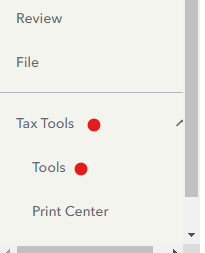
- Select Tax Tools
- On the drop-down select Tools
- On the pop-up menu
- Select View Tax Summary
- On the left sidebar, select Preview my 1040
IF you find that the carryover credit from 2022 is not being applied to your return, consider sharing a diagnostic version of your tax file with us so that we can look into this further and request a correction if needed.
The diagnostic file will not contain personally identifiable information, only numbers related to your tax forms. If you would like to provide us with the diagnostic file, follow the instructions below and post the token number along with which version of TurboTax Online you are using and what states you are filing in a follow-up thread.
Use these steps if you are using TurboTax Online:
- Sign in to your account and be sure you are in your tax return.
- Select Tax Tools in the menu to the left.
- Select Tools.
- Select Share my file with agent.
- A pop-up message will appear, select OK to send the sanitized diagnostic copy to us.
- Post the token number here.
**Mark the post that answers your question by clicking on "Mark as Best Answer"
