


- Community
- Topics
Turn on suggestions
Auto-suggest helps you quickly narrow down your search results by suggesting possible matches as you type.
Showing results for
- Community
- :
- Discussions
- :
- Taxes
- :
- Deductions & credits
- :
- Re: Charitable donations must be blank - changes from std to itemized by itself


- Mark as New
- Bookmark
- Subscribe
- Subscribe to RSS Feed
- Permalink
- Report Inappropriate Content
Charitable donations must be blank - changes from std to itemized by itself
I am at just over the minimum for the standard deduction including my charitable donations (24,930) but I keep getting an error saying "charitable donations must be blank". When I blank it out, it now uses the standard deduction and says there has to be an entry for the same field. I can't put zero. When I put the $ amount that is in Schedule A, it switches back to my itemized deduction and says it can't be blank. How do I fix this? The difference for me is that with the standard deduction I would owe money, but with the itemized I get a small refund. So which way is correct?
posted
February 15, 2021
7:46 AM
last updated
February 15, 2021
7:46 AM
Connect with an expert

Do you have an Intuit account?
You'll need to sign in or create an account to connect with an expert.
1 Best answer
Accepted Solutions
- Mark as New
- Bookmark
- Subscribe
- Subscribe to RSS Feed
- Permalink
- Report Inappropriate Content
Charitable donations must be blank - changes from std to itemized by itself
Ok. solved this.
Since charitable donations must be over $500 in order to deduct them, they need to be completely removed from Schedule A (or the easy wizard). Evidently TT still uses the less than $500 in the calculation for itemizing. This causes the error when you make the contributions zero or blank.
If you remove them, you can still deduct up to $300 in cash contributions. It will ask you after all deductions are completed (with the STD deduction chosen). And then you can enter the $300.
February 21, 2021
10:26 AM
6 Replies

- Mark as New
- Bookmark
- Subscribe
- Subscribe to RSS Feed
- Permalink
- Report Inappropriate Content
Charitable donations must be blank - changes from std to itemized by itself
It depends.
TurboTax will recommend the deduction that yields the highest tax benefit.
I recommend reviewing your input as follows to ensure everything is pulled in correctly.
You will make this entry in the Federal interview section of the program.
- Select Deductions & Credits
- Scroll down to All Tax Breaks and select Charitable Donations
- Select Start to the right of Donations to Charity in 2020
- Proceed to enter the details of your charitable cash contribution by entity as applicable in this section.
- Once you have completed entering your details, select Done with Charitable Donations
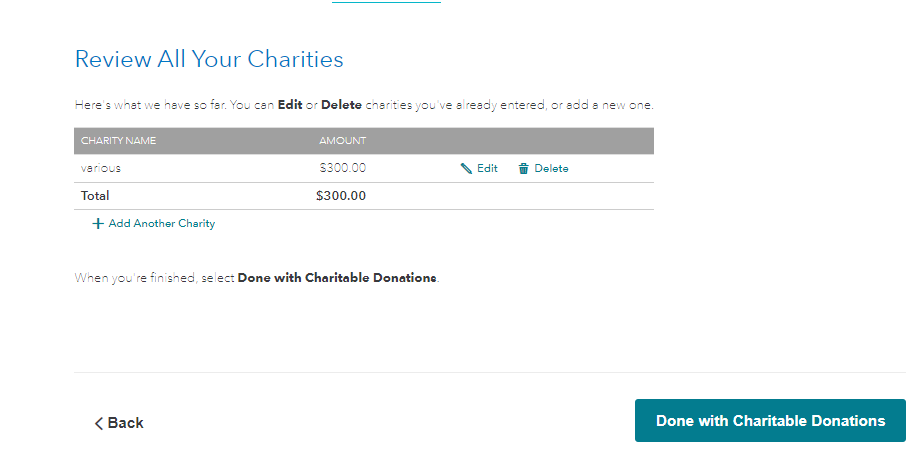
Scroll down to the bottom and select Wrap up Tax Breaks.
You should continue through the screens until you see the following screen titled Based on what you just told us,...your deduction is best for you:
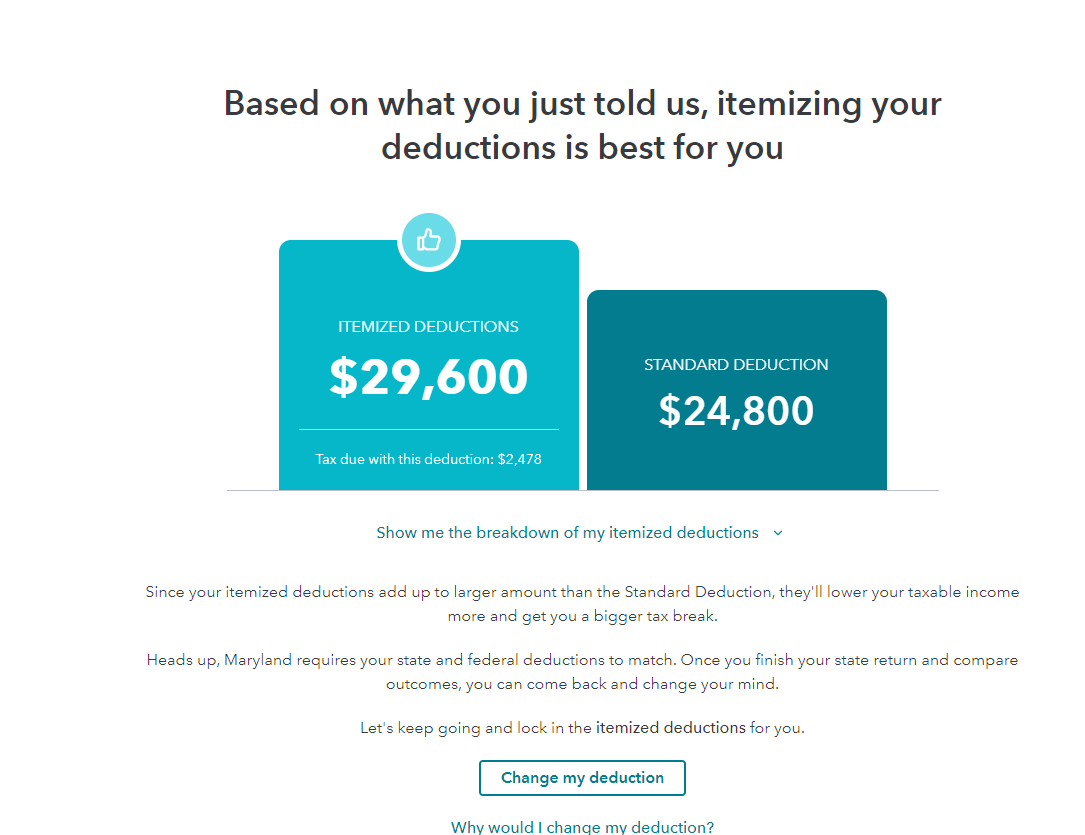
This screen will tell you if it is better to itemize or use the standard deduction.
If however, you are still receiving an error message regarding your charitable contributions, I recommend reviewing your input in the first section. Your deduction may be limited based upon the specific section where you donation was entered.
What deductions can I take for charitable contributions
Qualified charitable contributions
**Say "Thanks" by clicking the thumb icon in a post
**Mark the post that answers your question by clicking on "Mark as Best Answer"
**Mark the post that answers your question by clicking on "Mark as Best Answer"
February 15, 2021
8:20 AM
- Mark as New
- Bookmark
- Subscribe
- Subscribe to RSS Feed
- Permalink
- Report Inappropriate Content
Charitable donations must be blank - changes from std to itemized by itself
So, I have done most of this numerous times, with the same results.
I don't know what version you are talking about "Review all tax breaks".
This does not exist in my version. I have "done with deductions" at the bottom of my page.
And the screen shot you show, I have never seen before.
I am using TurboTax Deluxe on a Mac.
When I click continue, and get to a screen it says "What you're getting: Federal Itemized Deductions"
clicking on Continue until I get to the Fix Errors.
This is where it goes back and forth. At this point it says I have a small refund coming. But it says:
Check this entry.....Charitable contributions should be blank.
So, I delete the number and click continue, now I have a tax due.
I run Smart Check again and it comes up with an error.
It says: Charitable contributions must be entered.
This is a spiral, keeps going back to the same things over and over again.
I have never had a problem with TurboTax in the past 10 or more years of using it.
If I look at the Itemized vs Standard deduction selection. when it tells me that the charitable deductions should be blank, it is set to itemized. When it tells me that I have to enter the charitable contributions, it is set to the standard deduction.
Please help.
February 15, 2021
9:02 AM
- Mark as New
- Bookmark
- Subscribe
- Subscribe to RSS Feed
- Permalink
- Report Inappropriate Content
Charitable donations must be blank - changes from std to itemized by itself
This is still not solved after the last update and is preventing me from filing my taxes.
When I get to the end of deductions, it says "Congratulations, you are getting the standard deduction". On the next page it suggests that I itemize since my deductions are more than the standard (by $130).
When I get to the page to do smart check, it says I have errors "1040/1040SR Wks: Charitable Contributions should be blank". If I blank this out, my $65 refund changes to a $57 tax due. Running smart check again it finds an error "1040/104SR Wks: Charitable contributions must be entered".
this is a vicious cycle and I have no idea which is correct.
Would someone please help?
February 21, 2021
9:47 AM
- Mark as New
- Bookmark
- Subscribe
- Subscribe to RSS Feed
- Permalink
- Report Inappropriate Content
Charitable donations must be blank - changes from std to itemized by itself
Ok. solved this.
Since charitable donations must be over $500 in order to deduct them, they need to be completely removed from Schedule A (or the easy wizard). Evidently TT still uses the less than $500 in the calculation for itemizing. This causes the error when you make the contributions zero or blank.
If you remove them, you can still deduct up to $300 in cash contributions. It will ask you after all deductions are completed (with the STD deduction chosen). And then you can enter the $300.
February 21, 2021
10:26 AM

- Mark as New
- Bookmark
- Subscribe
- Subscribe to RSS Feed
- Permalink
- Report Inappropriate Content
Charitable donations must be blank - changes from std to itemized by itself
I am doing itemized deductions and continue to get an error in this space. It says it must be blank but always changes in the final outcome with an error. It automatically puts in $300.
I continually get different results in the final amount owed for federal tax.
I must itemize to get the most benefit on State tax.
February 9, 2022
9:14 AM

- Mark as New
- Bookmark
- Subscribe
- Subscribe to RSS Feed
- Permalink
- Report Inappropriate Content
Charitable donations must be blank - changes from std to itemized by itself
Make sure that the line 12b charitable deduction has been removed from both areas of entry.
Federal 1040 line 12b Charitable Cash Contributions under CARES Act can be entered or removed at either:
- Federal Taxes / Deductions & Credits / Your tax breaks / Donations to Charity in 2021 or
- at the screen Charitable Cash Contributions under CARES Act immediately following Based on what you just told us, the Standard Deduction is best for you.
You may have an entry posted at the second area of entry. If this is the case, you may have to temporarily reduce one or more itemized deduction entries to invoke the screen Based on what you just told us, the Standard Deduction is best for you.
- At the screen titled Charitable Cash Contributions under the CARES Act, make sure that the box contains $0.
- Under Deductions & Credits, re-instate the deductions that had been temporarily changed.
- Scroll to the bottom of the page and click on Wrap up tax breaks.
- At Other Tax Situations, scroll to the bottom of the page and click on Let’s keep going.
- Continue through Review.
Go to Tax Tools / Tools / View Tax Summary / Preview my 1040 to view line 12b for the charitable deduction.
**Say "Thanks" by clicking the thumb icon in a post
**Mark the post that answers your question by clicking on "Mark as Best Answer"
**Mark the post that answers your question by clicking on "Mark as Best Answer"
February 9, 2022
12:35 PM
Still have questions?
Questions are answered within a few hours on average.
Post a Question*Must create login to post


Unlock tailored help options in your account.


Get more help
Ask questions and learn more about your taxes and finances.
Related Content

jhfoltz
New Member

Couserk
Level 1

Cris
Level 3

Wedding5500
Level 4

user17766499932
Level 2