


- Community
- Topics
Turn on suggestions
Auto-suggest helps you quickly narrow down your search results by suggesting possible matches as you type.
Showing results for
- Community
- :
- Discussions
- :
- Taxes
- :
- Business & farm
- :
- How or where do I delete a Federal K-1 From 2022 taxes that does not pertain anymore. There is no delete box
Announcements


- Mark as New
- Bookmark
- Subscribe
- Subscribe to RSS Feed
- Permalink
- Report Inappropriate Content
How or where do I delete a Federal K-1 From 2022 taxes that does not pertain anymore. There is no delete box
Topics:
posted
January 29, 2023
7:26 AM
last updated
January 29, 2023
7:26 AM
Connect with an expert

Do you have an Intuit account?
You'll need to sign in or create an account to connect with an expert.
1 Best answer
Accepted Solutions

- Mark as New
- Bookmark
- Subscribe
- Subscribe to RSS Feed
- Permalink
- Report Inappropriate Content
How or where do I delete a Federal K-1 From 2022 taxes that does not pertain anymore. There is no delete box
The proper way to delete an unwanted K-1 is from the K-1 Summary screen, which also removes the associated worksheets.
- Open or continue your return in TurboTax, if you haven't already.
- Using the search feature in the upper right, search for K-1 and select the Jump to link in the search results.
- Answer Yes to Did you receive any Schedules K-1 or Q? Select this even if the correct answer is no.
- Select Update next to the type of K-1 you initially entered (partnership/LLC, S corp, or estate/trust).
- On the K-1 Summary screen, select Delete next to the K-1 you want to remove. Answer Yes on the following screen.
- Select Done.
- If necessary, repeat steps 4–7 for other K-1s you need to remove.
January 29, 2023
7:30 AM
8 Replies
- Mark as New
- Bookmark
- Subscribe
- Subscribe to RSS Feed
- Permalink
- Report Inappropriate Content
How or where do I delete a Federal K-1 From 2022 taxes that does not pertain anymore. There is no delete box
The proper way to delete an unwanted K-1 is from the K-1 Summary screen, which also removes the associated worksheets.
- Open or continue your return in TurboTax, if you haven't already.
- Using the search feature in the upper right, search for K-1 and select the Jump to link in the search results.
- Answer Yes to Did you receive any Schedules K-1 or Q? Select this even if the correct answer is no.
- Select Update next to the type of K-1 you initially entered (partnership/LLC, S corp, or estate/trust).
- On the K-1 Summary screen, select Delete next to the K-1 you want to remove. Answer Yes on the following screen.
- Select Done.
- If necessary, repeat steps 4–7 for other K-1s you need to remove.
January 29, 2023
7:30 AM

- Mark as New
- Bookmark
- Subscribe
- Subscribe to RSS Feed
- Permalink
- Report Inappropriate Content
How or where do I delete a Federal K-1 From 2022 taxes that does not pertain anymore. There is no delete box
Problems with these instructions.
1. There is no question - Did you receive any Schedules K-1 or Q? Select this even if the correct answer is no.
The question I have is Do you want to review your K-1s.
2. When I click, yes, and then click "Update," I don't see a Delete button and don't know what a "Summary Screen" is. I don't see anything like this
April 8, 2023
12:38 PM


- Mark as New
- Bookmark
- Subscribe
- Subscribe to RSS Feed
- Permalink
- Report Inappropriate Content
How or where do I delete a Federal K-1 From 2022 taxes that does not pertain anymore. There is no delete box
The specific steps and pages may be different if you are using TurboTax Online or TurboTax for Desktop. You may need to be flexible in interpreting the instructions for the version you are using. This is especially true if you are using the TurboTax app.
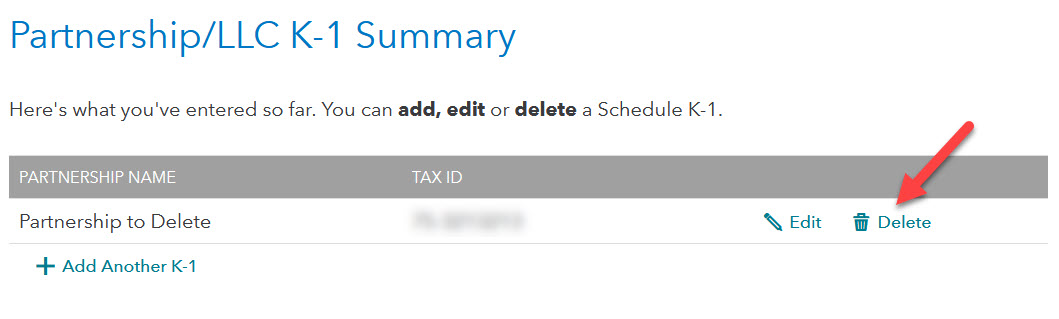
Once you see a list of the Schedules K-1 that you entered previously (a list with "summary" in the title), there should be a choice or icon to the right that serves to delete the K-1. This may be a trashcan icon or the word "delete."
**Say "Thanks" by clicking the thumb icon in a post
**Mark the post that answers your question by clicking on "Mark as Best Answer"
**Mark the post that answers your question by clicking on "Mark as Best Answer"
April 9, 2023
7:10 AM

- Mark as New
- Bookmark
- Subscribe
- Subscribe to RSS Feed
- Permalink
- Report Inappropriate Content
How or where do I delete a Federal K-1 From 2022 taxes that does not pertain anymore. There is no delete box
yes, these instructions are not accurate. There is no option to delete
May 16, 2023
7:07 PM

- Mark as New
- Bookmark
- Subscribe
- Subscribe to RSS Feed
- Permalink
- Report Inappropriate Content
How or where do I delete a Federal K-1 From 2022 taxes that does not pertain anymore. There is no delete box
These steps do work ... what step are you having trouble with?
- Open or continue your return in TurboTax, if you haven't already.
- Using the search feature in the upper right, search for K-1 and select the Jump to link in the search results.
- Answer Yes to Did you receive any Schedules K-1 or Q? Select this even if the correct answer is no.
- Select Update next to the type of K-1 you initially entered (partnership/LLC, S corp, or estate/trust).
- On the K-1 Summary screen, select Delete next to the K-1 you want to remove. Answer Yes on the following screen.
- Select Done.
- If necessary, repeat steps 4–7 for other K-1s you need to remove.
May 19, 2023
8:37 AM

- Mark as New
- Bookmark
- Subscribe
- Subscribe to RSS Feed
- Permalink
- Report Inappropriate Content
How or where do I delete a Federal K-1 From 2022 taxes that does not pertain anymore. There is no delete box
One user found he had to add a fake name first.....
I figured out that I had to actually start fixing this problem by entering a fake K-1 name to the TurboTax request and then going back to the "Update the Schedule K-1" and deleting the fake K-1 name.
May 19, 2023
10:00 AM
2,774

- Mark as New
- Bookmark
- Subscribe
- Subscribe to RSS Feed
- Permalink
- Report Inappropriate Content
How or where do I delete a Federal K-1 From 2022 taxes that does not pertain anymore. There is no delete box
exactly. these instructions are nonsense.
February 18, 2024
2:25 PM

- Mark as New
- Bookmark
- Subscribe
- Subscribe to RSS Feed
- Permalink
- Report Inappropriate Content
How or where do I delete a Federal K-1 From 2022 taxes that does not pertain anymore. There is no delete box
Here's the general procedure for deleting unwanted forms, schedules, and worksheets in TurboTax Online:
- Open your return in TurboTax. (To do this, sign in to TurboTax, and select the Take me to my return button.)
- In the left sidebar, select Tax Tools> Tools.
- In the pop-up window Tool Center, choose Delete a form.
- Select Delete next to the form/schedule/worksheet and follow the onscreen instructions.
Windows Instructions:
- Switch to Forms mode.
- In the left pane, select the form you want to remove. (if you don't see it, click Open Form at the top).
- After the form is generated in the right pane, click the Delete Form button at the bottom of the window.
- Follow any on-screen instructions to remove the form or forms.
Mac Instructions:
- Switch to Forms mode.
- In the left pane, select the form you want to remove (if you don't see it, click Open Form at the top).
- From the Forms menu, select Remove [form name].
- Follow any on-screen instructions to remove the form or forms.
**Say "Thanks" by clicking the thumb icon in a post
**Mark the post that answers your question by clicking on "Mark as Best Answer"
**Mark the post that answers your question by clicking on "Mark as Best Answer"
February 18, 2024
2:30 PM
Still have questions?
Questions are answered within a few hours on average.
Post a Question*Must create login to post


Unlock tailored help options in your account.


Get more help
Ask questions and learn more about your taxes and finances.
Related Content

user17670216539
New Member

carollperez
New Member
shsu
New Member

jon
New Member
specialevents
New Member