


- Community
- Topics
Turn on suggestions
Auto-suggest helps you quickly narrow down your search results by suggesting possible matches as you type.
Showing results for
- Community
- :
- Discussions
- :
- Taxes
- :
- Get your taxes done
- :
- When will schedule 1-A be available?
Announcements


- Mark as New
- Bookmark
- Subscribe
- Subscribe to RSS Feed
- Permalink
- Report Inappropriate Content
When will schedule 1-A be available?
Topics:
posted
2 weeks ago
last updated
January 21, 2026
4:51 AM
Connect with an expert

Do you have an Intuit account?
You'll need to sign in or create an account to connect with an expert.
9 Replies


- Mark as New
- Bookmark
- Subscribe
- Subscribe to RSS Feed
- Permalink
- Report Inappropriate Content
When will schedule 1-A be available?
Schedule 1-A is available in TurboTax
2 weeks ago


- Mark as New
- Bookmark
- Subscribe
- Subscribe to RSS Feed
- Permalink
- Report Inappropriate Content
When will schedule 1-A be available?
IRS Schedule 1-A is generated when the taxpayer reports:
- No tax on tips,
- No tax on overtime,
- No tax on car loan interest, or
- Enhanced deduction for seniors
In TurboTax Online, view the entry by:
- Selecting Tools down the left side of the screen,
- Selecting View Tax Summary
Note the entry Additional Deductions (Schedule 1-A).
In TurboTax Desktop, select FORMS in the upper right hand corner of the screen.
**Say "Thanks" by clicking the thumb icon in a post
**Mark the post that answers your question by clicking on "Mark as Best Answer"
**Mark the post that answers your question by clicking on "Mark as Best Answer"
2 weeks ago

- Mark as New
- Bookmark
- Subscribe
- Subscribe to RSS Feed
- Permalink
- Report Inappropriate Content
When will schedule 1-A be available?
Turbotax is also not generating a Schedule 1-A form for me either despite qualifying for everything.
2 weeks ago

- Mark as New
- Bookmark
- Subscribe
- Subscribe to RSS Feed
- Permalink
- Report Inappropriate Content
When will schedule 1-A be available?
Form 1-A is available. I used it for Tips and it works. I'm using Windows desktop. Turbotax says its avaialble for all platforms. If it's not working, check your entries. If you have desktop, you can review the Schedule in forms mode. Not sure about online. You may have to pay any fees before you can review or print it.
2 weeks ago
- Mark as New
- Bookmark
- Subscribe
- Subscribe to RSS Feed
- Permalink
- Report Inappropriate Content
When will schedule 1-A be available?
It's not available in my turbo tax deluxe and it does not show up in the forms.
Tuesday

- Mark as New
- Bookmark
- Subscribe
- Subscribe to RSS Feed
- Permalink
- Report Inappropriate Content
When will schedule 1-A be available?
Go to ONLINE at the top of the page and 'Check for Updates'.
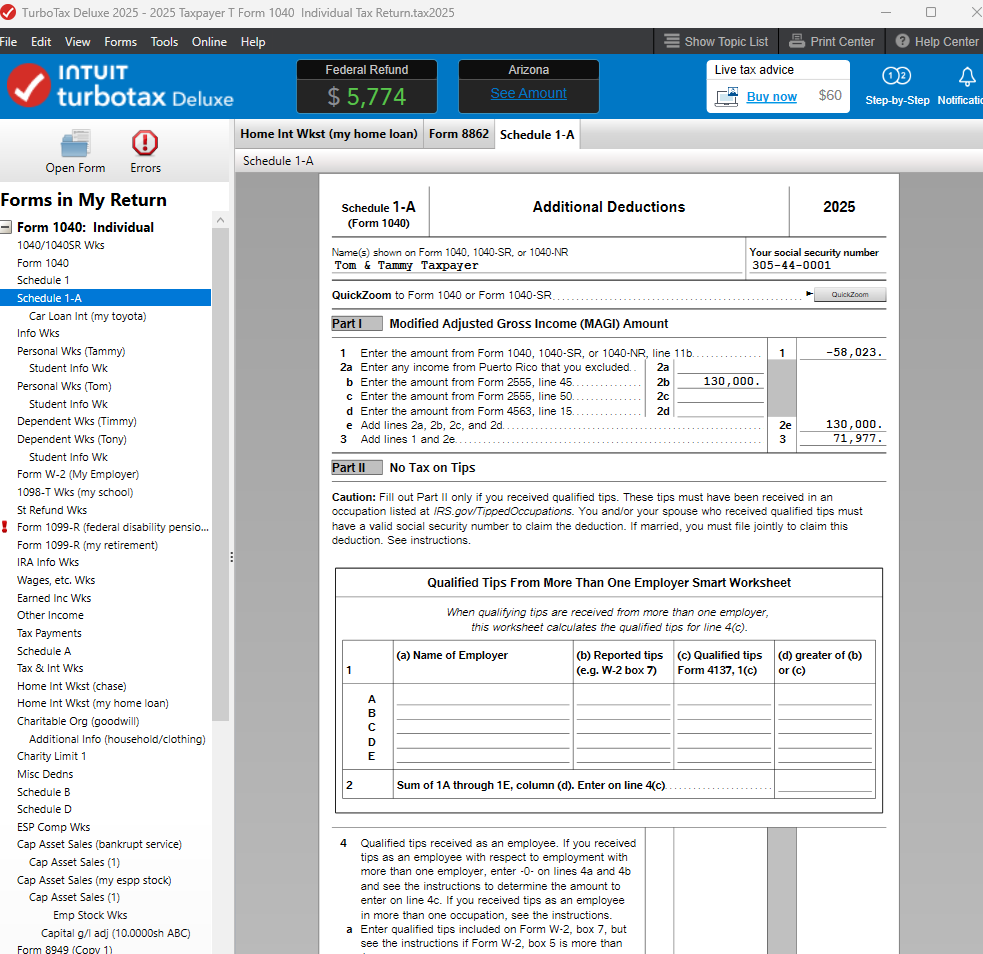
If your program is updated, step through the interview sections for Schedule 1-A deductions (W-2 entry for no tax on tips/ OT, Vehicle Loan Interest Deduction) to create the form in your return.
In FORMS, choose 'Open Form' and type in '1-A' to view the form.
**Say "Thanks" by clicking the thumb icon in a post
**Mark the post that answers your question by clicking on "Mark as Best Answer"
**Mark the post that answers your question by clicking on "Mark as Best Answer"
Tuesday
- Mark as New
- Bookmark
- Subscribe
- Subscribe to RSS Feed
- Permalink
- Report Inappropriate Content
When will schedule 1-A be available?
I'm having the same issue as the original poster. I'm using the desktop software and checked for updates - "my software is up to date". Schedule 1-A captured my overtime, but not my tips. The software won't let me type in a number manually into the form. Any hints?
Wednesday
- Mark as New
- Bookmark
- Subscribe
- Subscribe to RSS Feed
- Permalink
- Report Inappropriate Content
When will schedule 1-A be available?
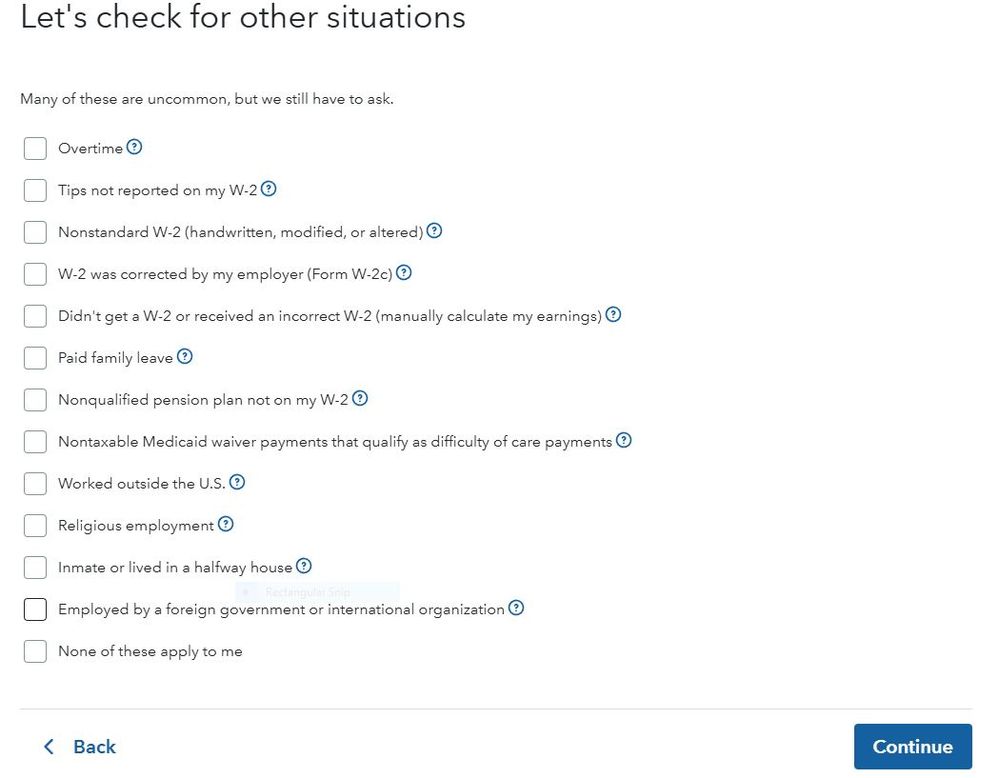
@slepore8 Did you have tips reported on your W-2 in box 7? If so, the calculation is done by the software in Part II of the Schedule 1-A.
If you did not report tips to your employer you should have checked the box Tips not reported on my W-2
Wednesday
- Mark as New
- Bookmark
- Subscribe
- Subscribe to RSS Feed
- Permalink
- Report Inappropriate Content
When will schedule 1-A be available?
Box 7 is blank. My tips were included in box 1 so were already taxed for social security taxes. My employer noted my tips in box 14 which I understand is just a general memo field and does not feed into schedule 1-A. Should I still check that box "tips not reported"? They were reported - in box 1.
Wednesday
Still have questions?
Questions are answered within a few hours on average.
Post a Question*Must create login to post


Unlock tailored help options in your account.


Get more help
Ask questions and learn more about your taxes and finances.
Related Content

tiannatrang
Returning Member

sglewis1485
New Member

forrestson
New Member

17700563553
New Member
lisashe
Level 1