


- Community
- Topics
Turn on suggestions
Auto-suggest helps you quickly narrow down your search results by suggesting possible matches as you type.
Showing results for
- Community
- :
- Discussions
- :
- Taxes
- :
- Get your taxes done
- :
- Re: When will schedule 1-A be available?
Announcements


- Mark as New
- Bookmark
- Subscribe
- Subscribe to RSS Feed
- Permalink
- Report Inappropriate Content
When will schedule 1-A be available?
Topics:
posted
January 21, 2026
4:51 AM
last updated
January 21, 2026
4:51 AM
Connect with an expert

Do you have an Intuit account?
You'll need to sign in or create an account to connect with an expert.
1 Best answer
Accepted Solutions


- Mark as New
- Bookmark
- Subscribe
- Subscribe to RSS Feed
- Permalink
- Report Inappropriate Content
When will schedule 1-A be available?
@Hans L wrote:
no it is not available
The Schedule 1-A has been available for months.
If you are using the TurboTax desktop editions, click on Online at the top of the desktop program screen. Then click on Check for Updates.
If you are filing as Married Filing Separately you are not eligible for the deduction. If you are Single and your AGI is over $150,000 or Married Filing Jointly and your AGI is over $250,000 you are not eligible for the deduction.
If you are age 65 or older and meet the requirement, the additional deduction is automatically added on your federal tax return.
Standard deductions for 2025
Single - $15.750 add $2,000 if age 65 or older
Married Filing Separately - $15,750 add $1,600 if age 65 or older
Married Filing Jointly - $31,500 add $1,600 for each spouse age 65 or older
Head of Household - $23,625 add $2,000 if age 65 or older
New Bonus Standard Deduction (OBBB):
An additional $6,000 deduction for taxpayers 65 and older.
This is per eligible individual, meaning a married couple both over 65 could get $12,000.
Important: This bonus deduction is temporary, lasting from 2025 through 2028.
Income limitations: It phases out for taxpayers with modified adjusted gross income over $75,000 for single filers and $150,000 for joint filers.
The amount is calculated on Schedule 1-A, Part V, with that amount flowing to Form 1040 Line 13b
.
February 21, 2026
6:45 AM
14 Replies
- Mark as New
- Bookmark
- Subscribe
- Subscribe to RSS Feed
- Permalink
- Report Inappropriate Content
When will schedule 1-A be available?
Schedule 1-A is available in TurboTax
January 21, 2026
5:37 AM


- Mark as New
- Bookmark
- Subscribe
- Subscribe to RSS Feed
- Permalink
- Report Inappropriate Content
When will schedule 1-A be available?
IRS Schedule 1-A is generated when the taxpayer reports:
- No tax on tips,
- No tax on overtime,
- No tax on car loan interest, or
- Enhanced deduction for seniors
In TurboTax Online, view the entry by:
- Selecting Tools down the left side of the screen,
- Selecting View Tax Summary
Note the entry Additional Deductions (Schedule 1-A).
In TurboTax Desktop, select FORMS in the upper right hand corner of the screen.
**Say "Thanks" by clicking the thumb icon in a post
**Mark the post that answers your question by clicking on "Mark as Best Answer"
**Mark the post that answers your question by clicking on "Mark as Best Answer"
January 21, 2026
5:55 AM

- Mark as New
- Bookmark
- Subscribe
- Subscribe to RSS Feed
- Permalink
- Report Inappropriate Content
When will schedule 1-A be available?
Turbotax is also not generating a Schedule 1-A form for me either despite qualifying for everything.
January 21, 2026
5:35 PM

- Mark as New
- Bookmark
- Subscribe
- Subscribe to RSS Feed
- Permalink
- Report Inappropriate Content
When will schedule 1-A be available?
Form 1-A is available. I used it for Tips and it works. I'm using Windows desktop. Turbotax says its avaialble for all platforms. If it's not working, check your entries. If you have desktop, you can review the Schedule in forms mode. Not sure about online. You may have to pay any fees before you can review or print it.
January 21, 2026
9:17 PM
- Mark as New
- Bookmark
- Subscribe
- Subscribe to RSS Feed
- Permalink
- Report Inappropriate Content
When will schedule 1-A be available?
It's not available in my turbo tax deluxe and it does not show up in the forms.
January 27, 2026
11:00 AM

- Mark as New
- Bookmark
- Subscribe
- Subscribe to RSS Feed
- Permalink
- Report Inappropriate Content
When will schedule 1-A be available?
Go to ONLINE at the top of the page and 'Check for Updates'.
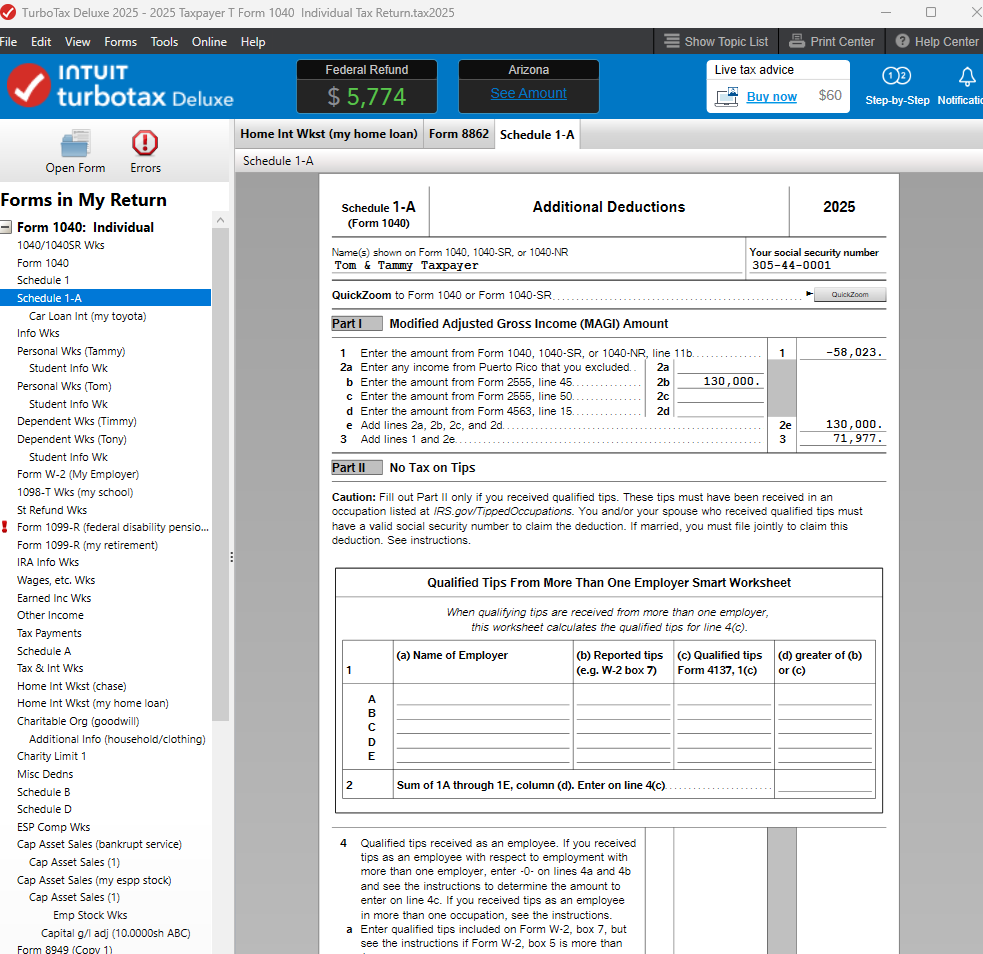
If your program is updated, step through the interview sections for Schedule 1-A deductions (W-2 entry for no tax on tips/ OT, Vehicle Loan Interest Deduction) to create the form in your return.
In FORMS, choose 'Open Form' and type in '1-A' to view the form.
**Say "Thanks" by clicking the thumb icon in a post
**Mark the post that answers your question by clicking on "Mark as Best Answer"
**Mark the post that answers your question by clicking on "Mark as Best Answer"
January 27, 2026
11:30 AM
- Mark as New
- Bookmark
- Subscribe
- Subscribe to RSS Feed
- Permalink
- Report Inappropriate Content
When will schedule 1-A be available?
I'm having the same issue as the original poster. I'm using the desktop software and checked for updates - "my software is up to date". Schedule 1-A captured my overtime, but not my tips. The software won't let me type in a number manually into the form. Any hints?
January 28, 2026
11:24 AM
- Mark as New
- Bookmark
- Subscribe
- Subscribe to RSS Feed
- Permalink
- Report Inappropriate Content
When will schedule 1-A be available?
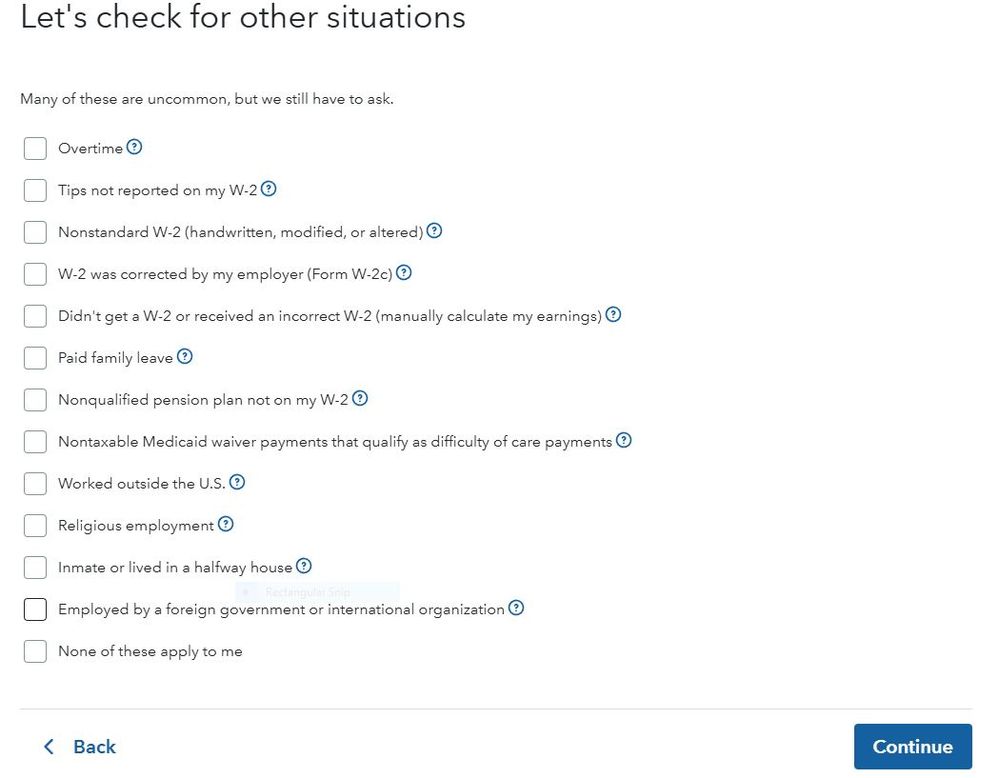
@slepore8 Did you have tips reported on your W-2 in box 7? If so, the calculation is done by the software in Part II of the Schedule 1-A.
If you did not report tips to your employer you should have checked the box Tips not reported on my W-2
January 28, 2026
11:28 AM
- Mark as New
- Bookmark
- Subscribe
- Subscribe to RSS Feed
- Permalink
- Report Inappropriate Content
When will schedule 1-A be available?
Box 7 is blank. My tips were included in box 1 so were already taxed for social security taxes. My employer noted my tips in box 14 which I understand is just a general memo field and does not feed into schedule 1-A. Should I still check that box "tips not reported"? They were reported - in box 1.
January 28, 2026
12:03 PM
- Mark as New
- Bookmark
- Subscribe
- Subscribe to RSS Feed
- Permalink
- Report Inappropriate Content
When will schedule 1-A be available?
According to TurboTax's tax form availability matrix (https://form-status.app.intuit.com/tax-forms-availability/formsavailability?albRedirect=true&product...), this form should be available for e-file in the desktop windows software, however, I have the software with the latest updates, and it shows that the form is not finalized and cannot be submitted. Unfortunately, it doesn't have a date. TurboTax, can you fix your matrix please!

Rich
February 16, 2026
5:54 PM
- Mark as New
- Bookmark
- Subscribe
- Subscribe to RSS Feed
- Permalink
- Report Inappropriate Content
When will schedule 1-A be available?
@richlux The Schedule 1-A has been available in TurboTax for two months or longer. You need to make sure you have the latest software update. Click on Online at the top of the desktop program screen. Click on Check for Updates.
If you show as being updated and still have this issue, then use a manual update if you are using a Windows based computer. See this for a manual update - https://ttlc.intuit.com/turbotax-support/en-us/help-article/update-products/manually-update-turbotax...
Or, save the tax return, close the TurboTax program. Close and re-start your computer.
February 17, 2026
5:55 AM
- Mark as New
- Bookmark
- Subscribe
- Subscribe to RSS Feed
- Permalink
- Report Inappropriate Content
When will schedule 1-A be available?
@DoninGA Thank you so much! I had rebooted my computer and did the check for updates multiple times, but that didn't fix it. Downloading the manual update finally fixed it. I'm having a similar issue with TurboTax Business, where the availability matrix says the forms are available, but the software says they aren't. It says that the 1065 Partnership Form p1-4 and p5-6 along with Schedule B-1 and Schedule K-1 are not available yet. Is there a manual update for the Business version? The one that fixed the Deluxe version did not fix this.
Actually, I found it: https://ttlc.intuit.com/turbotax-support/en-us/help-article/update-products/manually-update-turbotax... and it fixed that problem also.
This is a little concerning. I'm worried that I won't get future updates since the "Check For Updates" feature kept telling me that there were no updates even though there clearly were :(
Thanks again,
Rich
February 17, 2026
8:59 AM
- Mark as New
- Bookmark
- Subscribe
- Subscribe to RSS Feed
- Permalink
- Report Inappropriate Content
When will schedule 1-A be available?
no it is not available
February 21, 2026
6:42 AM
- Mark as New
- Bookmark
- Subscribe
- Subscribe to RSS Feed
- Permalink
- Report Inappropriate Content
When will schedule 1-A be available?
@Hans L wrote:
no it is not available
The Schedule 1-A has been available for months.
If you are using the TurboTax desktop editions, click on Online at the top of the desktop program screen. Then click on Check for Updates.
If you are filing as Married Filing Separately you are not eligible for the deduction. If you are Single and your AGI is over $150,000 or Married Filing Jointly and your AGI is over $250,000 you are not eligible for the deduction.
If you are age 65 or older and meet the requirement, the additional deduction is automatically added on your federal tax return.
Standard deductions for 2025
Single - $15.750 add $2,000 if age 65 or older
Married Filing Separately - $15,750 add $1,600 if age 65 or older
Married Filing Jointly - $31,500 add $1,600 for each spouse age 65 or older
Head of Household - $23,625 add $2,000 if age 65 or older
New Bonus Standard Deduction (OBBB):
An additional $6,000 deduction for taxpayers 65 and older.
This is per eligible individual, meaning a married couple both over 65 could get $12,000.
Important: This bonus deduction is temporary, lasting from 2025 through 2028.
Income limitations: It phases out for taxpayers with modified adjusted gross income over $75,000 for single filers and $150,000 for joint filers.
The amount is calculated on Schedule 1-A, Part V, with that amount flowing to Form 1040 Line 13b
.
February 21, 2026
6:45 AM
Still have questions?
Questions are answered within a few hours on average.
Post a Question*Must create login to post


Unlock tailored help options in your account.


Get more help
Ask questions and learn more about your taxes and finances.
Related Content

dezamarripa
New Member
lauri_jo
New Member

gannagona
New Member

uspatriot55
New Member
user17759533802
New Member