Level 2
February 29, 2020
Solved

W-2 Income in box 12 code z

  • February 29, 2020
  • 2 replies
  • 0 views

I have a W-2 from a previous employer with a Only small amount of income reported in box 12 with code z. Turbo tax automatically imported my W-2, but it says it cannot calculate the tax on it. Do I need to manually fill out any values or additional forms here? Has anyone run into this/will I still be able to efile with this?


 Thanks! 
    Best answer by macuser_22

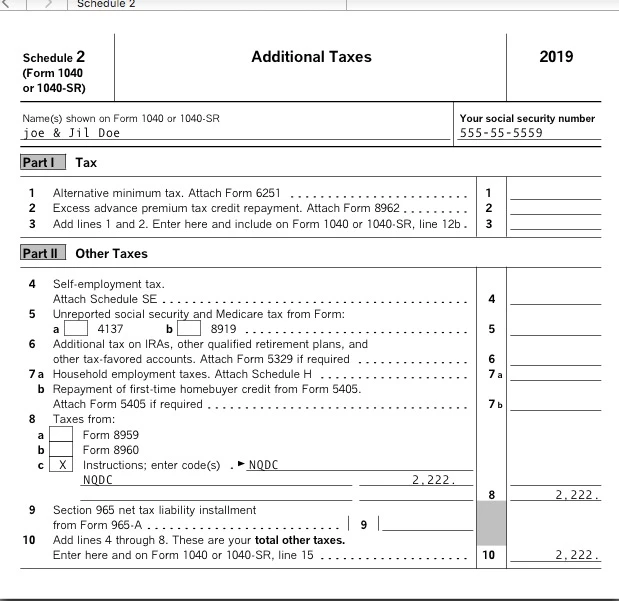
    I deleted my prior posts that were totally incorrect.  I made a big blunder.  The line 8 in the instructions is not the 1040 line 8 but the schedule 2 line 8 - totally different.


    Schedule 2 line 8 makes more since that is "Additional Taxes".


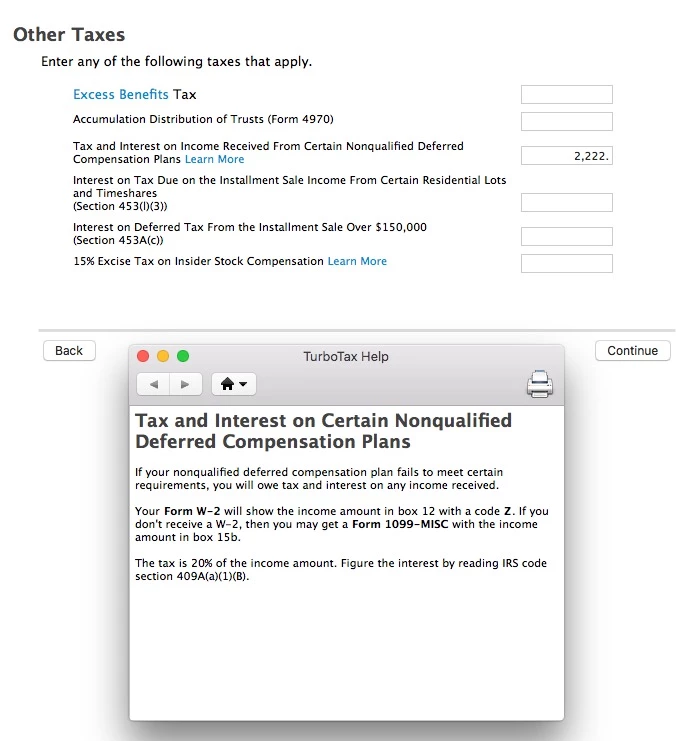
    It appears that this IS actually supported in the interview mode.


    Search topics for "other taxes".   There is a line just for this.


    Sorry to mislead you,


    2 replies

    macuser_22
    Alumni - Champ
    Alumni - Champ
    February 29, 2020

    Is there anything in box 1?


    A zero box 1 cannot be e-files per IRS rules.   The IRS does not want a do-nothing W-2.

    **Disclaimer: This post is for discussion purposes only and is NOT tax advice. The author takes no responsibility for the accuracy of any information in this post.**
    PhoenixbtAuthor
    Level 2
    February 29, 2020

    Thanks for the reply! Yes, same amount ($102) is listed both in box 1 and in 12. That’s all that’s on the w-2

    Level 14
    February 29, 2020

    Yes, you would need to manually handle it.  TurboTax does not support its calculation.


    Per instructions, 

    Z: Income under a nonqualified deferred compensation plan that fails to satisfy section 409A. This amount is subject to an additional 20% tax plus interest (TurboTax does not support this calculation).


    See instructions on how to report, click here: https://www.irs.gov/pub/irs-pdf/iw2w3.pdf , page 21


    @Phoenixbt

     
    PhoenixbtAuthor
    Level 2
    February 29, 2020

    Thanks! So with the additional 20% calculation, can I still use the rest of the taxes as prepared by turbo tax then I just have to fill in this extra value in a different form? Is the 409A form they refer to in the link you sent something I need to add in using the forms view? Never had to do this before, so apologies for the dumb questions

    Level 12
    April 13, 2023

    In the 2022 Turbotax I only get an error that TT can't resolve, and won't calculate this NQDC amount for me.  Is there a work around?  If not, would TT Live work to figure out this issue, or am I needing to see a tax pro??  I'm done except for this but don't want to underpay my tax and get audited. 


     It would be helpful to have a TurboTax token.  The token provides a sanitized version of your return.  We will be able to see the numbers but not any personal information such as your name, SSN, or address.  


    If you would like to do this, here are the instructions: 


    In TurboTax Online, go to the black panel on the left side of your program and select Tax Tools. 

    1. Then select Tools below Tax Tools. 
    2. A window will pop up which says Tools Center.  
    3. On this screen, select Share my file with Agent. 
    4. You will see a message explaining what the diagnostic copy is.  Click okay through this screen, and you will get a Token number. 

    In TurboTax CD/Download versions, go to the black panel on your screen and select Online. 

    1. Scroll down and select Send tax file to Agent. 
    2. You will see a message explaining what the diagnostic copy is.  Click send through this screen, and you will get a Token number. 

    Reply to this thread with your Token number. 


    We will then be able to see precisely what you are seeing, and we can determine what exactly is going on in your return and provide you with a resolution.

    **Say "Thanks" by clicking the thumb icon in a post. **Mark the post that answers your question by clicking on "Mark as Best Answer"