turbotax icon
cancel
Showing results for 
Search instead for 
Did you mean: 
Close icon
Do you have a TurboTax Online account?

We'll help you get started or pick up where you left off.

Questionable 1099-R

My wife & I lived in 2 states during 2019.  She received 2 separate 1099-R's from her employer. The 1st included the full annual amount of her pension payments in Box 1 (Gross Distribution) & Box 2a (Taxable Amount) and one state's distribution amount in Box 14 (we did not withhold any taxes fro this state). The 2nd 1099-R shows $0.00 in Box 1 and Box 2a and the 2nd state's distribution and amount withheld. I entered these into Turbo Tax Deluxe as 2 separate documents but Turbo Tax Deluxe won't let me e-file until I correct this. I believe it is saying that on the 2nd 1099-R that I could not have withheld any state tax if there was no gross distribution.

How do I proceed?

Can I input these into Turbo Tax Deluxe as if they were one document? Will this raise an audit flag within the IRS? 

x
Do you have an Intuit account?

Do you have an Intuit account?

You'll need to sign in or create an account to connect with an expert.

1 Best answer

Accepted Solutions
JotikaT2
Employee Tax Expert

Questionable 1099-R

It depends.


If the two separate 1099-R forms are for the same distribution, you can go ahead and add the state to your input on the 1099-R that has the distribution amounts in boxes 1 and 2.


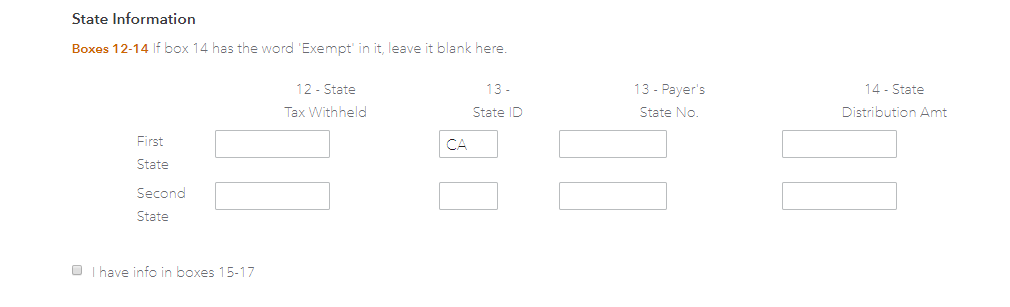
On your 1099-R input, you can add payments made to more than one state on the same input screen as shown below.


State input


**Say "Thanks" by clicking the thumb icon in a post
**Mark the post that answers your question by clicking on "Mark as Best Answer"

View solution in original post

1 Reply
JotikaT2
Employee Tax Expert

Questionable 1099-R

It depends.


If the two separate 1099-R forms are for the same distribution, you can go ahead and add the state to your input on the 1099-R that has the distribution amounts in boxes 1 and 2.


On your 1099-R input, you can add payments made to more than one state on the same input screen as shown below.


State input


**Say "Thanks" by clicking the thumb icon in a post
**Mark the post that answers your question by clicking on "Mark as Best Answer"

Unlock tailored help options in your account.

message box icon

Get more help

Ask questions and learn more about your taxes and finances.

Post your Question