


- Community
- Topics
Turn on suggestions
Auto-suggest helps you quickly narrow down your search results by suggesting possible matches as you type.
Showing results for
- Community
- :
- Discussions
- :
- Taxes
- :
- Get your taxes done
- :
- Re: How do I report a problem to TurboTax?

Connect with an expert

Do you have an Intuit account?
You'll need to sign in or create an account to connect with an expert.

- Mark as New
- Bookmark
- Subscribe
- Subscribe to RSS Feed
- Permalink
- Report Inappropriate Content
How do I report a problem to TurboTax?
Foreign Person's U.S Source Income Subject to withholding form 1042-S.
I was entering my foreign dividend income in the forms manually, Line 12100 - Interest and other investment income.
When you click to enter the income on line 8 it takes you to Federal Slips T5 line 15 and 16.
I converted the U.S dollar amount to Canadian and entered info for Line 15 and 16.
Then I went to verify the information on line 12100 Line 8 and it was correct.
But then I went to verify the FTC form Foreign Tax Credits worksheet an this is where the problem occurs.
It picks up the income from Federal Slips T5 line 15 and reports it as investment income on FTC form Foreign Tax Credits but it also enters picks up line 16 and enters it as investment income on FTC form Foreign Tax Credits.
This increases your investment income and doesn't correctly reflect the withholding tax paid.
Thanks - Yehuda
March 18, 2026
1:56 PM

- Mark as New
- Bookmark
- Subscribe
- Subscribe to RSS Feed
- Permalink
- Report Inappropriate Content
How do I report a problem to TurboTax?
Problems with Federal Review and Form 7203
I put in the info from my K-1 1120S this generates Form 7203.
Then I do a Federal Review and get these errors;
1) " box 17 code V has been selected but no section 199A income has been entered on statement A"
but when looking at the 7203 form the income is entered.
2) when I enter the AC and AJ codes from my K-1 1120S i get this error for the 7203 Form " not provided for in program. manually enetr on appropriate tax form"
I've tried deleting the form, putting the numeric numbers in the K-1 1120S drop downs, omitting the numbers from the K-1 1120S drop downs. Nothing gets rid of this review error.
There seems to be a glitch with the TT online when it comes to the K-1 and 7203 forms.
Please respond and fix I can't file my taxes until this is resolved.
March 19, 2026
3:10 PM

- Mark as New
- Bookmark
- Subscribe
- Subscribe to RSS Feed
- Permalink
- Report Inappropriate Content
How do I report a problem to TurboTax?
It should have used it as a modifier of the gains. Instead it added to the gains. That is not how it is showing on my system when I try to duplicate your issue. But your workaround seems to have handled the situation so stick with that and I will escalate the question to see if there is something in the software.
**Say "Thanks" by clicking the thumb icon in a post
**Mark the post that answers your question by clicking on "Mark as Best Answer"
**Mark the post that answers your question by clicking on "Mark as Best Answer"
March 23, 2026
3:03 PM

- Mark as New
- Bookmark
- Subscribe
- Subscribe to RSS Feed
- Permalink
- Report Inappropriate Content
How do I report a problem to TurboTax?
form 1116 will not properly fill out.
the step by step only pulls the first country listed from the 1099. it leaves income blank for any other countries
March 24, 2026
1:07 PM

- Mark as New
- Bookmark
- Subscribe
- Subscribe to RSS Feed
- Permalink
- Report Inappropriate Content
How do I report a problem to TurboTax?
If you're taking a Foreign Tax Credit for tax paid on a 1099-Div or 1099-Int, when you enter the amount of Foreign Tax paid in those entries, the tax amount is automatically transferred to the Foreign Tax Credit section for you.
Then, when you go into that section, all you need to add is the amount of foreign income associated with that tax, and the country. If your Foreign Tax was paid on a 1099 and the income was from several countries, you can add all the foreign income together and use country 'RIC' in one entry, so you don't need to enter each individual country's income separately.
Here's more info on Claiming the Foreign Tax Credit.
**Say "Thanks" by clicking the thumb icon in a post
**Mark the post that answers your question by clicking on "Mark as Best Answer"
**Mark the post that answers your question by clicking on "Mark as Best Answer"
March 25, 2026
2:27 PM
1,365
- Mark as New
- Bookmark
- Subscribe
- Subscribe to RSS Feed
- Permalink
- Report Inappropriate Content
How do I report a problem to TurboTax?
3I am having the same problem trying to pay for my state e-file. It won't accept my experation date of month 12.
March 25, 2026
8:06 PM
- Mark as New
- Bookmark
- Subscribe
- Subscribe to RSS Feed
- Permalink
- Report Inappropriate Content
How do I report a problem to TurboTax?
I can't pay for my state e-file because the payment form won't let me enter the expiration month 12. I only goes to 08.
There is a Big Bug in the program. It is entering Capital gains from stock sales, schedule D. in a space that should be the capital gains distributions from from interest an dividens Schedule A. This doubles any amount of income from stock sales in total income, therby doubling your taxes. This is a major bug where I spent hours figuring out where it was getting an obviously wrong number. The only way to get the taxes to compute correctly was tod overide the entry and put in the correct amount. I have been using Turbo Tax for many years. This year the program is trash. I will not be using Turbo tax again. Did you sell out to some AI company that is just letting the machine write it and never checking to see if it really works? These bugs make the program worthless. Turbo Tax Deluxe - Desktop - .Personal Taxes
March 25, 2026
8:31 PM

- Mark as New
- Bookmark
- Subscribe
- Subscribe to RSS Feed
- Permalink
- Report Inappropriate Content
How do I report a problem to TurboTax?
I read a post that the expiration date problem was fixed.
A user on this post got the expiration date to work
https://ttlc.intuit.com/community/taxes/discussion/unable-to-purchase-2024-turbotax-delux-as-desktop...
See CatinaT1's post on 2/4/26 for things to try
https://ttlc.intuit.com/community/taxes/discussion/i-m-trying-to-buy-co-state-software-the-pulldown-...
2/4/26 I have the Desktop program but even though I could scroll down to month 10 I couldn't click on it. Had to scroll to it then hit the ENTER key, not mouse click. Took a little doing.
March 26, 2026
8:35 AM
1,339
- Mark as New
- Bookmark
- Subscribe
- Subscribe to RSS Feed
- Permalink
- Report Inappropriate Content
How do I report a problem to TurboTax?
I've solved this problem for myself. Don't know if it's a TurboTax problem generally or specific to my MacBook Pro M1. When I tried to open or import my 2024 TurboTax file I was asked to enter my password which I did not remember. I answered the security question. I then got the screen "The document..... .tax2024 has the wrong tax year or some other issue that prevents us from opening it. Please make sure you have the right file and try again." Then TurboTax 2024 opened with an empty file (about 1 M as opposed to my 24 tax file which is 10M.)
I spent a couple of hours with two different Intuit support persons. One told me to go to IRS.gov and I would be able to download a .tax2024 file. That is wrong. You can download a transcript but not a .tax file. The second one worked VERY hard to help me but ended by saying the file was probably corrupt . He suggested I try it on a different Mac to see if it was my Mac's problem.
I eventually looked in my keychain (which had the wrong password for TurboTax 2024) and saw a password I had used for TurboTax a different year. I tried it for 2024 and it opened with all my data. The file then imported into 2025.
Just wanted to tell you in case someone else has the same problem. Thank you for listening.
April 1, 2026
11:29 AM

- Mark as New
- Bookmark
- Subscribe
- Subscribe to RSS Feed
- Permalink
- Report Inappropriate Content
How do I report a problem to TurboTax?
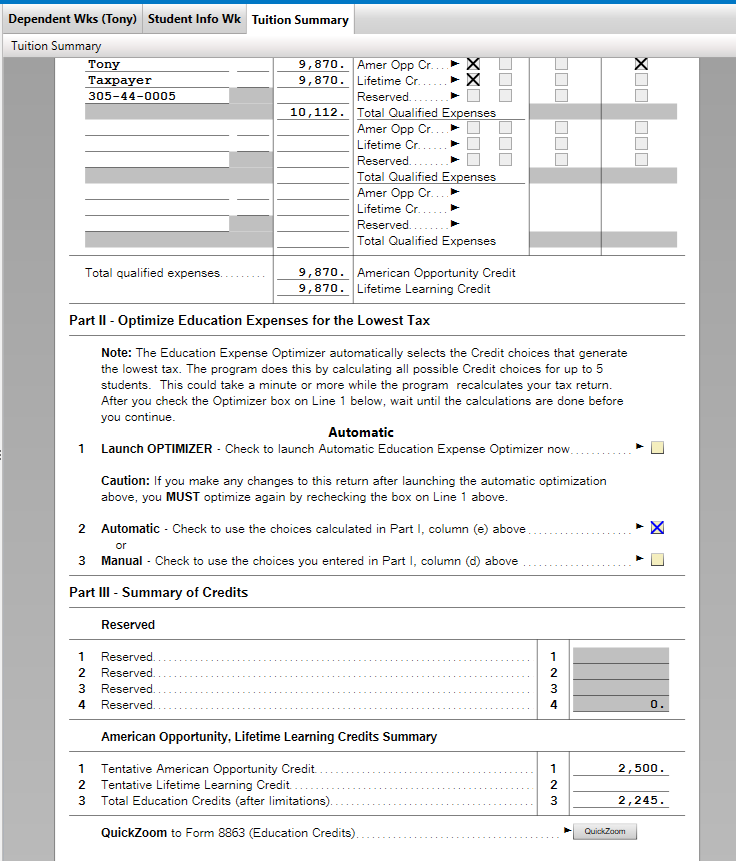
I got to the Federal Review and TT reported that there was a problem and offered to fix it. The fix took me to a page in the Smart Check section titled "Check This Entry". The body says:
Education Tuition and Fees Summary: Please check the Launch optimizer checkbox so we can be sure you get the education deduction or credit that saves you the most.
[ ] Launch optimizer
But when I click the checkbox, it immediately unchecks itself again. TBH it feels like an April Fools joke but it's already April 5
April 5, 2026
10:40 PM
- Mark as New
- Bookmark
- Subscribe
- Subscribe to RSS Feed
- Permalink
- Report Inappropriate Content
How do I report a problem to TurboTax?
If you entered Education Expenses and you are using TurboTax Desktop, in FORMS mode, 'Open Form' Education Tuition and Fees Summary. There's a box to check to 'Launch Optimizer' that flashes and goes away, and the 'Automatic' box is checked below. This may be what is happening to you in Review. You can verify that you got the Education Credit on Form 1040, Line 29 and on Form 8863.
If so, don't worry about the checkbox flashing on/off. Actually, if that is the only error you get in Review, you could go directly to File.
**Say "Thanks" by clicking the thumb icon in a post
**Mark the post that answers your question by clicking on "Mark as Best Answer"
**Mark the post that answers your question by clicking on "Mark as Best Answer"
April 7, 2026
6:37 PM

- Mark as New
- Bookmark
- Subscribe
- Subscribe to RSS Feed
- Permalink
- Report Inappropriate Content
How do I report a problem to TurboTax?
- The Turbo Tax Hawaii return doesn't include the for N-615 (kiddie tax) so the step-by-step tell us we have to go find and manually prepare that schedule and then come back to the interview to enter the result the box provided and that it will override the tax on Form N-15 line 44. Only problem is that putting a number in the box doesn't change anything on Form N-15.
- TurboTax Desktop
- Premium
- This is second screen in the "Taxes and Credits" section of Hawaii state program is a screen titled "Investment Income for Children Under 14". It says we have to manually prepare Form N-615 and then provides a box to enter the Tax from Form N-615. It says that the tax I enter in the box on this screen replaces the regular tax calculation on the return, only it doesn't. Looks like I will have to right click and override this on line 44 for N-15. Disappointing because stuff like this is why I switched to TurboTax from HR Block. Dumb error.
April 11, 2026
3:17 AM

- Mark as New
- Bookmark
- Subscribe
- Subscribe to RSS Feed
- Permalink
- Report Inappropriate Content
How do I report a problem to TurboTax?
I believe that your software is not capturing exemptions of standard deductions on the Rhode Island Tax forms. I am using the Mac desktop download for 2025.
April 11, 2026
11:43 AM

- Mark as New
- Bookmark
- Subscribe
- Subscribe to RSS Feed
- Permalink
- Report Inappropriate Content
How do I report a problem to TurboTax?
@HeavenKnowsTrust I worked up a mock non-resident/part year resident Hawaii return in TurboTax Desktop and the manual entry of the Kiddie tax from form N-615 did get included. I looked at line 44 on N-15 before before I added the Kiddie tax in the box and the lowest box was not checked for tax from several Hawaii forms. I then added an amount to the box for the N-615 Kiddie Tax and the amount on Line 44 increased by the amount I entered in that box and the lowest box on line 44 for tax from other Hawaii forms was checked. If you delete your Hawaii return and start over, that may fix this on your screen. To do this, click the State Taxes tab, then click Continue. Then click on File and select Remove State Return from the dropdown. Highlight your Hawaii return, then click Remove, then click Yes on the pop-up to confirm deletion. If you are filing as a Hawaii non-resident, you might also need to delete your resident state return, then complete your Hawaii return and then start over on your resident state return.
@Emakrod1 I just worked up a mock Rhode Island return for a single individual and the RI-1040 shoed the correct $5,100 exemption on line 6 and the correct standard deduction of $10,900 on line 4. If you are seeing a discrepancy with the amounts on these lines, please let us know how the results you are seeing are differing from what you are expecting. If you want us to take a closer look at this, we would need a diagnostic file which is a copy of your tax return that has all of your personal information removed. You can send one to us by following the directions below:
TurboTax Online:
- Sign into your online account.
- Locate the Tax Tools on the left-hand side of the screen.
- A drop-down will appear. Select Tools
- On the pop-up screen, click on “Share my file with agent.”
- This will generate a message that a diagnostic file gets sanitized and transmitted to us.
- Please provide the Token Number that was generated in the response.
TurboTax Desktop/Download Versions:
- Open your return.
- Click the Online tab in the black bar across the top of TurboTax and select “Send Tax File to Agent” *
- This will generate a message that a diagnostic copy will be created. Click on OK and the tax file will be sanitized and transmitted to us.
- Please provide the Token Number (including the dash) that was generated in the response.
*(If using a MAC, go to the menu at the top of the screen, select Help, then, “Send Tax File to Agent”)
**Say "Thanks" by clicking the thumb icon in a post
**Mark the post that answers your question by clicking on "Mark as Best Answer"
**Mark the post that answers your question by clicking on "Mark as Best Answer"
April 13, 2026
11:00 AM
- Mark as New
- Bookmark
- Subscribe
- Subscribe to RSS Feed
- Permalink
- Report Inappropriate Content
How do I report a problem to TurboTax?
2026 Turbo tax Premier desktop for windows incorrectly calculated my Social Security taxable income (form 1040-SR line 6b). As a result, I own IRS additional taxes and interest. What is the policy for handling miscalculations?
3 weeks ago
Still have questions?
Questions are answered within a few hours on average.
Post a Question*Must create login to post


Unlock tailored help options in your account.


Get more help
Ask questions and learn more about your taxes and finances.
Related Content

user17799310224
New Member

hmkacz
New Member

mkhaderva
New Member

techiejackie
New Member
BarryEM
Level 2