


- Community
- Topics
Turn on suggestions
Auto-suggest helps you quickly narrow down your search results by suggesting possible matches as you type.
Showing results for
- Community
- :
- Discussions
- :
- Taxes
- :
- Get your taxes done
- :
- Re: How do I report a problem to TurboTax?
Announcements


- Mark as New
- Bookmark
- Subscribe
- Subscribe to RSS Feed
- Permalink
- Report Inappropriate Content
How do I report a problem to TurboTax?
I have found errors in TurboTax and want to report them. I can't seem to find a way to do so.
posted
March 5, 2025
10:44 AM
last updated
February 03, 2026
8:45 AM
Connect with an expert

Do you have an Intuit account?
You'll need to sign in or create an account to connect with an expert.
64 Replies


- Mark as New
- Bookmark
- Subscribe
- Subscribe to RSS Feed
- Permalink
- Report Inappropriate Content
How do I report a problem to TurboTax?
You can start right here.
- What is the problem?
- Are you in TurboTax Online, or are you on Desktop?
- What version, or product are you in?
- What section are you trying to post?
- What are the details of your problem or calculation error?
Please contact us again with additional details.
**Say "Thanks" by clicking the thumb icon in a post
**Mark the post that answers your question by clicking on "Mark as Best Answer"
**Mark the post that answers your question by clicking on "Mark as Best Answer"
March 5, 2025
12:25 PM
- Mark as New
- Bookmark
- Subscribe
- Subscribe to RSS Feed
- Permalink
- Report Inappropriate Content
How do I report a problem to TurboTax?
I am using TurboTax Premier - Desktop - Windows
Lots of errors this year when letting TurboTax guide me step-by-step:
1.When entering Charitable Donations, it accepts all the information but there is not a "Done" button. Therefore, when you go back to the Donation summary, the amounts are blank! Exiting the donations section sometimes fixes the problem and sometimes doesn't. I couldn't figure out the pattern.
2. When I entered rental property income, it said it would ask for expenses later. It never did! I went back to expenses manually. Then, when trying to add a dishwasher as a Rental Property Asset, it insisted on saying it was computers/electronics. I exited and came back in and it allowed me to enter it as an appliance.
3. One time when I was exiting, the tally at the top said my refund was in the $100.00 range. When I immediately reopened, it recalculated to be over $1200. It should have been current at the time I exited.
4. One time when I opened TurboTax, it said it was updating. OK, that is good. It is actually why I had exited and restarted. However, the update was to INSTALL NC TurboTax. I DID NOT ask for a state install. Fortunately, NC is what I will ultimately want, otherwise I would be really upset.
5. One time when I was opening TurboTax, and it said it needed to restart. OK. But it just completely shut down instead.
Frieda
March 9, 2025
9:29 PM

- Mark as New
- Bookmark
- Subscribe
- Subscribe to RSS Feed
- Permalink
- Report Inappropriate Content
How do I report a problem to TurboTax?
Hi,
I am using The desktop version for Mac and completing the K1 (1065). On the screen which asks to input the "Enter the Box 20 Code E Amounts", the "Solar Property 2020-2022 construction" is valid but shouldn't there be one for "Solar Property 2023-2024 construction" since the ITC is different?
OR does "Solar Property 2020-2022 construction" also cover the latest projects constructed in 2023-2024 and the ITC is properly calculated already and it is a simple labeling issue?
Happy to post an image of the screen.
Thanks,
My
April 1, 2025
11:11 AM

- Mark as New
- Bookmark
- Subscribe
- Subscribe to RSS Feed
- Permalink
- Report Inappropriate Content
How do I report a problem to TurboTax?
You are correct that the third line on the page "Enter Box 20 Code E Amounts" should be labelled as "Placed in service during 2024." Enter your current construction costs in the box for "2020-2022 construction" as this will report the amount on the correct line of the underlying form.
Confirm this by reviewing the Schedule K-1 Partnership Additional Information worksheet that is included in the PDF of your complete return.
This has been reported to the development team for further investigation.
**Say "Thanks" by clicking the thumb icon in a post
**Mark the post that answers your question by clicking on "Mark as Best Answer"
**Mark the post that answers your question by clicking on "Mark as Best Answer"
April 6, 2025
7:07 AM
3,028

- Mark as New
- Bookmark
- Subscribe
- Subscribe to RSS Feed
- Permalink
- Report Inappropriate Content
How do I report a problem to TurboTax?
Cannot purchase State return software, the credit card Month expiring only allows months 1-7. 8-12 are not accepted.
August 17, 2025
6:51 AM


- Mark as New
- Bookmark
- Subscribe
- Subscribe to RSS Feed
- Permalink
- Report Inappropriate Content
How do I report a problem to TurboTax?
To call TurboTax customer support
Monday - Friday 5 a.m. to 5 p.m. Pacific time.
**Disclaimer: Every effort has been made to offer the most correct information possible. The poster disclaims any legal responsibility for the accuracy of the information that is contained in this post.**
August 17, 2025
7:00 AM
2,750

- Mark as New
- Bookmark
- Subscribe
- Subscribe to RSS Feed
- Permalink
- Report Inappropriate Content
How do I report a problem to TurboTax?
@ScottWeicht If you are using the Desktop program and have trouble paying fees like the $25 fee to efile a state return you can go up to Help-> Pay by Phone.
August 17, 2025
9:13 AM
2,738
- Mark as New
- Bookmark
- Subscribe
- Subscribe to RSS Feed
- Permalink
- Report Inappropriate Content
How do I report a problem to TurboTax?
@ScottWeicht See the solution they found on this one
https://ttlc.intuit.com/community/taxes/discussion/unable-to-purchase-2024-turbotax-delux-as-desktop...
August 17, 2025
9:20 AM
- Mark as New
- Bookmark
- Subscribe
- Subscribe to RSS Feed
- Permalink
- Report Inappropriate Content
How do I report a problem to TurboTax?
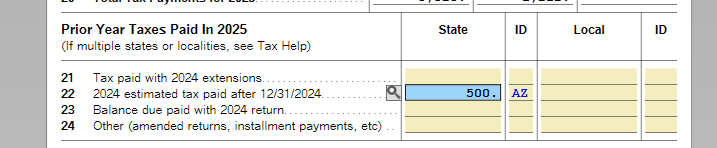
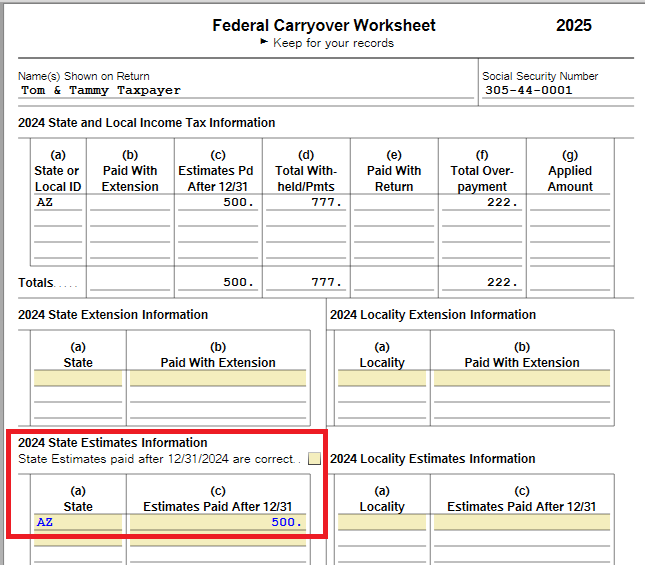
TurboTax Deluxe 2025 desktop for Mac. There appears to be an error on the Tax Payments Worksheet 2025, Line 22. Line 22 asks for "2024 estimated tax paid after 12/31/2024". TurboTax is entering the State amount actually paid in 2024, not the tax paid after 12/31/2024. This amount is coming from form Federal Carryover Worksheet under "2024 State Estimates Information" column (c) and "2024 State and Local Income Tax Information" column (c).
December 16, 2025
11:17 AM

- Mark as New
- Bookmark
- Subscribe
- Subscribe to RSS Feed
- Permalink
- Report Inappropriate Content
How do I report a problem to TurboTax?
You will have to contact TurboTax support for assistance with this problem.
See this TurboTax support FAQ for contacting support - https://ttlc.intuit.com/turbotax-support/en-us/help-article/account-management/turbotax-phone-number...
December 16, 2025
11:37 AM

- Mark as New
- Bookmark
- Subscribe
- Subscribe to RSS Feed
- Permalink
- Report Inappropriate Content
How do I report a problem to TurboTax?
I am using the 2025 Premiere Turbo Tax product. When I looked at my Schedule A deductions, I noticed that there was a large State Tax deduction even though I had not entered any income yet. Upon further review of the tax payment worksheet, I saw line 22 indicating that I made 2024 estimated tax payments in 2025. I looked at my 2024 return and all estimated payments were in 2024. Somehow Turbo Tax carried over all 2024 payments as if they were paid in 2025. This appears to be an error that needs to be corrected for Schedule A to calculate the correct amount. Thank you.
January 19, 2026
11:43 AM

- Mark as New
- Bookmark
- Subscribe
- Subscribe to RSS Feed
- Permalink
- Report Inappropriate Content
How do I report a problem to TurboTax?
If Line 22 on the Tax Payment Worksheet shows an amount, check your Federal Carryover Worksheet to see if that amount also shows under State Estimates.
If it is incorrect, you can delete the amount on the Federal Carryover Worksheet (or the entire form, if there are no other entries).
Fourth quarter estimated payments for 2024 are often made in January 2025, so this could be the amount you see, if this applies to you.
**Say "Thanks" by clicking the thumb icon in a post
**Mark the post that answers your question by clicking on "Mark as Best Answer"
**Mark the post that answers your question by clicking on "Mark as Best Answer"
January 22, 2026
11:23 AM
- Mark as New
- Bookmark
- Subscribe
- Subscribe to RSS Feed
- Permalink
- Report Inappropriate Content
How do I report a problem to TurboTax?
@msengel There was a big bug in the program transferring ALL the estimated payments made in 2024 into Schedule A. But that was fixed a while ago. Be sure to update your program, go up to Online- Check for Updates.
It should be only a 4th quarter payment made in January 2025.
January 22, 2026
11:30 AM
- Mark as New
- Bookmark
- Subscribe
- Subscribe to RSS Feed
- Permalink
- Report Inappropriate Content
How do I report a problem to TurboTax?
Found my complete note on it.
The state estimates error was fixed in a Jan 6, 2026 update. I didn't update until Jan 8, 2026. The update didn't fix my existing return BUT if you transfer 2024 again into a new return it works right now. I updated my Windows Desktop Home & Business program and started a NEW return and transferred from 2024 again and my 2024 state estimated payments did NOT go to Schedule A. My first 2025 return still shows all my 2024 state estimates (April, June, Sept & Dec) on Sch A.
UPDATE…..Today 1/8/26 I got an email from TurboTax Support saying to update the program and "Please go through your federal review/smart check portion of your software".
So I went through the Review and eventually came to a screen that asked…How much of your 2024 estimated state taxes did you pay in 2025? and it had my total 2024 state estimated payment amount listed. I changed it to zero and it updated my return and schedule A. So you don't have to start a new return and transfer from 2024 again.
See this post
https://ttlc.intuit.com/community/taxes/discussion/re-carryover-of-state-tax-payments/01/3722389#M13...
a month ago
Still have questions?
Questions are answered within a few hours on average.
Post a Question*Must create login to post


Unlock tailored help options in your account.


Get more help
Ask questions and learn more about your taxes and finances.
Related Content

Garykl
New Member

TiltedTaxes
New Member

user17717422060
New Member
RustyShackleford
Level 4

slickfix
Level 2