turbotax icon
cancel
Showing results for 
Search instead for 
Did you mean: 
Close icon
Do you have a TurboTax Online account?

We'll help you get started or pick up where you left off.

cranky58
New Member

How do I download my return from 2020

 
x
Do you have an Intuit account?

Do you have an Intuit account?

You'll need to sign in or create an account to connect with an expert.

3 Replies

How do I download my return from 2020

  You have to access your own account and/or  print it for yourself using exactly the same account and user ID that you used when you prepared the return.


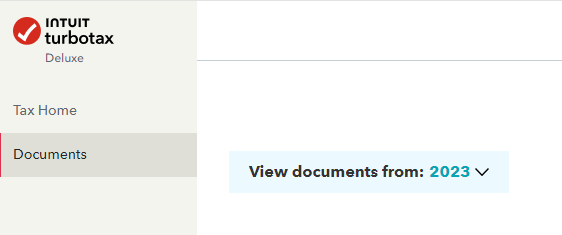
Start a 2023 return online and enter some personal information  so that the menu on the left opens up and lets you access your past year returns.


https://ttlc.intuit.com/community/prior-year-return/help/how-do-i-access-my-prior-year-return/01/270...


Many people have multiple TT accounts and forget how to access them.  Log out of the account you are in now.


Account Recovery

https://ttlc.intuit.com/questions/1901535-forgot-your-turbotax-online-user-id-or-password


https://ttlc.intuit.com/questions/1901486-how-many-turbotax-accounts-do-i-have


Or did you use the desktop version of TurboTax?  If so, the files are on your own hard drive or any backup device you used like a flash drive.


https://ttlc.intuit.com/questions/1901659-find-your-tax-data-file-in-mac


https://ttlc.intuit.com/turbotax-support/en-us/help-article/tax-return/find-last-year-tax-data-file-...


You can get a free transcript from the IRS or for a fee of $43, an actual copy of your tax return.

https://www.irs.gov/individuals/get-transcript

https://www.irs.gov/pub/irs-pdf/f4506.pdf


**Disclaimer: Every effort has been made to offer the most correct information possible. The poster disclaims any legal responsibility for the accuracy of the information that is contained in this post.**
JohnB5677
Expert Alumni

How do I download my return from 2020

Yes you can download your 2020 TurboTax tax return.

You must use the same login ID.

For TurboTax Online customers, no software download is needed.


  1. Log into your current TurboTax using your original ID
  2. On the left sidebar you will select the Downloads tab.
  3. A drop down will appear
  4. Select the year you want to download and save it somewhere on your computer where you can find it.


If I've misunderstood your question, and this does not completely answer it, please contact us again and provide some additional details.

**Say "Thanks" by clicking the thumb icon in a post
**Mark the post that answers your question by clicking on "Mark as Best Answer"

Unlock tailored help options in your account.

message box icon

Get more help

Ask questions and learn more about your taxes and finances.

Post your Question