turbotax icon
cancel
Showing results for 
Search instead for 
Did you mean: 
Announcements
Close icon
Do you have a TurboTax Online account?

We'll help you get started or pick up where you left off.

danielku
New Member

Completed return will not open in TurboTax 2019

Return for Tax year 2019 completed 3/6/2020. Finally decided to file and when I try to open that return, TurboTax only lets me start a new return.

x
Do you have an Intuit account?

Do you have an Intuit account?

You'll need to sign in or create an account to connect with an expert.

5 Replies
KarenM90
Expert Alumni

Completed return will not open in TurboTax 2019

Try these steps to get back into your return:


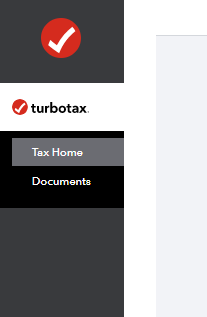
  1. Select Tax Home in the left menu.
  2. Scroll down to Your tax returns & documents.
  3. Select 2019, and then select Add a State (you're not actually adding a state, this just gets you into the right area).
  4. Select File in the left menu (expand your browser window if you don't see this, or select the menu icon in the top left corner).
  5. On the Just one more step screen, follow steps 1 and 2 if you haven't already.
  6. Select the Start button to the right of Step 3.
  7. On the Let's get ready to e-file screen, select I want to e-file.
  8. Follow the instructions to e-file your return.
**Say "Thanks" by clicking the thumb icon in a post
**Mark the post that answers your question by clicking on "Mark as Best Answer"
MLEIBO7805
Returning Member

Completed return will not open in TurboTax 2019

step 1 

tax home (on Left) I cannot find it.

where can I find it.

JotikaT2
Employee Tax Expert

Completed return will not open in TurboTax 2019

It should be on the top left hand side of the screen.


Tax Home

**Say "Thanks" by clicking the thumb icon in a post
**Mark the post that answers your question by clicking on "Mark as Best Answer"
dduffy40
New Member

Completed return will not open in TurboTax 2019

what can i do

JotikaT2
Employee Tax Expert

Completed return will not open in TurboTax 2019

It depends


It could also be that you logged in with a different account than the one you used to file your tax return with last year. 


Please see the following link to help you determine if this may have been a possibility. 

Why didn't my information transfer over from last year 


You can log into TurboTax if you used the software in the past and log in to obtain the returns. See the following link for instructions. 

Accessing prior year returns in TurboTax 

**Say "Thanks" by clicking the thumb icon in a post
**Mark the post that answers your question by clicking on "Mark as Best Answer"

Unlock tailored help options in your account.

message box icon

Get more help

Ask questions and learn more about your taxes and finances.

Post your Question