


- Community
- Topics
Turn on suggestions
Auto-suggest helps you quickly narrow down your search results by suggesting possible matches as you type.
Showing results for
- Community
- :
- Discussions
- :
- Taxes
- :
- Deductions & credits
- :
- Re: SOLAR CARRY FORWARD 2023

Connect with an expert

Do you have an Intuit account?
You'll need to sign in or create an account to connect with an expert.


- Mark as New
- Bookmark
- Subscribe
- Subscribe to RSS Feed
- Permalink
- Report Inappropriate Content
SOLAR CARRY FORWARD 2023
Good to know. I have two possible suggestions:
1 - If you haven't already done so, delete the energy credit section altogether, log out of your return, then go back in to re-enter the energy credit information and see if the carryover is applied.
2 - Use one of the CD/downloaded versions of TurboTax to file your return. You can download the tax data file that you have from TurboTax Online so that you don't have to start over. See this article for steps: How do I switch from TurboTax Online to TurboTax Desktop?
If you wish to share the screenshots, I'll be happy to take a look and see if there is something that can be submitted for further investigation.
**Say "Thanks" by clicking the thumb icon in a post
**Mark the post that answers your question by clicking on "Mark as Best Answer"
**Mark the post that answers your question by clicking on "Mark as Best Answer"
February 19, 2024
9:40 AM

- Mark as New
- Bookmark
- Subscribe
- Subscribe to RSS Feed
- Permalink
- Report Inappropriate Content
SOLAR CARRY FORWARD 2023
@AnnetteB6 I just completed option 1 you suggested and no change. When I deleted the form the return amount did not change. I logged out and logged back in and the amount was still the same. I added the form back in and it was still the same amount, with no changes.
I am a bit apprehensive about spending money to download the software if it is not working online. I would think it should be the same with no differences if people file either way. I could send you a screenshot of the information. I do not see a way to share it here.
February 19, 2024
9:52 AM
- Mark as New
- Bookmark
- Subscribe
- Subscribe to RSS Feed
- Permalink
- Report Inappropriate Content
SOLAR CARRY FORWARD 2023
Here is the first snip showing where it says I get the carry forward from last year. I blacked out the amounts.

Here is the snip showing where after I I hit continue it show $0

February 19, 2024
7:11 PM
- Mark as New
- Bookmark
- Subscribe
- Subscribe to RSS Feed
- Permalink
- Report Inappropriate Content
SOLAR CARRY FORWARD 2023
For some reason, that is the way the program is written. When it is a carryover credit, it does show a $0 amount on the page where you are able to go back and edit that section. My test case using TurboTax Premium Online is doing the exact same thing.
However, when looking at the Form 1040 and Form 1040 Schedule 3, the energy credit is shown. Take a look at the screenshots below. All numbers are made up, but I entered a $3000 carryover credit amount.
This is the main page of Form 1040. Line 18 shows that there is enough income tax liability to allow the energy credit to be claimed. Line 20 shows an amount being brought to the main Form 1040 from Schedule 3 -- this amount represents the energy credit carryover that was entered.
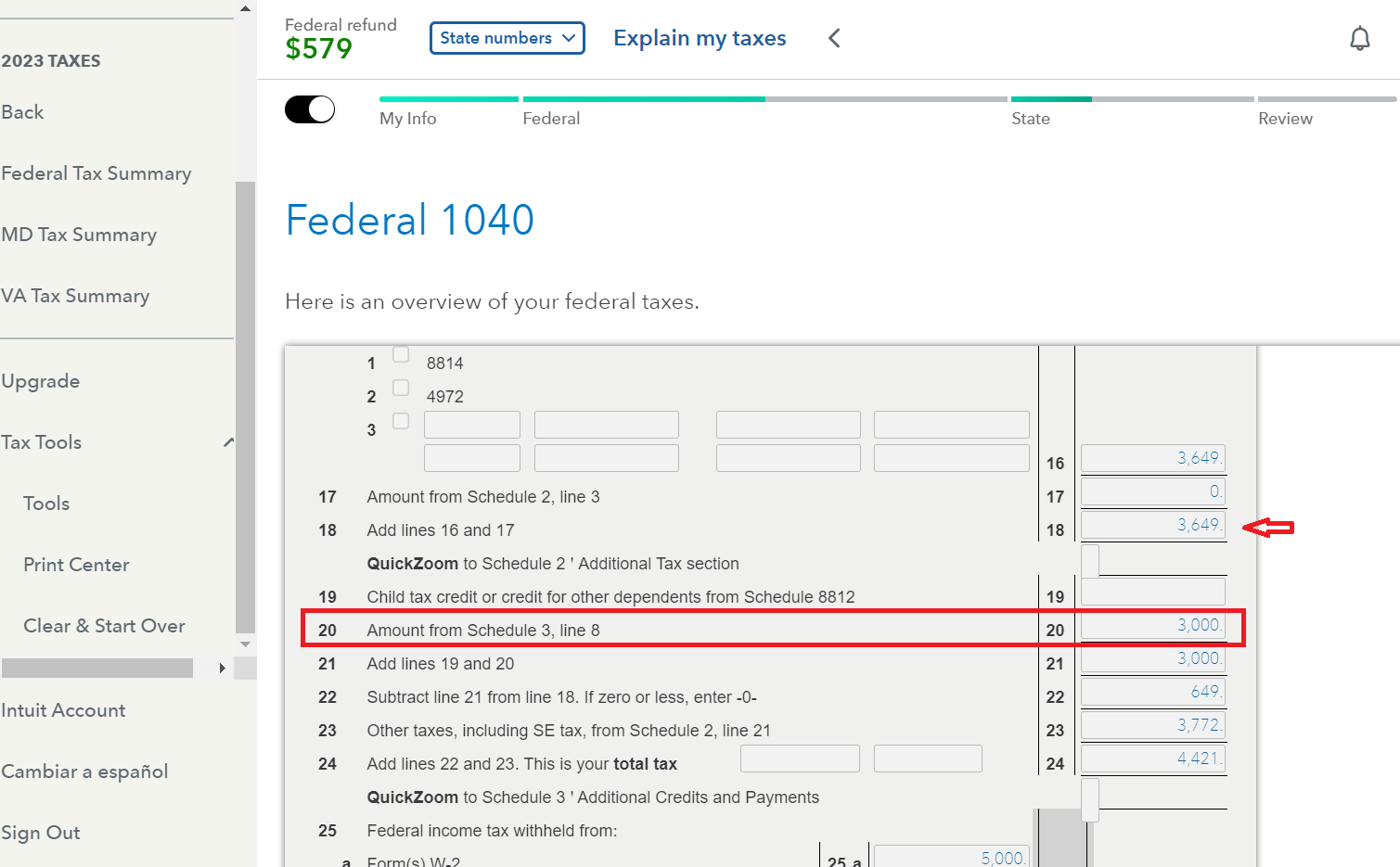
Scrolling further down the page, Schedule 3 shows the $3000 energy credit coming from Form 5695.
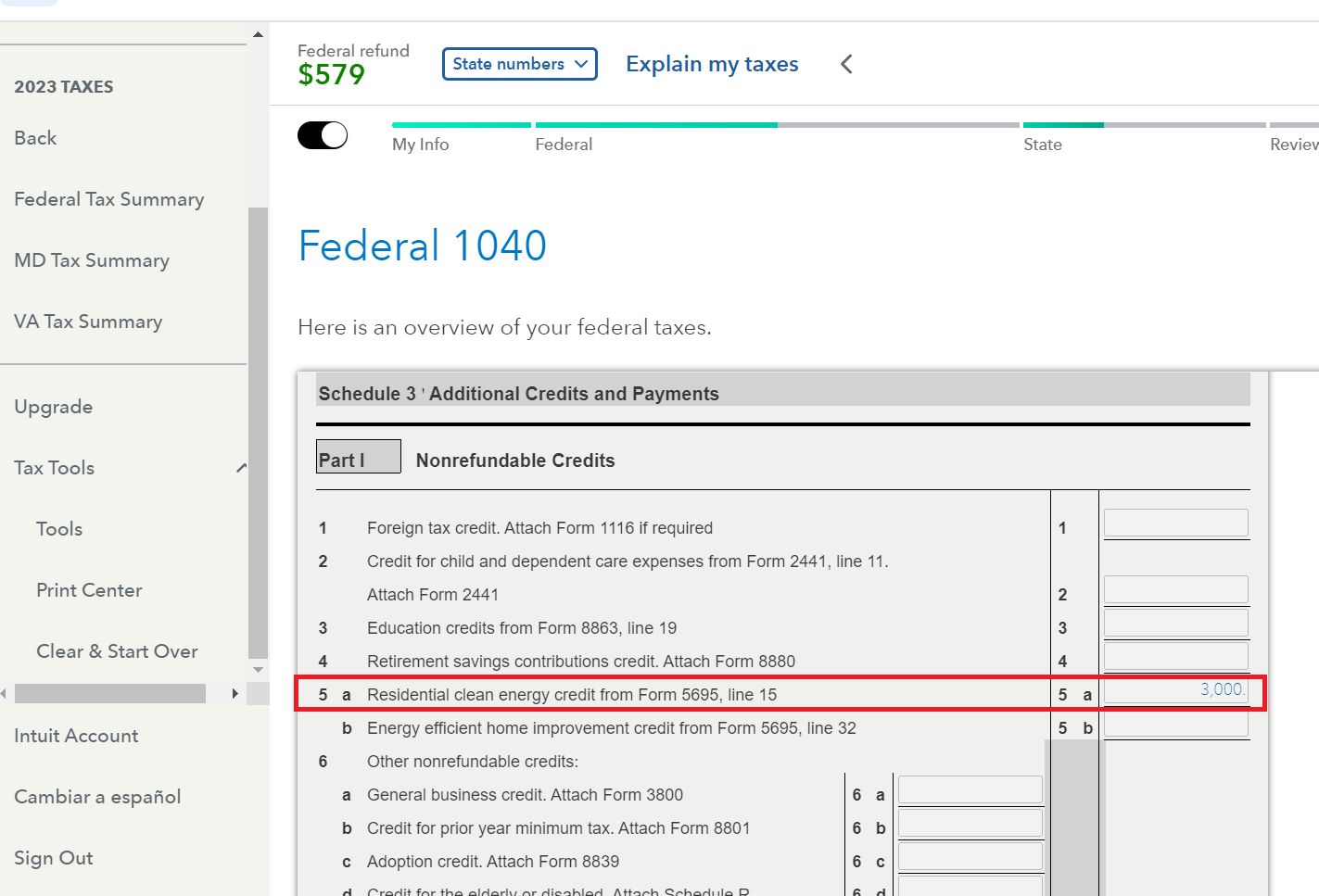
You should Preview your Form 1040 and double check the entries I've shown here. This is your actual tax form and not just a summary entry in TurboTax that may or may not be accurate. It is hard to determine what the developers had in mind when writing the program, but unless you look at your actual tax forms you cannot be sure there is an issue.
**Say "Thanks" by clicking the thumb icon in a post
**Mark the post that answers your question by clicking on "Mark as Best Answer"
**Mark the post that answers your question by clicking on "Mark as Best Answer"
February 20, 2024
6:38 AM
- Mark as New
- Bookmark
- Subscribe
- Subscribe to RSS Feed
- Permalink
- Report Inappropriate Content
SOLAR CARRY FORWARD 2023
I do see the form is correct but it is not carrying it over and showing that it will be in my reurn. It is still shorting me over 4$k.
February 20, 2024
1:12 PM

- Mark as New
- Bookmark
- Subscribe
- Subscribe to RSS Feed
- Permalink
- Report Inappropriate Content
SOLAR CARRY FORWARD 2023
So the form 5695 is correct but it is not carrying to sch 3 line 5 or is sch 3 not carrying to the 1040 line 31? Where is the disconnect? The credit should be used to reduce your tax liability on line 24.
**Say "Thanks" by clicking the thumb icon in a post
**Mark the post that answers your question by clicking on "Mark as Best Answer"
**Mark the post that answers your question by clicking on "Mark as Best Answer"
February 20, 2024
4:46 PM
- Mark as New
- Bookmark
- Subscribe
- Subscribe to RSS Feed
- Permalink
- Report Inappropriate Content
SOLAR CARRY FORWARD 2023
@AmyC correct. Even when I have done it manually or on other software it comes up properly. For some reason it is not carrying over in the program to reflect to the refund. If i put something in any other line of the enery credits, just to test, it is carrying over.
February 20, 2024
4:59 PM
- Mark as New
- Bookmark
- Subscribe
- Subscribe to RSS Feed
- Permalink
- Report Inappropriate Content
SOLAR CARRY FORWARD 2023
Form 5695 is under construction again. Please check back this weekend or later. Enjoy your week!
**Say "Thanks" by clicking the thumb icon in a post
**Mark the post that answers your question by clicking on "Mark as Best Answer"
**Mark the post that answers your question by clicking on "Mark as Best Answer"
February 20, 2024
5:47 PM
- Mark as New
- Bookmark
- Subscribe
- Subscribe to RSS Feed
- Permalink
- Report Inappropriate Content
SOLAR CARRY FORWARD 2023
@AmyC Just went and looked again to see what the form was doing, I know you said to wait a week. As an IT guy, I have to try to troubleshoot. I see that most of the answers form the site are not going to the form also. Hope the helps your developers. 

February 21, 2024
4:22 PM
- « Previous
-
- 1
- 2
- Next »
Still have questions?
Questions are answered within a few hours on average.
Post a Question*Must create login to post


Unlock tailored help options in your account.


Get more help
Ask questions and learn more about your taxes and finances.
Related Content

jimmyinhmb
Level 1
ChapmanM
Level 1

golam-kibrya
New Member

goliathgrouter
New Member

athrey
New Member