turbotax icon
cancel
Showing results for 
Search instead for 
Did you mean: 
Announcements
Close icon
Do you have a TurboTax Online account?

We'll help you get started or pick up where you left off.

Tax Year Prior to 2020: deductions

Where do I put in my deductions for travel/mileage for my car for my business on turbotax Home & Business. It does not give the option or tell me how much per mile. Nor did it ask about things like storage cost for tools or phone costs for my business, or anything. I swear it was there last time I used turbo tax for my taxes.

x
Do you have an Intuit account?

Do you have an Intuit account?

You'll need to sign in or create an account to connect with an expert.

5 Replies
RobertG
Expert Alumni

Tax Year Prior to 2020: deductions

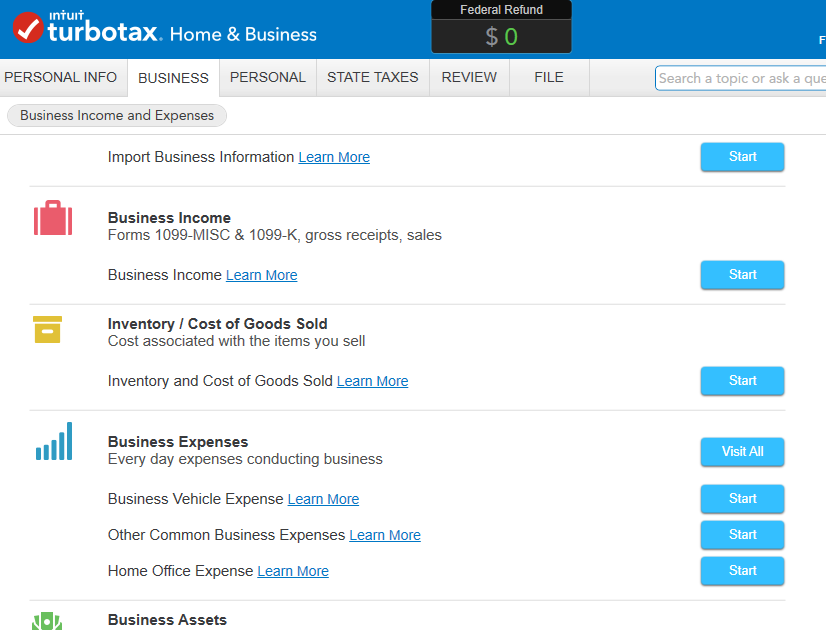
In TurboTax Home and Business, when you go in to edit your business, the program will offer you the option under 'Business Expenses' to 'Visit All'.


Under 'Vehicle Expenses', it will allow you to enter both your mileage and actual expenses to determine which is best for you.


To add expenses not classified, select 'Other Miscellaneous Expenses', and enter a description and the amount.


Phone expenses are usually reported as a 'Communication' expense.


**Say "Thanks" by clicking the thumb icon in a post
**Mark the post that answers your question by clicking on "Mark as Best Answer"

Tax Year Prior to 2020: deductions

Dear Sir,

I am not seeing business expenses. I see business deductions under 'Less commen business situations'

I hope it doesn't make a difference but I am working on 2016 turbo tax  home and business.  One would think business deductions would be on here somewhere.  Thanks

KarenJ2
Expert Alumni

Tax Year Prior to 2020: deductions

In your 2016 Home and Business software (see below screen shot):

  1. Click on Business tab at the top
  2. Click I'll work on sections myself
  3. 1st screen asks for information on Business profile, go through and answer all question 
  4. After entering basic Business information, you will come to a summary screen 
  5. Then click the Continue button at the bottom of the page
  6. You will see a screen where you can enter your business income, business expenses and business assets.  Click on start for each section.

2016 Home and Business

**Say "Thanks" by clicking the thumb icon in a post
**Mark the post that answers your question by clicking on "Mark as Best Answer"

Tax Year Prior to 2020: deductions

ok thanks,  now what is better to go with  when entering mileage, total miles I drove for the year or beginning and ending odometer readings for 2016.

thanks

WKins2
Expert Alumni

Tax Year Prior to 2020: deductions

You will enter the total business miles driven for the tax year and then the number of commuting miles. If you drove your car 100% for business then putting the starting and ending miles would be good since 100% of the miles drive were for business and would be deducted. 

**Say "Thanks" by clicking the thumb icon in a post
**Mark the post that answers your question by clicking on "Mark as Best Answer"

Unlock tailored help options in your account.

message box icon

Get more help

Ask questions and learn more about your taxes and finances.

Post your Question