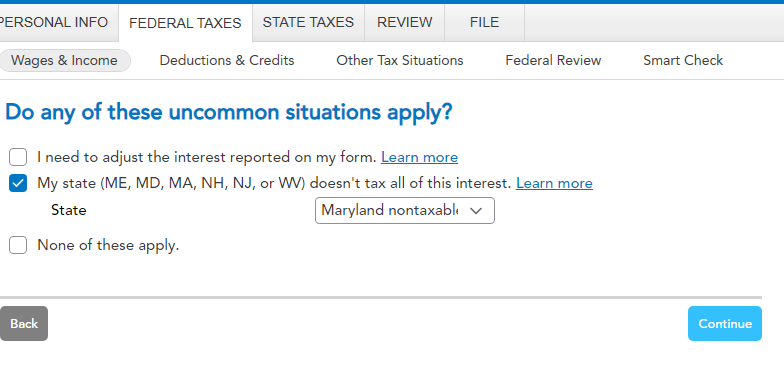
I entered four states that paid me tax-free OID interest totaling $21.18. TT lumped them together with the State code set as MX (perhaps for Mixed?). "SmartCheck" rejects MX on the basis that it "is not a valid state ID." I am ignoring it and hope IRS doesn't reject my return. This appears to be a bug in the Smart Check code that needs to be corrected since TT changed the four states to one field as MX and Smart Check doesn't like it.
You'll need to sign in or create an account to connect with an expert.
The code MX indicates "Multiple States". Assuming you are not filing a tax return for the states from which you received the OID interest, the state and it's code is not relevant. However, if you were filing in one or more of the states involved it would matter (especially if the amounts were significant). The SmarCheck would then alert you that they had been aggregated under state code MX.
David, thank you for your reply.
The compiled 1099-INT I received contained eight different states from which I received 2025 muni interest payments, After entering the data from each state into TT's 1099-INT interview with each state's digraph and interest amount paid and received through one brokerage, upon running the error check prior to filing, the consolidated 1099-INT flagged it for having the incorrect MX state digraph.
My state does not tax munies, and all states that paid interest were entered with their correct digraph. TT created the MX, but doesn't want me to submit what it entered.
I'd like to get this filed but don't know whether to ignore the MX, change it in the form to one of the state codes, or remove the MX from the form and submit it blank.
Any advice received will be appreciated as the issue seems to be one internal within TT.

If you entered each state and interest amount manually, and your 1099-INT shows these totaled under state MX, you did you choose your non-taxable state from the dropdown list? If so, you could enter the total under that state, since you're not filing in the other states, or change it to another state code, as you suggested.
If you also entered the address of your bank, make sure that there's no indication of a foreign location. If you previously tried to import your 1099-INT, it may be an error related to that.
You may want to delete the 1099-INT and re-enter.

Still have questions?
Questions are answered within a few hours on average.
Post a Question*Must create login to post
Ask questions and learn more about your taxes and finances.
User2698470
Level 3
MDRVa
New Member
plaid_hippo
Level 1
chuck52nt
New Member
rlenfant
New Member