


- Community
- Topics
Turn on suggestions
Auto-suggest helps you quickly narrow down your search results by suggesting possible matches as you type.
Showing results for
- Community
- :
- Discussions
- :
- Taxes
- :
- Retirement
- :
- Re: Cannot include an explanation statement for form 5329. The Quickzoom launches a statement, bu...


- Mark as New
- Bookmark
- Subscribe
- Subscribe to RSS Feed
- Permalink
- Report Inappropriate Content
Cannot include an explanation statement for form 5329. The Quickzoom launches a statement, but I am not allowed to type (get red font that disappears)
This is for line 54a, to request a waiver of tax on incomplete RMD
Topics:
posted
February 3, 2026
12:34 PM
last updated
February 03, 2026
12:34 PM
Connect with an expert

Do you have an Intuit account?
You'll need to sign in or create an account to connect with an expert.
23 Replies


- Mark as New
- Bookmark
- Subscribe
- Subscribe to RSS Feed
- Permalink
- Report Inappropriate Content
Cannot include an explanation statement for form 5329. The Quickzoom launches a statement, but I am not allowed to type (get red font that disappears)
If you are still having this experience you have one of two options.
- Print your return and mail it with your statement by selecting mail instead of e-file.
- How do I switch from TurboTax Online to TurboTax Desktop?
- In this version you can change to Forms, scroll to Form 5329, Line 54a, click to add the statement. TurboTax will allow a statement to be added.
Please update here if you need additional assistance and we will help.
**Say "Thanks" by clicking the thumb icon in a post
**Mark the post that answers your question by clicking on "Mark as Best Answer"
**Mark the post that answers your question by clicking on "Mark as Best Answer"
February 9, 2026
10:19 AM

- Mark as New
- Bookmark
- Subscribe
- Subscribe to RSS Feed
- Permalink
- Report Inappropriate Content
Cannot include an explanation statement for form 5329. The Quickzoom launches a statement, but I am not allowed to type (get red font that disappears)
Why should we have to mail a copy of return when turbo tax is supposed to add the explanation statement.
It did it for m last year plus there is a free e-file of federal return.
U have tried multiple times to enter a explanation statement only for turbo tax not to accept it.
Please either fix the issue or I should get a refund for what I paid to get your program
February 13, 2026
2:56 PM

- Mark as New
- Bookmark
- Subscribe
- Subscribe to RSS Feed
- Permalink
- Report Inappropriate Content
Cannot include an explanation statement for form 5329. The Quickzoom launches a statement, but I am not allowed to type (get red font that disappears)
I have the same issue with Turbotax Desktop 2025 Home and Business.
When I go to Form view and open Form 5329-S, I can fill out all of the information, but when I go to enter the Wavier Explanation Statement (Explan QuickZoon), the Explanation Statement does NOT allow me to enter text into the lines. If I am unable to provide a proper explanation, I will be forced to pay the penalty.
Can your team try to add an explanation to this form? If so, you will also see it does not work
Thank you
February 14, 2026
6:31 PM
2,439
- Mark as New
- Bookmark
- Subscribe
- Subscribe to RSS Feed
- Permalink
- Report Inappropriate Content
Cannot include an explanation statement for form 5329. The Quickzoom launches a statement, but I am not allowed to type (get red font that disappears)
why should I have to print the forms and mail it in when I paid for efile when I bought the program.
Seems to me that there is a glitch in the program
February 16, 2026
7:47 AM

- Mark as New
- Bookmark
- Subscribe
- Subscribe to RSS Feed
- Permalink
- Report Inappropriate Content
Cannot include an explanation statement for form 5329. The Quickzoom launches a statement, but I am not allowed to type (get red font that disappears)
Yes, this is a known issue in TurboTax. It's been referred to the investigation team for further resolution.
**Say "Thanks" by clicking the thumb icon in a post
**Mark the post that answers your question by clicking on "Mark as Best Answer"
**Mark the post that answers your question by clicking on "Mark as Best Answer"
February 16, 2026
8:03 AM
- Mark as New
- Bookmark
- Subscribe
- Subscribe to RSS Feed
- Permalink
- Report Inappropriate Content
Cannot include an explanation statement for form 5329. The Quickzoom launches a statement, but I am not allowed to type (get red font that disappears)
Is there an update on getting the issue with the explanation statement for 5329 resolved?
February 21, 2026
11:26 AM

- Mark as New
- Bookmark
- Subscribe
- Subscribe to RSS Feed
- Permalink
- Report Inappropriate Content
Cannot include an explanation statement for form 5329. The Quickzoom launches a statement, but I am not allowed to type (get red font that disappears)
Completely agree! And how hard is it to address an issue with simply allowing text input? Turbo Tax flags this as an 'error' when reviewing my return, which I assume would then not allow the e-filing of the return, which is supposed to be included in the cost of the software. Ridiculous.
February 23, 2026
11:25 AM
1,996
- Mark as New
- Bookmark
- Subscribe
- Subscribe to RSS Feed
- Permalink
- Report Inappropriate Content
Cannot include an explanation statement for form 5329. The Quickzoom launches a statement, but I am not allowed to type (get red font that disappears)
I have Turbo Tax Desktop and it will not accept an explanation. I type in the box and then what I type disappears. There should be a fix for this glitch. When can we expect it?
February 24, 2026
3:22 PM
- Mark as New
- Bookmark
- Subscribe
- Subscribe to RSS Feed
- Permalink
- Report Inappropriate Content
Cannot include an explanation statement for form 5329. The Quickzoom launches a statement, but I am not allowed to type (get red font that disappears)
Having the same issue. Can't save an explanation on 5329
February 24, 2026
6:00 PM
1,931

- Mark as New
- Bookmark
- Subscribe
- Subscribe to RSS Feed
- Permalink
- Report Inappropriate Content
Cannot include an explanation statement for form 5329. The Quickzoom launches a statement, but I am not allowed to type (get red font that disappears)
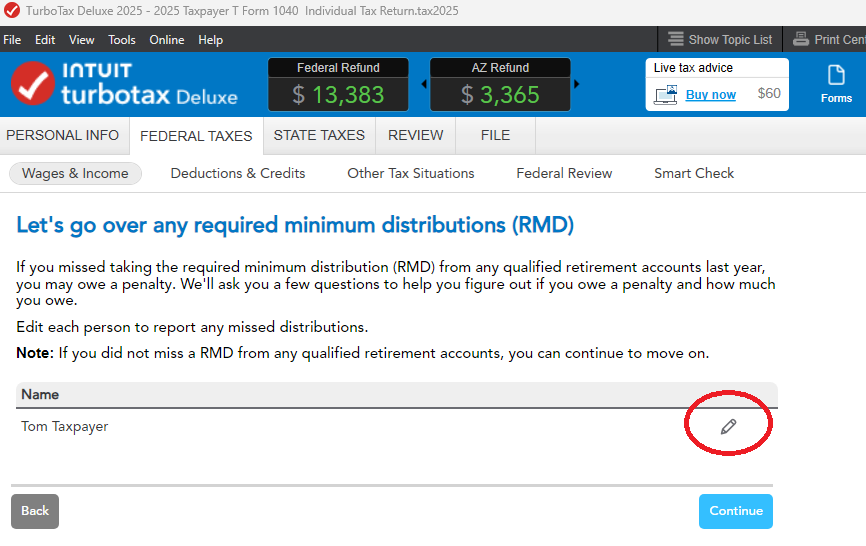
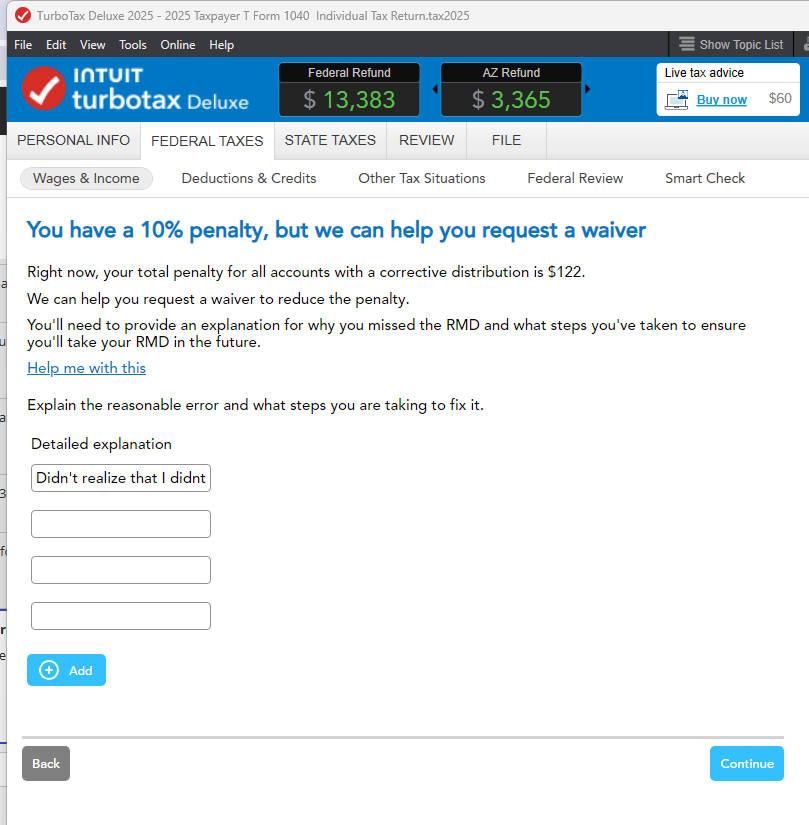
If you missed an RMD, you will enter your explanation for Form 5329 requesting waiver of the penalty in the interview section of TurboTax regarding RMD. This transfers to the form and doesn't cause an error.
If this applies, the IRS rarely denies waivers if you have already withdrawn the missed RMD amount. You must report that you have "corrected" the missed RMD by taking the distribution, and state that it was due to reasonable error.
Check Form 5329: Review the form in FORMS mode in TurboTax. If your explanation for the missed RMD was accepted, the penalty on Form 5329, Line 55 should show as 0.
If you still see a penalty after fixing the issue, re-answer the questions regarding the RMD in the, "Let's go over any required minimum distributions (RMD)" section, as this refreshes the calculation. You could delete Form 5329 before stepping though the section to be sure.
**Say "Thanks" by clicking the thumb icon in a post
**Mark the post that answers your question by clicking on "Mark as Best Answer"
**Mark the post that answers your question by clicking on "Mark as Best Answer"
February 25, 2026
4:17 PM
- Mark as New
- Bookmark
- Subscribe
- Subscribe to RSS Feed
- Permalink
- Report Inappropriate Content
Cannot include an explanation statement for form 5329. The Quickzoom launches a statement, but I am not allowed to type (get red font that disappears)
The issue is that the explanation is not saving in the interview or on the form. The amount is showing as zero but I am unable to include a statement to request the waiver.
February 25, 2026
4:46 PM
- Mark as New
- Bookmark
- Subscribe
- Subscribe to RSS Feed
- Permalink
- Report Inappropriate Content
Cannot include an explanation statement for form 5329. The Quickzoom launches a statement, but I am not allowed to type (get red font that disappears)
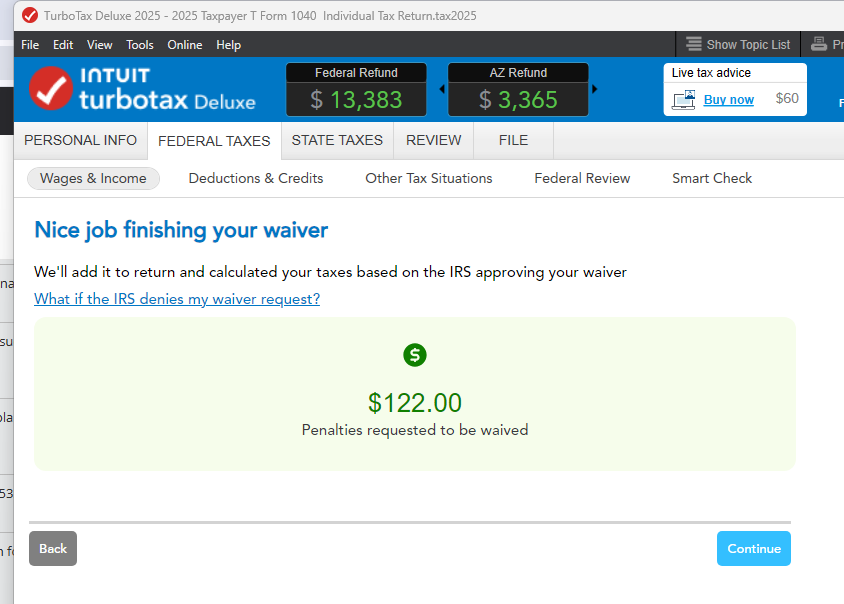
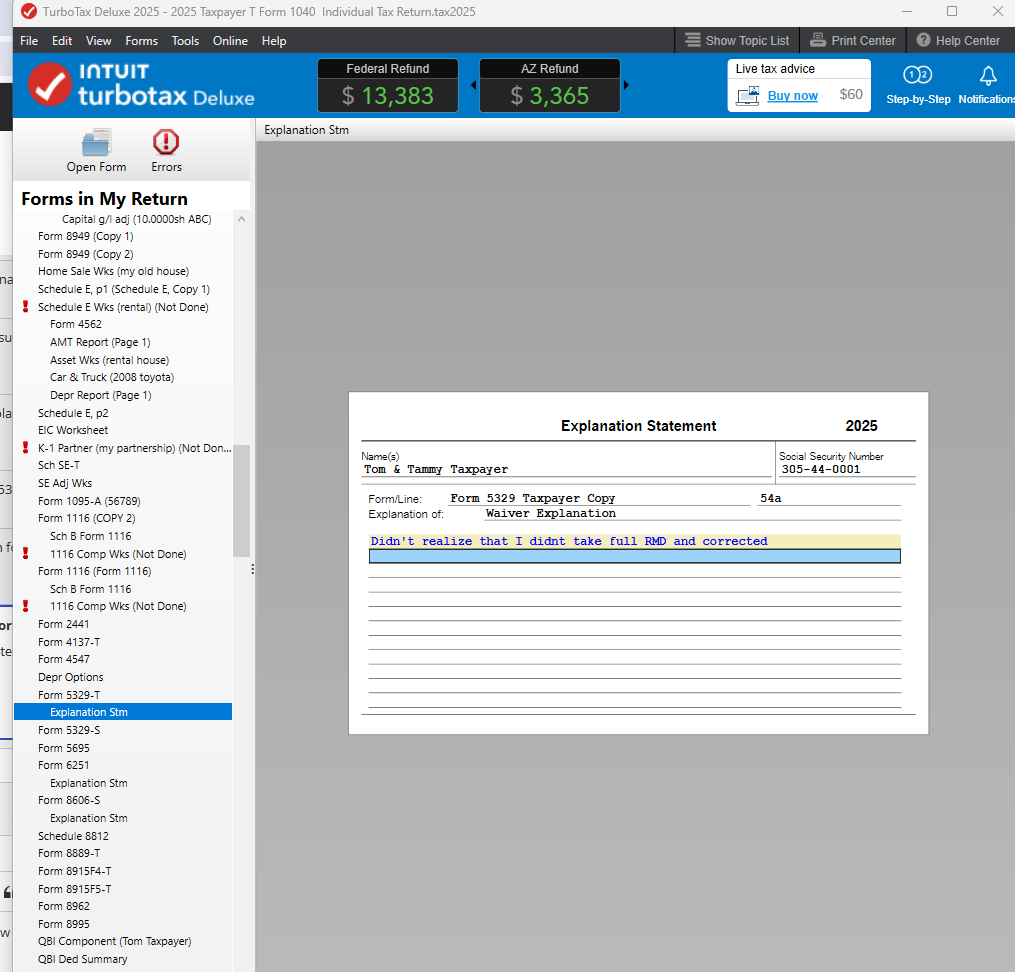
Don't enter your Explanation Statement directly on Form 5329. Enter it in the interview and it will transfer to the 5329. EDIT your RMD entry, continue through the questions, and enter your explanation. The box allows an entry that scrolls out of the box area. You'll get a screen verifying you completed your waiver request.
Flip into FORMS and your explanation statement will show up.
**Say "Thanks" by clicking the thumb icon in a post
**Mark the post that answers your question by clicking on "Mark as Best Answer"
**Mark the post that answers your question by clicking on "Mark as Best Answer"
February 25, 2026
5:11 PM
- Mark as New
- Bookmark
- Subscribe
- Subscribe to RSS Feed
- Permalink
- Report Inappropriate Content
Cannot include an explanation statement for form 5329. The Quickzoom launches a statement, but I am not allowed to type (get red font that disappears)
I understand what you are saying but I am using Home and Business and I don't have the ability to get to the information about missed RMD. The only option I have is to add a 1099-R but I didn't receive one and the interview questions never ask me about any missed RMD. It appears the only place I can enter it is directly in the form but if I can't enter an explanation I will be forced to pay the penalty (even though it was a rollover to a new IRA, I forgot to setup auto RMD Distribution and took the RMD for the required amount on February 16, 2026). I would like to explain the mistake rather than pay the penalty.
Can you check if/how Home and Business version will allow me to enter this information in the interview mode?
Thank you
February 25, 2026
8:04 PM
- Mark as New
- Bookmark
- Subscribe
- Subscribe to RSS Feed
- Permalink
- Report Inappropriate Content
Cannot include an explanation statement for form 5329. The Quickzoom launches a statement, but I am not allowed to type (get red font that disappears)
The software update today took care of the problem.
Thanks for taking care of the problem.
February 26, 2026
12:31 PM
1,819
Still have questions?
Questions are answered within a few hours on average.
Post a Question*Must create login to post


Unlock tailored help options in your account.


Get more help
Ask questions and learn more about your taxes and finances.
Related Content

Priller
Level 4

turbolamborne
New Member

BrendaArn
New Member

Brenton_H
Level 2

OldFatDog
Level 3