
turbotax icon
cancel
Showing results for 
Search instead for 
Did you mean: 
Close icon
Do you have a TurboTax Online account?

We'll help you get started or pick up where you left off.

Error on IRA Calc Worksheet (or is it me)?

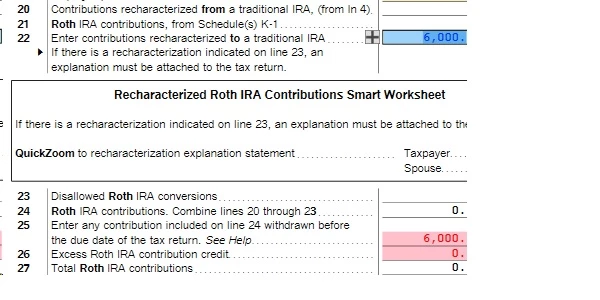
I contributed to my Roth in error and recharacterized to a traditional IRA. So, $6k on lines 19 and 22. But line 24 is supposed to be the sum of lines 20-23, but it's showing as $0. TurboTax then catches the amount on line 25 any says that it should be $0, presumably because it's > line 24. All these values come from the walk through, btw. I didn't add them directly to the form.


Did I mess something up (and I'm reading the form incorrectly) or is there an error here? Regardless, since the software is flagging an error, I don't want to file without knowing whether there's an issue.

 
Untitled.jpg
x
Do you have an Intuit account?

Do you have an Intuit account?

You'll need to sign in or create an account to connect with an expert.

1 Best answer

Accepted Solutions
MarilynG1
Expert Alumni

Error on IRA Calc Worksheet (or is it me)?

I don't think you should have $6,000 on Line 25, as you did not 'withdraw excess contributions', you recharacterized. 


Since we can't see your return in this forum, below are the steps to enter a recharacterization.  You may want to return to the interview and review your entries.


You will enter the recharacterization when you enter the contribution to the Roth IRA:


  1. Login to your TurboTax Account 
  2. Click on the Search box on the top and type “IRA contributions”
  3. Click on “Jump to IRA contributions"
  4. Select “Roth IRA
  5. Answer “No” to “Is This a Repayment of a Retirement Distribution
  6. Enter the Roth contribution amount 
  7. Answer “Yes” to the recharacterized question on the “Did You Change Your Mind?” screen and amount (no earnings or losses)
  8. TurboTax will ask for an explanation statement where it should be stated that the original $xxx.xx plus $xxx.xx earnings (or loss) were recharacterized.
  9. On the screen "Choose Not to Deduct IRA Contributions" answer "Yes"
**Say "Thanks" by clicking the thumb icon in a post
**Mark the post that answers your question by clicking on "Mark as Best Answer"

View solution in original post

3 Replies
MarilynG1
Expert Alumni

Error on IRA Calc Worksheet (or is it me)?

I don't think you should have $6,000 on Line 25, as you did not 'withdraw excess contributions', you recharacterized. 


Since we can't see your return in this forum, below are the steps to enter a recharacterization.  You may want to return to the interview and review your entries.


You will enter the recharacterization when you enter the contribution to the Roth IRA:


  1. Login to your TurboTax Account 
  2. Click on the Search box on the top and type “IRA contributions”
  3. Click on “Jump to IRA contributions"
  4. Select “Roth IRA
  5. Answer “No” to “Is This a Repayment of a Retirement Distribution
  6. Enter the Roth contribution amount 
  7. Answer “Yes” to the recharacterized question on the “Did You Change Your Mind?” screen and amount (no earnings or losses)
  8. TurboTax will ask for an explanation statement where it should be stated that the original $xxx.xx plus $xxx.xx earnings (or loss) were recharacterized.
  9. On the screen "Choose Not to Deduct IRA Contributions" answer "Yes"
**Say "Thanks" by clicking the thumb icon in a post
**Mark the post that answers your question by clicking on "Mark as Best Answer"
dmertz
Level 15

Error on IRA Calc Worksheet (or is it me)?

Line 26 needs to be left blank.

Error on IRA Calc Worksheet (or is it me)?

I wonder what I buggered up to get the number in line 26? You were both right - that fixed it. No matter what I did in the step-by-step, line 26 was populated. Maybe I was misunderstanding a question. I just deleted it by hand.


Thank you.

Unlock tailored help options in your account.

message box icon

Get more help

Ask questions and learn more about your taxes and finances.

Post your Question




