


- Community
- Topics
Turn on suggestions
Auto-suggest helps you quickly narrow down your search results by suggesting possible matches as you type.
Showing results for
- Community
- :
- Discussions
- :
- Taxes
- :
- Business & farm
- :
- Limited to 3 state withholdings entered? How to enter more?
Announcements


- Mark as New
- Bookmark
- Subscribe
- Subscribe to RSS Feed
- Permalink
- Report Inappropriate Content
Limited to 3 state withholdings entered? How to enter more?
A K-1 came attached with income from a number of states, all of I opted in for withholding. I'm trying to enter these withheld amounts into the federal return but it seems to only allow for 3 state withholdings to be entered, and then the ' Add another' button disappears. I have a whole bunch more -- and I'm on Turbotax Premier. Is this supposed to get entered somewhere else? Am I supposed to upgrade again?
Topics:
posted
October 3, 2020
3:02 PM
last updated
October 03, 2020
3:02 PM
Connect with an expert

Do you have an Intuit account?
You'll need to sign in or create an account to connect with an expert.
1 Best answer
Accepted Solutions
- Mark as New
- Bookmark
- Subscribe
- Subscribe to RSS Feed
- Permalink
- Report Inappropriate Content
Limited to 3 state withholdings entered? How to enter more?
Also note that the total of your state and local taxes paid (combined for income, sales, property tax) on Schedule A is limited to $10,000.
October 4, 2020
9:43 AM
10 Replies
- Mark as New
- Bookmark
- Subscribe
- Subscribe to RSS Feed
- Permalink
- Report Inappropriate Content
Limited to 3 state withholdings entered? How to enter more?
It is not clear as to the entity that issued your K-1, but it appears as if it would be a partnership or multi-member LLC.
If that is the case, did the entity file a composite return? Some partnerships/LLCs file composite returns, and pay state income tax, so that their partners/members do not have to file returns in each state in which the entities do business.
October 4, 2020
8:36 AM
- Mark as New
- Bookmark
- Subscribe
- Subscribe to RSS Feed
- Permalink
- Report Inappropriate Content
Limited to 3 state withholdings entered? How to enter more?
There was indeed a composite and that’ll save me from most of the state filings though a few states don’t do composites. I needed to find a way to enter the withheld amounts so the TT system credits me for the deduction. I popped them in under estimated payments for now but it seems like the TT software is hardcapping the additional withholdings for state taxes to 3 entries.
October 4, 2020
8:51 AM
- Mark as New
- Bookmark
- Subscribe
- Subscribe to RSS Feed
- Permalink
- Report Inappropriate Content
Limited to 3 state withholdings entered? How to enter more?
On a test return using TurboTax Home & Business, I do not have an issue entering estimated taxes for multiple states (see screenshot). Where are you entering the data?

October 4, 2020
9:39 AM
- Mark as New
- Bookmark
- Subscribe
- Subscribe to RSS Feed
- Permalink
- Report Inappropriate Content
Limited to 3 state withholdings entered? How to enter more?
Also note that the total of your state and local taxes paid (combined for income, sales, property tax) on Schedule A is limited to $10,000.
October 4, 2020
9:43 AM
- Mark as New
- Bookmark
- Subscribe
- Subscribe to RSS Feed
- Permalink
- Report Inappropriate Content
Limited to 3 state withholdings entered? How to enter more?
Yep that’s where i ended up putting without issues as you’re seeing. I was previously attempting to put it under deductions/additional withholding/additional state withholdings, which was capped.
October 4, 2020
9:53 AM

- Mark as New
- Bookmark
- Subscribe
- Subscribe to RSS Feed
- Permalink
- Report Inappropriate Content
Limited to 3 state withholdings entered? How to enter more?
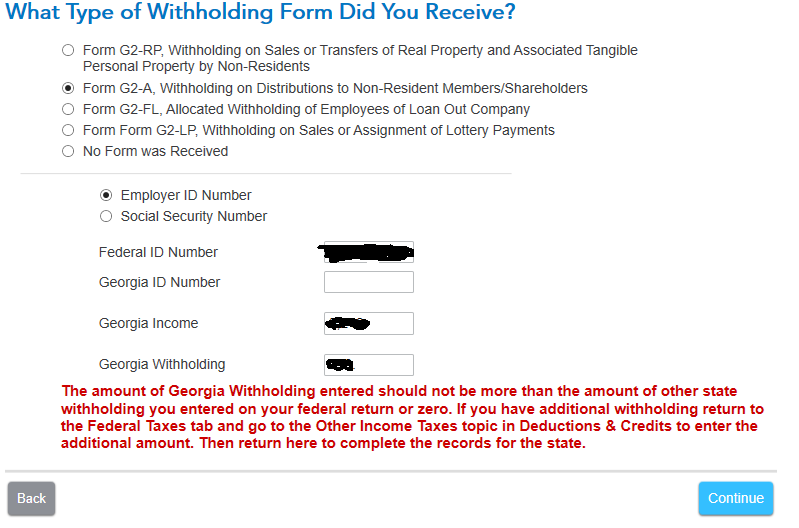
Hi, a partnership of mine made withholdings at more than 3 states. (It doesn't do composite.) Is there a better way to enter them than estimated tax payments? When you enter it as estimated tax payments, instead of a "Other Income Taxes", you can't put additional information. For example, see the screenshot below of the TT entry form for G2-A withholdings for Georgia I would like to be able to use instead of estimated tax payment, which just takes a dollar amount and a date (which I don't know as the partnership didn't tell me the date of withholding). I'm also afraid Georgia will reject my tax return since they won't be able to find a historic estimated tax payment from me (it came from the partnership instead). Treating the withholdings as estimated tax payments seem like a trick to get TT to calculate the correct tax rather actually filling the taxes correctly. Am I missing something?
May 10, 2021
12:16 PM


- Mark as New
- Bookmark
- Subscribe
- Subscribe to RSS Feed
- Permalink
- Report Inappropriate Content
Limited to 3 state withholdings entered? How to enter more?
Yes, the only way to get credit for your income tax withheld is to claim it as a state estimated tax payment. If the state of Georgia questions on this, just show proof that the partnership paid it but passed on the payment to you. You would show proof of this from a statement issued by the partnership if not reflected on your K1. You can use form G2-A as you illustrated above only if you have received this from the partnership.
**Say "Thanks" by clicking the thumb icon in a post
**Mark the post that answers your question by clicking on "Mark as Best Answer"
**Mark the post that answers your question by clicking on "Mark as Best Answer"
May 12, 2021
12:53 PM
- Mark as New
- Bookmark
- Subscribe
- Subscribe to RSS Feed
- Permalink
- Report Inappropriate Content
Limited to 3 state withholdings entered? How to enter more?
Last year, I entered a state withholding amount, using the estimated tax as the entering point in TT, in my California tax return, to get around the problem cited in the original question. It was rejected by the Calif tax authority, the Franchise Tax Board. So please don't tell your users to use the estimated tax platform for withholding state tax. TT should get your act together, by adding more data points in your software for state withholding amounts. Say up to 25 states (there are a total of 50 states). This is a easy fix for Intuit. We pay more money for the premier version, so provide more service. This is a common problem for people with Schedule K-1 reports.
April 8, 2022
10:15 PM

- Mark as New
- Bookmark
- Subscribe
- Subscribe to RSS Feed
- Permalink
- Report Inappropriate Content
Limited to 3 state withholdings entered? How to enter more?
Is there a good solution for this? I have about 9 states I need to enter for withholding and this really messes things up.
I was hoping I could at least change the amount on the state form, but can't do that either.
My only other idea is to set the values for a state, then print out that state's return, then change the federal to remove the filed state, and replace with a new state...so lame!
September 21, 2025
7:46 PM
- Mark as New
- Bookmark
- Subscribe
- Subscribe to RSS Feed
- Permalink
- Report Inappropriate Content
Limited to 3 state withholdings entered? How to enter more?
As of a couple of years ago, I think the desktop download version of TurboTax could handle more states. (The online version could not.)
October 1, 2025
3:25 PM
Still have questions?
Questions are answered within a few hours on average.
Post a Question*Must create login to post


Unlock tailored help options in your account.


Get more help
Ask questions and learn more about your taxes and finances.
Related Content

jrW9A8dBAY
New Member

movinaya
New Member
statusquo
Level 3

pennbrook
New Member

barbara-barbour
New Member