
Level 2
August 20, 2021
Solved

Trying to File Amended 2019 Return - Posted Help steps do not work

  • August 20, 2021
  • 3 replies
  • 0 views

I am using 2019 Download version of TurboTax Premier.

There does not appear to be an Amend selection anywhere to attempt to follow the steps in the link below.
I open my submitted 2019 return in the 2019 software on my PC but have no options to Select 'Amend a Return'.

(2019 software is up to date)

https://ttlc.intuit.com/community/amending/help/how-do-i-amend-my-turbotax-online-return/00/27577


I cannot find a way to complete these steps:
2. Select Amend a return (make changes) after it was filed and accepted by the IRS.
3. Select Continue on the We'll help you change (amend) your return screen.
4. On the following screen, Did you already file your return? select Yes, I've already filed my return, then select I need to amend my 2019 return and Continue.


Thanks for any advice

globewalker
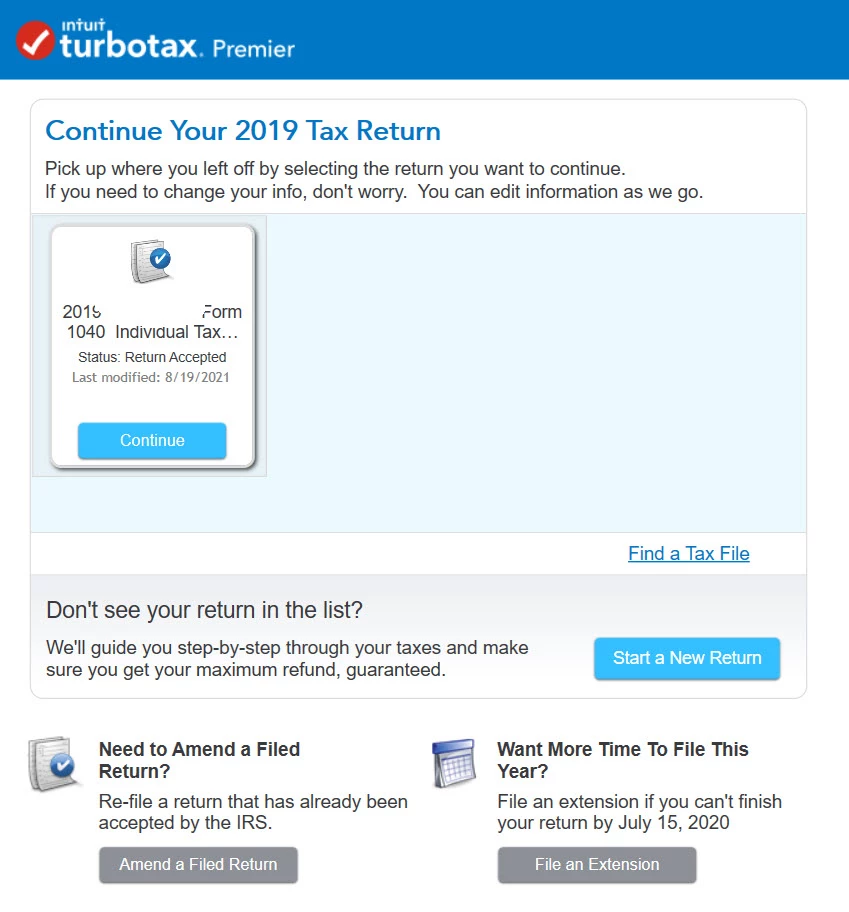
    Best answer by globewalker

    SOLVED:
    Thanks @Mike9241  and @Critter-3 for your replies.

    The reason I could not see the Amend Option is because we never Registered the Downloaded software.
    So when I first opened TurboTax, it showed me a registration page to fill out. We were able to use the software just fine w/o ever registering. But now that I registered, I see the oh so obvious options!


    3 replies

    Critter-3
    Level 15
    August 20, 2021

    Well you posted the ONLINE instructions so if you used the downloaded version to file the original return ...

    Level 2
    August 20, 2021

    Critter3: You obviously did not read my post. Those are the instructions I am trying to follow.

    Thanks anyhow.

    Level 2
    August 20, 2021

    @globewalker 


    You posted the ONLINE instructions which will not work on the DOWNLOADED program ... from the link I posted : 


    TurboTax CD/Download

    1. Open TurboTax 2019.
      1. It's important that you open your 2019 return in your 2019 version of TurboTax. It won't work in other year versions.
    2. Select Amend a return (make changes) after it was filed and accepted by the IRS.
    3. Select Continue on the We'll help you change (amend) your return screen.
    4. On the following screen, Did you already file your return? select Yes, I've already filed my return, then select I need to amend my 2019 return and Continue.
    5. Now, make an "amend" copy your return by selecting Save As (Mac: select Duplicate) from the File menu. This preserves the return you originally filed.


    After launching the TurboTax program, you can either:

    • Click Continue under the return you want to open, or
    • Select Open Tax Return from the File menu (Windows) or TurboTax menu (Mac), browse to the location of your .tax or tax data file (not the PDF), select it, and then select Open.

    Critter3: Ok I see your point. The link I posted covers both so yes I have been looking at the Download instructions. Thanks

    Level 15
    August 20, 2021

    when you open Turbotax (full screen) toward's the bottom there's a gray rectangle that says "Amend a Filed Return". click on it. then there's a new screen and you'll see a blue rectangle on the filed return that says "Amend" . click on it.


    Level 2
    August 20, 2021
     

    Mike9241: Thanks for that detail. But I don't seem to have that option anywhere.


    globewalkerAuthorAnswer
    Level 2
    August 20, 2021

    SOLVED:
    Thanks @Mike9241  and @Critter-3 for your replies.

    The reason I could not see the Amend Option is because we never Registered the Downloaded software.
    So when I first opened TurboTax, it showed me a registration page to fill out. We were able to use the software just fine w/o ever registering. But now that I registered, I see the oh so obvious options!




