


- Community
- Topics
Turn on suggestions
Auto-suggest helps you quickly narrow down your search results by suggesting possible matches as you type.
Showing results for
- Community
- :
- Discussions
- :
- Taxes
- :
- Get your taxes done
- :
- Wells Fargo Advisors


- Mark as New
- Bookmark
- Subscribe
- Subscribe to RSS Feed
- Permalink
- Report Inappropriate Content
Wells Fargo Advisors
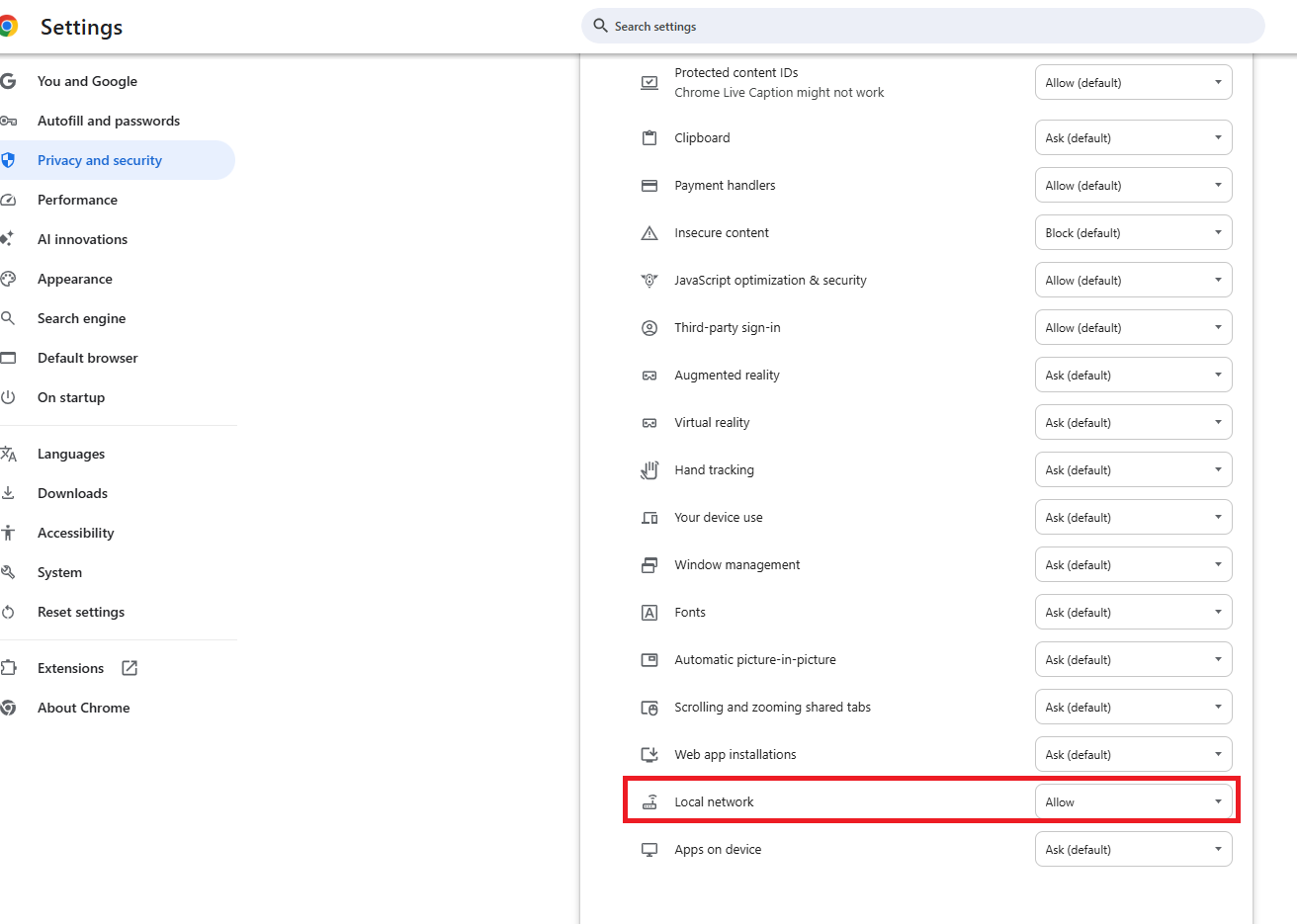
Like Other I have used TurboTax for over 10 years and have always selected Wells Fargo Advisors from the List of Institutions. This year it is not there. So I have tried Wells Fargo as other posts have suggested. I have enabled local area networks as suggested.
After connecting and giving me indications that data is flowing both directions i get what I assume is error /message (378).
Lets head back to your bank to connect one or more accounts
Those transactions will flow into TTWIN on a faster more reliable connection (378)
No "Successful" message
I have selected all of the accounts one time.
Then I changed the setting to only one account
I don't know whether I need to check just tax Documents or also Profile and/or statements.
This is TOTALLY confusing. Last year it was one click, and ID and PW and I was finished. Now I have no Idea what is expected. Like other I've selected TurboTax to keep from manually entering all of my Brokerage transactions. So What is the problem and how can I get it fixed... BTW Wells Fargo Advisors has on their web site that TurboTax data was mad available between Feb 13-17, 2026.
Please find a solution that works.
Topics:
posted
February 27, 2026
1:24 PM
last updated
February 27, 2026
1:24 PM
Connect with an expert

Do you have an Intuit account?
You'll need to sign in or create an account to connect with an expert.
8 Replies

- Mark as New
- Bookmark
- Subscribe
- Subscribe to RSS Feed
- Permalink
- Report Inappropriate Content
Wells Fargo Advisors
Use "Wells Fargo Clearing Services" instead of "Wells Fargo".
March 2, 2026
12:48 PM


- Mark as New
- Bookmark
- Subscribe
- Subscribe to RSS Feed
- Permalink
- Report Inappropriate Content
Wells Fargo Advisors
How to Fix Import Issues (Error 378):
If you are receiving this message but your transactions are not appearing, it is likely due to browser security updates or blocked Local Network Access. Try the following solutions:
- Enable Local Network Access: Click the "Lock" or "Tune" icon in your browser's address bar, look for Local Network Access, and toggle it to ON.
- Refresh and Retry: After changing the setting, refresh the page and try the import again.
- Use a Different Browser: If Chrome is not working, try Firefox or Safari.
- Ensure Only One Window is Open: Make sure only one TurboTax instance is active and that you are not switching between Wi-Fi networks
Prior to 'import' options being made available, your tax return only needed to contain Category Summary Totals. Remember the IRS already has copies of all your 1099's.

**Say "Thanks" by clicking the thumb icon in a post
**Mark the post that answers your question by clicking on "Mark as Best Answer"
**Mark the post that answers your question by clicking on "Mark as Best Answer"
March 4, 2026
1:17 PM

- Mark as New
- Bookmark
- Subscribe
- Subscribe to RSS Feed
- Permalink
- Report Inappropriate Content
Wells Fargo Advisors
Doesn't work. Been there done that
March 6, 2026
11:29 AM
- Mark as New
- Bookmark
- Subscribe
- Subscribe to RSS Feed
- Permalink
- Report Inappropriate Content
Wells Fargo Advisors
Not working
March 22, 2026
3:20 PM

- Mark as New
- Bookmark
- Subscribe
- Subscribe to RSS Feed
- Permalink
- Report Inappropriate Content
Wells Fargo Advisors
See this community thread about Wells Fargo.
Helpful TurboTax Articles:
- What if I can't import my 1099?
- How can I fix my 1099 import issue?
- How do I import my 1099s?
- How do I enter a large number of stock transactions in TurboTax?
If you received a "Success" message but your data hasn't appeared in TurboTax, it is likely due to recent browser security updates regarding Local Network Access.
To fix this you need to allow TurboTax to securely retrieve your data through your browser settings:
- Locate the View Site Information icon (the "tune" or "lock" icon) on the far left of your address bar, just before the URL.
- Find Local Network Access in the dropdown menu.
- Toggle the switch to ON.
- Refresh the page and attempt your import again.
What do I do when my data isn't imported into TurboTax Desktop even though it says successful import...
If permissions aren't the issue, one of the following factors may be at play:
- Brokerage Delays: While most forms arrive by January 31, many brokerages delay Consolidated 1099s (like the 1099-B) until mid-February due to complex reporting requirements.
- Availability: Your brokerage must specifically "release" the import file to TurboTax. If it isn’t ready, we recommend checking back.
- Connection Blocks: Active VPNs or aggressive Anti-Virus software can occasionally block the import feature between your bank and TurboTax. Try disabling them temporarily or switching to a different browser.
**Say "Thanks" by clicking the thumb icon in a post
**Mark the post that answers your question by clicking on "Mark as Best Answer"
**Mark the post that answers your question by clicking on "Mark as Best Answer"
March 23, 2026
7:21 AM

- Mark as New
- Bookmark
- Subscribe
- Subscribe to RSS Feed
- Permalink
- Report Inappropriate Content
Wells Fargo Advisors
Please fix this error.
I am stuck after tying these that do not work:
1. Local address
2. Different Browser
3. Well Fargo Clearing House (this one missing my accounts)
April 5, 2026
1:12 PM
- Mark as New
- Bookmark
- Subscribe
- Subscribe to RSS Feed
- Permalink
- Report Inappropriate Content
Wells Fargo Advisors
This does not work!
It is missing 2 of my regular accounts!
April 5, 2026
1:13 PM
- Mark as New
- Bookmark
- Subscribe
- Subscribe to RSS Feed
- Permalink
- Report Inappropriate Content
Wells Fargo Advisors
To fix this, you should delete your Form 1099-B and re-import it again. You can also enter your form manually.
To delete your Form 1099-B:
- Open your return
- Go to Tax Home
- Select Tax Tools in the left menu
- Click on Tools
- A pop-up will come out called Tool Center
- Select Delete a form
- Select Delete next to the Form 1099-B that you want to delete
To import it again:
- Go to Federal, then Wages & Income, then Investments and Savings
- Select Revisit next to Stocks, Cryptocurrency, Mutual Funds, Bonds, Other (1099-B)
- If you see Did you sell any of these investments in 2025?, select Yes. If you see Your Investment summary, select Add more sales
- Select Stocks, Bonds, Mutual Funds and Continue
- Type the name of your financial institution in the search box, select the appropriate financial institution name, and select Continue
- Enter your financial institution's credentials to sign in, and follow the remaining screens to re-import your 1099-B forms. Be sure to re-import only the forms that you deleted previously. If you made adjustments after your original import, you will need to re-enter those as well.
If you want to enter it manually, follow the steps above and select Skip Import, then follow the remaining screens to manually add your 1099-B data.
April 5, 2026
3:23 PM
Still have questions?
Questions are answered within a few hours on average.
Post a Question*Must create login to post


Unlock tailored help options in your account.


Get more help
Ask questions and learn more about your taxes and finances.
Related Content

m-rygala1
New Member

GarryCM
Level 2
GarryCM
Level 2

hdorrell
New Member

minw1
New Member