turbotax icon
cancel
Showing results for 
Search instead for 
Did you mean: 
Announcements
Close icon
Do you have a TurboTax Online account?

We'll help you get started or pick up where you left off.

VA 529 Plan Carryover

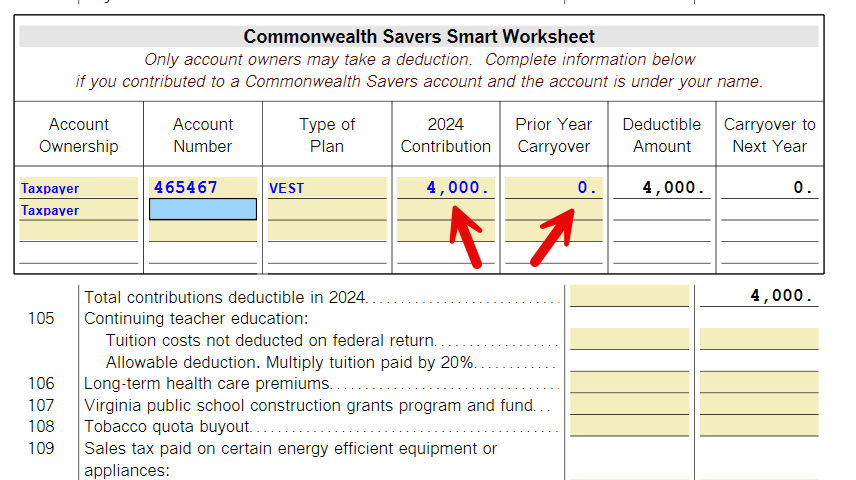
The TurboTax VA State FY24 tax is stating that I have to carry-over funds to next tax year.  However, I have not met the $4000 limit on all the accounts listed.  I have 6 accounts with contributions totaling $13k.  The VA 529 Plan allows a deductible limit of $24k (6 accounts x $4k).  Clearly, I have not met the limit, and TurboTax should not be carrying-over any funds. 


Is there a bug/glitch in the software or am I missing something?

x
Do you have an Intuit account?

Do you have an Intuit account?

You'll need to sign in or create an account to connect with an expert.

1 Best answer

Accepted Solutions
AmyC
Employee Tax Expert

VA 529 Plan Carryover

Your tax forms need to be correct. It is an odd number. I am sure you have reviewed your tax forms for a checked box or oddity that is out of place. The $4k is per account, it sounds like you know to add the many accounts. You may want to file an extension and /or contact support. I can't take a look at your return today or tomorrow but the phone lines can. 


**Say "Thanks" by clicking the thumb icon in a post
**Mark the post that answers your question by clicking on "Mark as Best Answer"

View solution in original post

4 Replies
AmyC
Employee Tax Expert

VA 529 Plan Carryover

Something is wrong. A full or corrupted cache can cause problems in TurboTax, sometimes you need to clear your cache (that is, remove these temporary files).


Online version:

  1. Delete the contributions 
  2. Log out of your return and try one or more of the following:
    • Don't use Internet Explorer.
    • Clear cache and cookies,
    • Sign in using a different browser.
    • Sign in using a different device.
  3. Log back into your return.
    • Enter the information again.

Desktop version: 

  1. Delete the contributions
  2. Save your return while closing the program.
  3. Update the program
  4. Open
  5. Enter the information again.
**Say "Thanks" by clicking the thumb icon in a post
**Mark the post that answers your question by clicking on "Mark as Best Answer"

VA 529 Plan Carryover

Your solution did not resolve the issue.  A carry-over is still stated, and what's weird is it's only for $602. This must be a bug.  My concern is if I file, will this be corrected with next year's software?  This is unlikely.

AmyC
Employee Tax Expert

VA 529 Plan Carryover

Your tax forms need to be correct. It is an odd number. I am sure you have reviewed your tax forms for a checked box or oddity that is out of place. The $4k is per account, it sounds like you know to add the many accounts. You may want to file an extension and /or contact support. I can't take a look at your return today or tomorrow but the phone lines can. 


**Say "Thanks" by clicking the thumb icon in a post
**Mark the post that answers your question by clicking on "Mark as Best Answer"

VA 529 Plan Carryover

Thanks, Amy. After reviewing the worksheet, I realized the contribution was over 4k, hence the carryover. My apologies; it was my error. 

Unlock tailored help options in your account.

message box icon

Get more help

Ask questions and learn more about your taxes and finances.

Post your Question