turbotax icon
cancel
Showing results for 
Search instead for 
Did you mean: 
Announcements
Close icon
Do you have a TurboTax Online account?

We'll help you get started or pick up where you left off.

Tech issue

Desktop online still not removing nontaxable Social Security income from total income.  Any news on when this will be fixed???

x
Do you have an Intuit account?

Do you have an Intuit account?

You'll need to sign in or create an account to connect with an expert.

1 Best answer

Accepted Solutions
JohnB5677
Expert Alumni

Tech issue

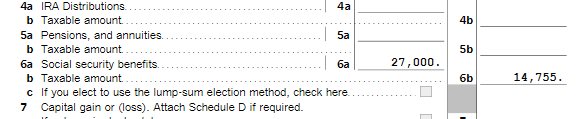
If you're on Desktop and go to FORMS mode in the top right-hand corner and select Form 1040, you can see your tax return.

  • Box 6a is your total Social Security.
  • Box 6b is the taxable amount.
  • If you have additional income beyond Social Security, a portion of it may be taxed.

For the 2022 tax year (which you will file in 2023), single filers with a combined income of $25,000 to $34,000 must pay income taxes on up to 50% of their Social Security benefits. If your combined income is more than $34,000, you will pay taxes on up to 85% of your Social Security benefits.


If this does not completely answer your question, please contact us again and provide some additional details.

**Say "Thanks" by clicking the thumb icon in a post
**Mark the post that answers your question by clicking on "Mark as Best Answer"

View solution in original post

5 Replies
JohnB5677
Expert Alumni

Tech issue

If you're on Desktop and go to FORMS mode in the top right-hand corner and select Form 1040, you can see your tax return.

  • Box 6a is your total Social Security.
  • Box 6b is the taxable amount.
  • If you have additional income beyond Social Security, a portion of it may be taxed.

For the 2022 tax year (which you will file in 2023), single filers with a combined income of $25,000 to $34,000 must pay income taxes on up to 50% of their Social Security benefits. If your combined income is more than $34,000, you will pay taxes on up to 85% of your Social Security benefits.


If this does not completely answer your question, please contact us again and provide some additional details.

**Say "Thanks" by clicking the thumb icon in a post
**Mark the post that answers your question by clicking on "Mark as Best Answer"

Tech issue

My return has been pending since 02/02/24. The IRS said they never received my return. I am still waiting to be accepted/rejected. I have not received an email.

Tech issue

Trying to get tech support for a program bug is very frustrating!

I have the desktop version of Home and Business.  It is not transferring information from the dependent worksheet to Form 8812 and from there to the 1040.


What is going wrong?

Vanessa A
Expert Alumni

Tech issue

If it is not transferring your dependent information to form 8812, it is likely because one of your answers makes your dependent ineligible for the Child Tax Credit or Other Dependent Credit or you are ineligible for the credit.  If you and your dependent meet the criteria below, you will need to go back and double check all of your answers in the personal info section. 


Child Tax Credit Criteria

  • Your income is less than  $200,000 ($400,000 if Married Filing Jointly)
  • You are not filing a return separate from your spouse (if you did not live in the same home for the last 6 months of the year, this may not apply)
  • You have a qualifying child or a Qualifying Relative
  • Your dependents have a social security number for the child tax credit
    • You can claim the Other Dependent Credit if they otherwise qualify

2023 and 2024 Child Tax Credit: Top 7 Requirements

**Say "Thanks" by clicking the thumb icon in a post
**Mark the post that answers your question by clicking on "Mark as Best Answer"

Tech issue

Thank you. I found where I had checked a couple of boxes incorrectly.

Unlock tailored help options in your account.

message box icon

Get more help

Ask questions and learn more about your taxes and finances.

Post your Question