


- Community
- Topics
Turn on suggestions
Auto-suggest helps you quickly narrow down your search results by suggesting possible matches as you type.
Showing results for
- Community
- :
- Discussions
- :
- Taxes
- :
- Get your taxes done
- :
- Seller-financed mortgage


- Mark as New
- Bookmark
- Subscribe
- Subscribe to RSS Feed
- Permalink
- Report Inappropriate Content
Seller-financed mortgage
In my 2024 turbotax small business version, I got to a screen in Personal Income with the title "Other Interest and Dividends". It has a checkbox that was PRE-checked when I got to the screen for "Received interest payments from a seller-financed mortgage"
I did NOT receive interest payments from a seller financed mortgage. I have not ever entered into a seller-financed mortgage arrangement.
The system will NOT let me uncheck this box.
What is causing this checkbox to be forced to ON? It should not be checked.
Thank you,
Everette Jordan
Topics:
posted
February 9, 2025
10:55 AM
last updated
February 09, 2025
11:08 AM
Connect with an expert

Do you have an Intuit account?
You'll need to sign in or create an account to connect with an expert.
12 Replies


- Mark as New
- Bookmark
- Subscribe
- Subscribe to RSS Feed
- Permalink
- Report Inappropriate Content
Seller-financed mortgage
Put your cursor in that box.
Click on Edit at the top of the desktop program screen
Click on Add Supporting Details
Click on the Red X in the upper right of the window to Remove the details
You can make your entry now.
February 9, 2025
10:57 AM
- Mark as New
- Bookmark
- Subscribe
- Subscribe to RSS Feed
- Permalink
- Report Inappropriate Content
Seller-financed mortgage
Even when I get that checkbox to have a focus box around it, the menu item, "Edit > Add Supporting Details" is disabled (i.e. grayed out). The Short-cut associated with that menu, Ctrl-I, also has no effect.
Thanks for the response though!
February 9, 2025
11:07 AM

- Mark as New
- Bookmark
- Subscribe
- Subscribe to RSS Feed
- Permalink
- Report Inappropriate Content
Seller-financed mortgage
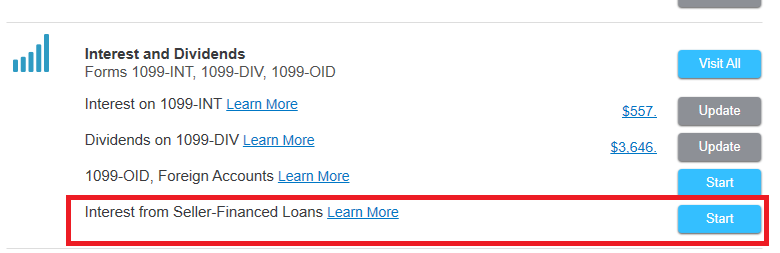
I ran into the same issue on mine. I got it to clear by going to the "Interest and Dividends" section of the form, then clicking "Start" on the "Interest from Seller-Financed Loans" category. Once I clicked "no" on the next screen, it cleared the automated checkbox. Hope this helps!

February 13, 2025
8:05 PM
- Mark as New
- Bookmark
- Subscribe
- Subscribe to RSS Feed
- Permalink
- Report Inappropriate Content
Seller-financed mortgage
This worked, thank you! Obviously a bug in the TurboTax software since several people have had that issue.
February 14, 2025
5:14 PM
9,120

- Mark as New
- Bookmark
- Subscribe
- Subscribe to RSS Feed
- Permalink
- Report Inappropriate Content
Seller-financed mortgage
Thank you! This worked. And, yes, a bug in the s/w IMO.
March 12, 2025
11:16 AM

- Mark as New
- Bookmark
- Subscribe
- Subscribe to RSS Feed
- Permalink
- Report Inappropriate Content
Seller-financed mortgage
A month later bug is still there. Thank you for finding and sharing the resolution!
March 18, 2025
7:19 AM
- Mark as New
- Bookmark
- Subscribe
- Subscribe to RSS Feed
- Permalink
- Report Inappropriate Content
Seller-financed mortgage
Thank you!
March 31, 2025
4:27 PM
- Mark as New
- Bookmark
- Subscribe
- Subscribe to RSS Feed
- Permalink
- Report Inappropriate Content
Seller-financed mortgage
Your suggestion worked but I had to hit Save after saying No in order to clear out the automated checkbox. Thanks again.
April 14, 2025
5:34 PM

- Mark as New
- Bookmark
- Subscribe
- Subscribe to RSS Feed
- Permalink
- Report Inappropriate Content
Seller-financed mortgage
Solved the problem for me. Thanks!
January 31, 2026
9:57 AM
- Mark as New
- Bookmark
- Subscribe
- Subscribe to RSS Feed
- Permalink
- Report Inappropriate Content
Seller-financed mortgage
This solution does not work. I cannot highlight the checkbox and the options in the edit menu are not available to me. They are all greyed out.
March 23, 2026
9:56 AM


- Mark as New
- Bookmark
- Subscribe
- Subscribe to RSS Feed
- Permalink
- Report Inappropriate Content
Seller-financed mortgage
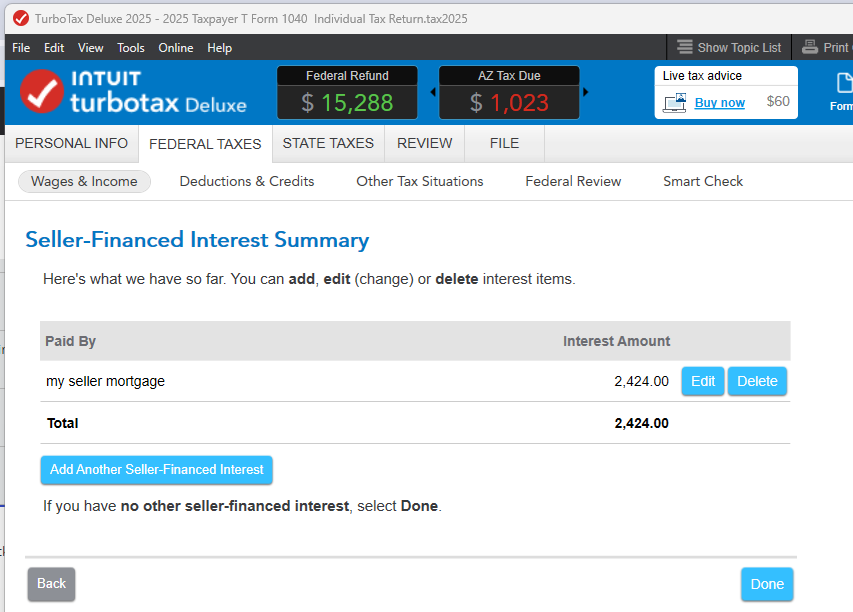
In TurboTax Desktop, on the Income Topics page, click on Start/Update next to 'Interest from Seller Financed Loans'. If you get the question 'Did you receive interest payments from a seller financed mortgage?' choose No. If you get a 'Seller Financed Interest Summary' page, you can Delete the entry.
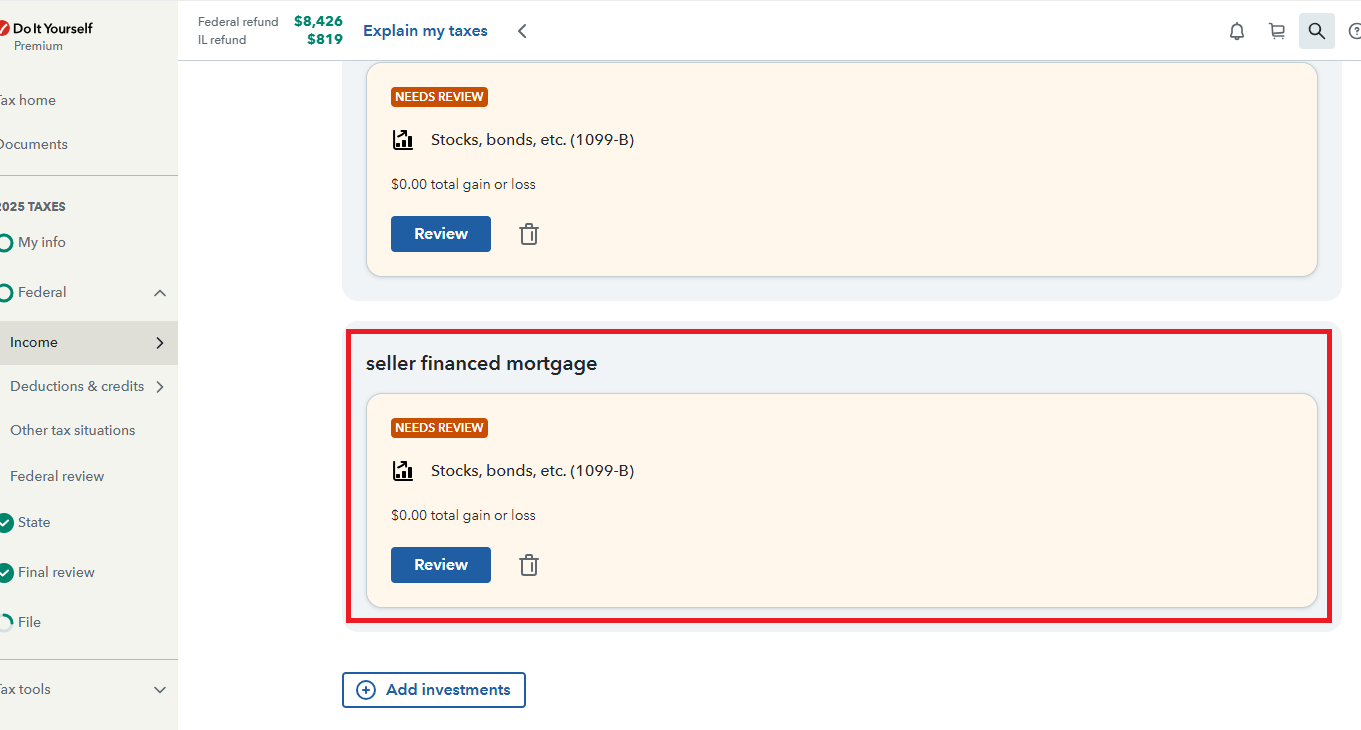
In TurboTax Online, from the left-side menu, go to Federal > Income > Investments and Savings. On the page 'Let's Finish Pulling in Your Investments' look for the tile labeled as 'Interest' and use the trash can icon to delete it.
**Say "Thanks" by clicking the thumb icon in a post
**Mark the post that answers your question by clicking on "Mark as Best Answer"
**Mark the post that answers your question by clicking on "Mark as Best Answer"
March 23, 2026
12:52 PM
Still have questions?
Questions are answered within a few hours on average.
Post a Question*Must create login to post


Unlock tailored help options in your account.


Get more help
Ask questions and learn more about your taxes and finances.
Related Content

johnmckinsey695
Level 1

bobdrad
Level 3
Lamb433
New Member

HoloK
New Member

elpez
Returning Member