turbotax icon
cancel
Showing results for 
Search instead for 
Did you mean: 
Announcements
Close icon
Do you have a TurboTax Online account?

We'll help you get started or pick up where you left off.

IRA Distribution

I have entered my IRA distribution and taxable amount on the worksheet and its being reflected on the tax return as a Pension distribution.  How do I get it reflected as an IRA distribution?

x
Do you have an Intuit account?

Do you have an Intuit account?

You'll need to sign in or create an account to connect with an expert.

4 Replies
DanaB27
Employee Tax Expert

IRA Distribution

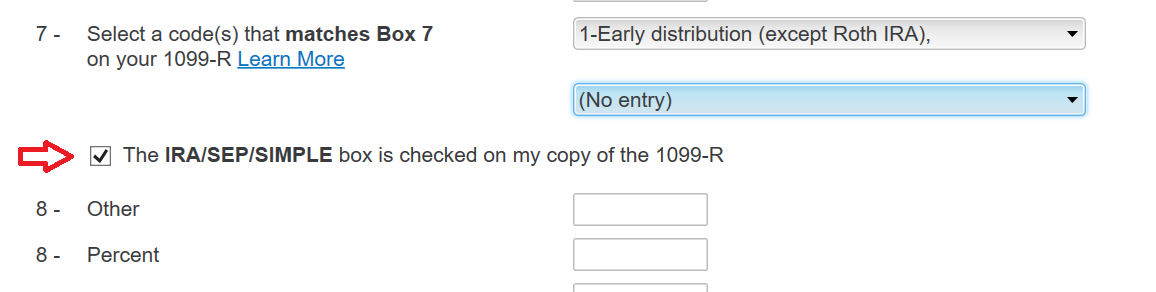
Please go back to the 1099-R section and verify that you checked the IRA/SEP/SIMPLE box:


  1. Click "Federal Taxes" on the top and select "Wages & Income"
  2. Click "I'll choose what to work on"
  3. Scroll down and click "Update" next to "IRA, 401(k), Pension Plan (1099-R)
  4. On the "Your 1099-R Entries" screen click "edit"
  5. Verify that the IRA/SEP/SIMPLE box is checked (under the box 7 entry)


**Say "Thanks" by clicking the thumb icon in a post
**Mark the post that answers your question by clicking on "Mark as Best Answer"

IRA Distribution

the IRA box must be checked on the Turbotax form. 

IRA Distribution

After "Edit" what do I enter on the 2023 worksheet to move my IRA distribution and taxable portion from Line 5a (Pension) to Line 4a (IRA Distributions ),  I appear to have entered all the info but my IRA distribution keeps being reflected on  Page 1 of the 2023 Individual tax return on Line 5a as contrasted to Line 4a.


DanaB27
Employee Tax Expert

IRA Distribution

When you are on the "Enter your 1099-R" screen (follow the steps mentioned above) scroll down and make sure that the IRA/SEP/SIMPLE box is checked (under the box 7 entry). Then TurboTax will list your distribution on line 4 of Form 1040.


**Say "Thanks" by clicking the thumb icon in a post
**Mark the post that answers your question by clicking on "Mark as Best Answer"

Unlock tailored help options in your account.

message box icon

Get more help

Ask questions and learn more about your taxes and finances.

Post your Question