lombeezy
Level 2
February 12, 2025
Question

1099-K Reconciliation Error/Review

  • February 12, 2025
  • 1 reply
  • 0 views

Hey everyone I'm still stuck at this "review"

I entered all my previous sales and still receive this error on the 1099-B worksheet that the number is not matching.

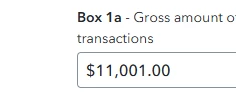
-I rounded down my 1099-K 1a down to the nearest dollar ($11,001)

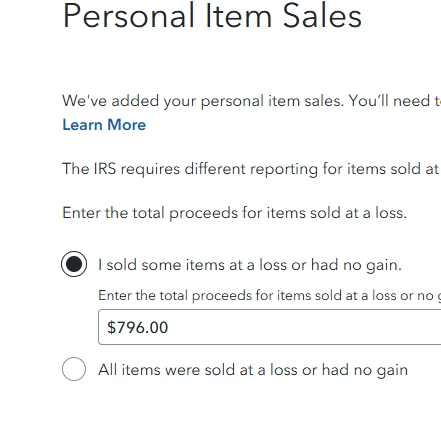
-I rounded also the "Personal Item Sales" - "I Sold some items at a loss or had no gain." ($796.00)


The number at the 1099-K Reconciliation box matches my total proceeds minus my loss $10,205.00.

So my question is why am I still getting this review?
 

    1 reply

    KrisD15
    Level 15
    February 12, 2025

    Proceeds need to match proceeds. 

    You need to make that number match total proceeds only. The loss was already subtracted when you entered 796 on the first screen. 


    On the snip below, you should show a total of 10,205 in Proceeds (in the blue box)  if your 1099-K was 11,001 and 796 doesn't count. 

    Proceeds are NOT the same as profit. 

    You sold for 10,205, but what did they cost you to purchase before you sold them? 


    In the example below, we needed to account for 1,098 proceeds. 


    **Say "Thanks" by clicking the thumb icon in a post. **Mark the post that answers your question by clicking on "Mark as Best Answer"
    lombeezy
    lombeezyAuthor
    Level 2
    February 12, 2025

    Ok so this number 10,875.06 is suppose to match the 10,205.00?


    Level 15
    February 26, 2025

    I'm having the same issue here. So just to fully confirm -- you enter the 1099-K  with the total amount listed (lets say $10,000), then when it asks what amount of proceeds were sold at a loss you enter the requisite amount (let's say $8,000). That leaves you with an amount of proceeds that were sold at a gain ($2,000). And once it prompts you to enter your transactions one by one, you ONLY enter the individual sales sold at a gain that amount to the total ($2,000 from my example). And items sold at a loss should NOT be entered individually? Hoping to confirm before I delete all the transactions I input, as that took forever.


    Yes, you are correct in theory. My advice would be to create two separate entries either by creating two 1099-Ks. One would be for your sales that resulted in gains, the other would be the sales that resulted in losses.

    1. Gains: Enter the full amount of the sales for these items, then enter the cost basis
    2. Losses: Enter the full amount of the sales for these items, then enter the same amount as the cost basis resulting in zero loss

    Or an entry for sales of personal property that resulted in gain in the investment section using the steps below. 


    To enter your sale in TurboTax, follow these steps. Click this link for more information. Where do I enter Investment Sales?

    1. Open or continue your return.
    2. Navigate to the investment sales section:
      • TurboTax Online/Mobile: Go to investment sales. If using this application, make sure it is open
      • TurboTax Desktop: Search for investment sales and then select the Jump to link. 
        • Or Personal Tab > Continue > I'll choose what I work on > Scroll to Investment Income > Select Stocks, Cryptocurrency, Mutual Funds, Bonds, Other
    3. Answer Yes to the question Did you sell any of these investments in 2024? (or Okay! to Time to kickoff your investments!).
      • If you land on  the Investment sales summary or Your investments and savings screen, select Add More Sales or Add investments.

    @spfanok 

    **Say "Thanks" by clicking the thumb icon in a post. **Mark the post that answers your question by clicking on "Mark as Best Answer"