It is quite possible that you have checked a box preventing the interest from flowing to your return or you did not check a box allowing the interest to flow. In the mortgage interest area I will try to take you step by step for you to check the entries you made. Please keep in mind the screenshots you will see below are from TurboTax online. The screens in TurboTax desktop are very similar but not exactly the same.
First click on "Deductions and Credits", and then Start or Edit/Add at Mortgage Interest and Refinancing (Form 1098)
You state you have entered your mortgage information previously so you should see your mortgage listed under "Here's your 1098 info", click "Edit"
Your mortgage lender name should appear next, if it is correct, click continue
Next is "Do any uncommon situations apply?" This could be one of the areas that could cause a problem if not checked correctly. Normally this would be checked "None of these apply"
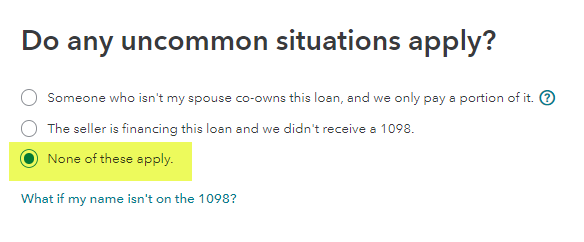
If the situation for the above screenshot does not apply for the first 2 options, click in the None circle and then continue. There are additional steps if either of the first 2 situations apply.
The next screen asks for the details of the data on Form 1098. Please remember the dates and amounts shown are for example purposes only.
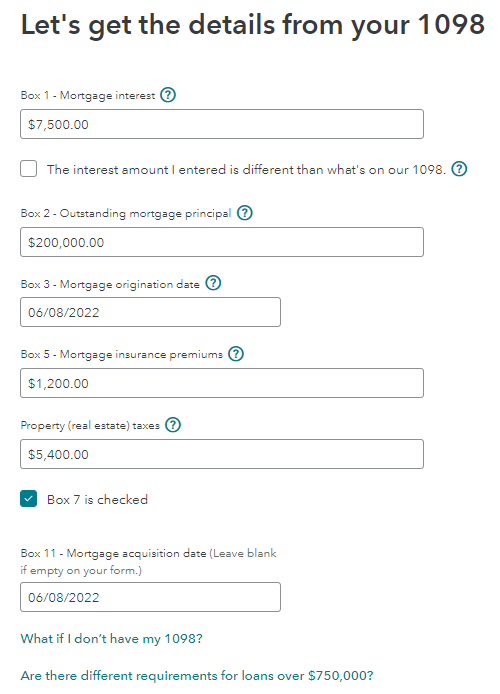
You may have Box 5 information listed if PMI was part of your closing. Mortgage Insurance Premiums are no longer deductible so if does not matter if there is an entry there or not.
If all entries are correct, click continue.
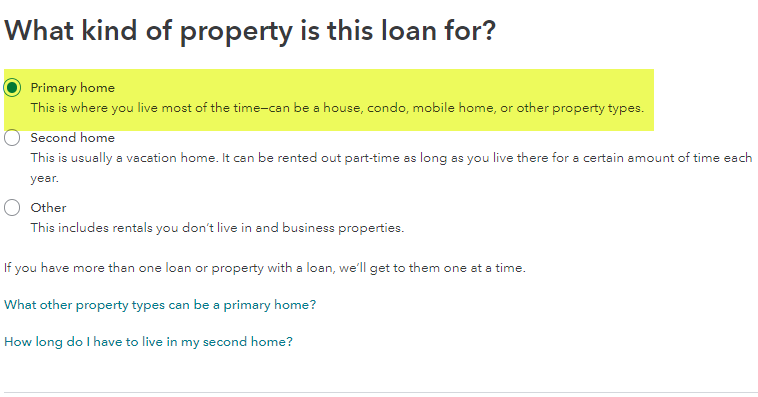
The next screen will ask about the property the loan is for. Form your statement above, the first item for primary home should be checked.
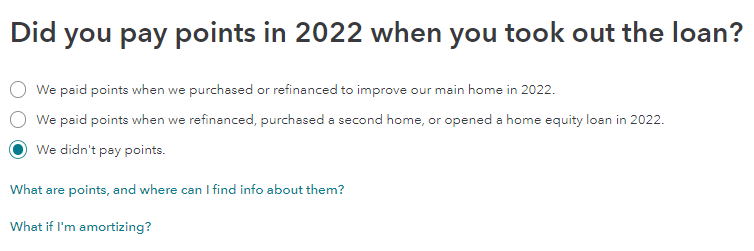
The next screen is to ask if you paid points on the mortgage. If it was for a prior year as indicated then the first item would be checked or if you did not pay points the last item would be checked.
The next screen will ask if the current 1098 info is the most current. Click yes, then continue
You will be asked if this is a refinance or home equity line of credit. From your statement this would be answered no.
Once answered, your should see a screen pertaining to whether you can itemize deductions of the standard deduction is the best for you. Click continue and you will return to the 1098 info screen. Click continue if no other information or another 1098 has to be entered. You will then return to the deductions summary page.
@walsh63
**Say "Thanks" by clicking the thumb icon in a post
**Mark the post that answers your question by clicking on "Mark as Best Answer"






