
turbotax icon
cancel
Showing results for 
Search instead for 
Did you mean: 
Announcements
Close icon
Do you have a TurboTax Online account?

We'll help you get started or pick up where you left off.

Errors occur when doing foreign tax credit

When I enter a country (Canada) and go to the "Report Foreign Tax Paid to Canada" page only one of my 3 form 1099-div shows up on the page to select from.Foreign Taxes select 1099 page.jpg
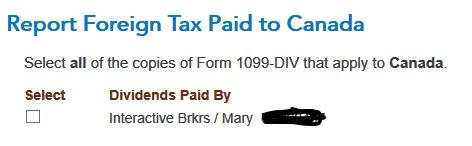
 

Also if I proceed to the next country, the last country disappears from the list

x
Do you have an Intuit account?

Do you have an Intuit account?

You'll need to sign in or create an account to connect with an expert.

13 Replies

Errors occur when doing foreign tax credit

TT can support only one country per 1099-DIV.
Here is a suggested technique to enter the data for foreign tax credit.


There are X distinct countries. Each country will occupy 1 column in form 1116.

The arrangement is to create X fictitious 1099-DIV’s, each to represent one distinct country. The main 1099-DIV will end up serving only U.S. sources.


Preparation:

I suggest getting the data ready on a spreadsheet. To begin with, for reference, record the amount on the 1099’s boxes 1a, 1b and box 7. Also the amount in schedule B, line 6.

On the spreadsheet, dedicate one column for each country.


Let’s assume that column A is for Canada. From the broker’s supplemental info, insert the ordinary dividends in box 1a. If Canada should be on more than one 1099, then enter them separately then add them up. Do the same for all qualified dividends in box 1b and taxes paid in box 7. These amounts must then be subtracted from the actual 1099’s so that the totals remain constant.


In column B, repeat the same format for the country it represents. Continue on with column C, etc. to the end.

The subtractions can be done piecemeal or any way you like, taking care that it is accurate. When you are done, the main 1099’s will display only the U.S. amounts in box 1a, box 1b and in box 7, make sure they are empty.


Now bring up a blank 1099-DIV. For clarity and convenience, name the payer “Canada.” Fill in box 1a, 1b, and box 7 from the spreadsheet data for Canada. Repeat this format for the remaining countries.

You are now ready to enter the foreign tax credit interview.
During the interview, you will come across a screen header “Report Foreign Tax Paid to (Country). Underneath is “select” and “Dividends paid by”. This screen can display only about 6 payers at a time. The remaining payers are on a succeeding screen. Also you may be asked to submit the date paid for each country. Use 12/31/2021.

KREC
Level 3

Errors occur when doing foreign tax credit

Same problem. Why can’t TT  support having multiple countries from one broker 1099? It’s not like this is a new situation and most filers are going to have more than one country. This is way more complicated than it should be. 

DaveF1006
Employee Tax Expert

Errors occur when doing foreign tax credit

If only one form 1099 DIV appears, you will need to go back and add in the other two forms. As far the countries disappearing, you can only make one entry per 1099 DIV selection. If more than one country should be listed on the 1099 DIV you have shown, select various.  


You will need to report the 1099 DIV's that are missing in the return.  Here is where to enter.

  1. Go to federal>wages and income
  2. Interest and Dividends>1099 DIV


@rfballtax1


**Say "Thanks" by clicking the thumb icon in a post
**Mark the post that answers your question by clicking on "Mark as Best Answer"

Errors occur when doing foreign tax credit

Thanks for the tip sir. I will give this a try.


WOW, I have written other financial software in my 30 year career in Software Engineering. This sounds like a major defect in the TT software. 

Errors occur when doing foreign tax credit

Employee Tax Expert : To DaveF1006


foreign tax credit: Not sure on what page to "select various. 

MarilynG1
Employee Tax Expert

Errors occur when doing foreign tax credit

In the Foreign Tax Credit section, you should get this screen (after entering your 1099-Div's).


**Say "Thanks" by clicking the thumb icon in a post
**Mark the post that answers your question by clicking on "Mark as Best Answer"

Errors occur when doing foreign tax credit

@MarilynG1  I do not get various as a selection on the page you show. Options are: a specific country, (not applicable) and "909 income" (????) 

Errors occur when doing foreign tax credit

@DaveF1006 foreign tax credit: Not sure on what page to "select various. "  I do not have a "various" selection on page "Where did you receive dividend income from"

Errors occur when doing foreign tax credit

@rogge1722 

Day 1:Thanks for the tip sir. I will give this a try.


WOW, I have written other financial software in my 30 year career in Software Engineering. This sounds like a major defect in the TT software. 


Day 2: I have like 13 different countries on both of two 1099 Div's. I am creating a monster spreadsheet

KREC
Level 3

Errors occur when doing foreign tax credit

I got to that but then I get seriously confused on how to proceed with subsequent screens. I have at least 10 different countries that need to be reported.

DaveF1006
Employee Tax Expert

Errors occur when doing foreign tax credit

When you arrive at the screen where you select the countries, select various. This will allow you to make one entry for multiple countries in the same category of income.


@MR2816

**Say "Thanks" by clicking the thumb icon in a post
**Mark the post that answers your question by clicking on "Mark as Best Answer"
KREC
Level 3

Errors occur when doing foreign tax credit

Thanks! Another related question. My broker, Raymond James, summarizes the foreign income section with both a total foreign source income and a qualified foreign source income. When TT asks for the foreign source income amount, which of these is it asking for?

MarilynG1
Employee Tax Expert

Errors occur when doing foreign tax credit

TurboTax wants the total of all foreign dividends (both qualified and unqualified).


Click this link for more info on Foreign Source Income. 

**Say "Thanks" by clicking the thumb icon in a post
**Mark the post that answers your question by clicking on "Mark as Best Answer"

Unlock tailored help options in your account.

message box icon

Get more help

Ask questions and learn more about your taxes and finances.

Post your Question




