turbotax icon
cancel
Showing results for 
Search instead for 
Did you mean: 
Announcements
Close icon
Do you have a TurboTax Online account?

We'll help you get started or pick up where you left off.

entering individual stock sales onto form 8949

I entered 192 individual transactions from my 1099 B from one broker.  Some of the entries made it onto my form 8949, but not all.  This also affected the totals shown on form D 1040

because only those transactions on the 8949 are in the total.

WHERE ARE THE REST

I entered lesser transactions from other brokers, and there was no problem. Total transactions from all brokers was less than 500, so I am nowheres near the upper limit,

What is the glitch?

On an unrelated matter, I entered $300 for cash charitable deductions in the program, but these also were not carried to my tax return, where the income adjustment line is blank

  what is that glitch?


x
Do you have an Intuit account?

Do you have an Intuit account?

You'll need to sign in or create an account to connect with an expert.

1 Reply
Irene2805
Expert Alumni

entering individual stock sales onto form 8949

With a large number of transactions, you may want to enter a summary in lieu of individual transactions.   For assistance entering a large number of stock transactions, please see this TurboTax Help article:  How do I enter a large number of stock transactions in TurboTax Online?


In order to take a deduction for your charitable donations if you are taking the standard deduction, there is an extra step to take in addition to entering the figure in charitable donations.  Please follow these steps:

  1. After entering your deductions, you will see a screen telling you which method is right for you -- standard or itemized deduction. 
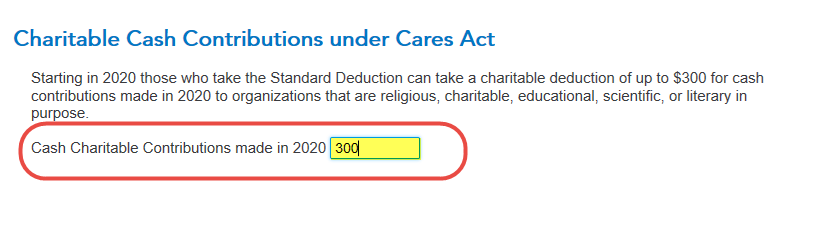
  2. If you are taking the standard deduction, after that screen you will see a Charitable Cash Contributions under Cares Act.  [See screenshot below.]  Enter the amount of your charitable contribution in the box (up to $300).  Click Continue.


Unlock tailored help options in your account.

message box icon

Get more help

Ask questions and learn more about your taxes and finances.

Post your Question