turbotax icon
cancel
Showing results for 
Search instead for 
Did you mean: 
Close icon
Do you have a TurboTax Online account?

We'll help you get started or pick up where you left off.

gaearl59
Returning Member

1099-R with both normal distribution and roll over

I just retired in 2022.  I got a 1099-R which includes 4 months of normal distribution including money to me plus fed and state tax withholding.  It also includes a sum of after-tax money that came from my 401k and was rolled into a Roth IRA.  The sum total is listed as a Gross distribution, all taxable and box 2b is checked for "taxable amount not Determined".  The form has one distribution code as 7 - normal distribution.  When I import this form from my brokerage into TT, it is treating the sum total as taxable income which seems to match the form but not real life.  TT does allow the selection of 2 codes and that seems to have a marked impact on the tax calculation but then I think I need to properly modify the numerical values on the rest of the form.   I tried choosing a second code of H and modifying 2a to include only the Normal distribution amount (money to me and taxes withheld).  For some reason when this plays out, TT treats the 2a amount as not taxable and the balance (Roth conversion amount) as taxable.  This seems backwards.


Other threads seem to suggest abandoning the original 1099R and manually entering 2 forms, one each for the normal distribution and one for the roll over.  


Several questions:

1 - which approach is preferred, 1 form and 2 codes or 2 forms?

2 - code 7 seems good for the normal distribution but what is the right code for the rollover of after-tax money and earnings to the Roth account?  Would that second code be H - Direct rollover to a designated Roth?

3 - regardless of the method, how do I record the cost basis for the Roth conversion?  It was about $17k total conversion with an $8k basis of after-tax contribution.  I am not sure if I need to put values in box 5 (Employee Contributions/Designated Roth Contributions) or 9b (Total Employee contributions).

4 - if I go the "2 forms " route, the Normal distribution form seems straight forward but how is the Roth conversion recorded?  


I am sure there are more questions but hopefully this is a clear start.  Thanks in advance for feedback.

x
Do you have an Intuit account?

Do you have an Intuit account?

You'll need to sign in or create an account to connect with an expert.

1 Best answer

Accepted Solutions
JohnB5677
Expert Alumni
Intuit Approved! This answer has been verified for accuracy by an Intuit expert employee

1099-R with both normal distribution and roll over

I would prefer you to use the original form and post it as it is with one exception.

  • Take the full distribution from box 1.
  • Subtract the amount in box 5.
  • Enter the taxable amount in box 2.

Code 7 is going to work just fine.


Because box 2b is checked, it is your responsibility to calculate the taxable amount, which we just did.

This is the Cost Basis calculation.

Since you took a distribution, and you rolled the balance into a ROTH the full amount in box 2 will be taxable.


 Now post your 1099-R as you have it including box 2.

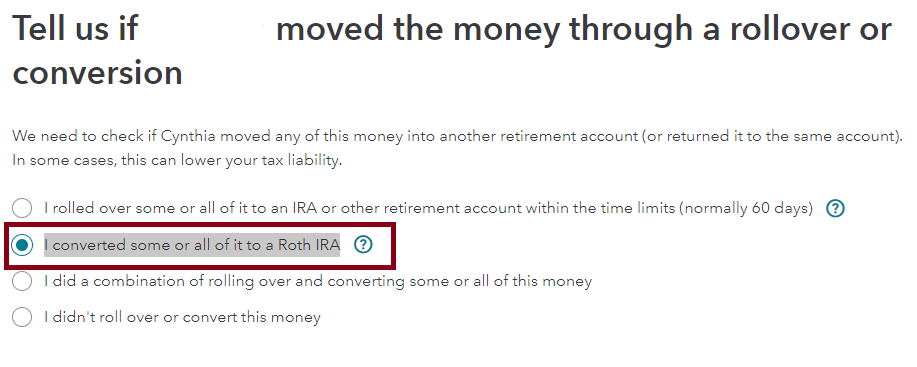
  1. Continue through the interview to Tell us if "You" moved the money through a rollover or conversion
  2. Select I converted some or all of it to a Roth IRA - Continue
  3. Did "You" convert all of this $X,000.00 (Box 1) to a Roth IRA?
  4. Select No, you converted less than $X,000.00
  5. Enter the actual amount. - Continue
  6. Complete the interview.

Now let's see what's been posted:

You can preview your tax return by going to:


  1. On the menu bar on the left that shows.
    1. My Info
    2. Federal
    3. State
    4. Review
    5. File
  2. Select Tax Tools
  3. On the drop-down select Tools
  4. On the popup menu
  5. Select View Tax Summary
  6. On the left sidebar
  7. Select Preview my 1040.
    1. Box 5a will show the total distribution.
    2. Box 5b will show the taxable portion.

To return to the entry screens press Back on the sidebar.


Some key numbers on your 1040 tax return are:

Line 15 - Taxable Income

Line 24 - Total Tax.

Line 25 - Withholdings.

Line 33 - Payments including Credits.

Line 34 - Overpayments.

Line 37 - Tax owed.


If I've misunderstood your question, and this does not completely answer it, please contact us again and provide some additional details.


**Say "Thanks" by clicking the thumb icon in a post
**Mark the post that answers your question by clicking on "Mark as Best Answer"

View solution in original post

3 Replies
JohnB5677
Expert Alumni
Intuit Approved! This answer has been verified for accuracy by an Intuit expert employee

1099-R with both normal distribution and roll over

I would prefer you to use the original form and post it as it is with one exception.

  • Take the full distribution from box 1.
  • Subtract the amount in box 5.
  • Enter the taxable amount in box 2.

Code 7 is going to work just fine.


Because box 2b is checked, it is your responsibility to calculate the taxable amount, which we just did.

This is the Cost Basis calculation.

Since you took a distribution, and you rolled the balance into a ROTH the full amount in box 2 will be taxable.


 Now post your 1099-R as you have it including box 2.

  1. Continue through the interview to Tell us if "You" moved the money through a rollover or conversion
  2. Select I converted some or all of it to a Roth IRA - Continue
  3. Did "You" convert all of this $X,000.00 (Box 1) to a Roth IRA?
  4. Select No, you converted less than $X,000.00
  5. Enter the actual amount. - Continue
  6. Complete the interview.

Now let's see what's been posted:

You can preview your tax return by going to:


  1. On the menu bar on the left that shows.
    1. My Info
    2. Federal
    3. State
    4. Review
    5. File
  2. Select Tax Tools
  3. On the drop-down select Tools
  4. On the popup menu
  5. Select View Tax Summary
  6. On the left sidebar
  7. Select Preview my 1040.
    1. Box 5a will show the total distribution.
    2. Box 5b will show the taxable portion.

To return to the entry screens press Back on the sidebar.


Some key numbers on your 1040 tax return are:

Line 15 - Taxable Income

Line 24 - Total Tax.

Line 25 - Withholdings.

Line 33 - Payments including Credits.

Line 34 - Overpayments.

Line 37 - Tax owed.


If I've misunderstood your question, and this does not completely answer it, please contact us again and provide some additional details.


**Say "Thanks" by clicking the thumb icon in a post
**Mark the post that answers your question by clicking on "Mark as Best Answer"
gaearl59
Returning Member

1099-R with both normal distribution and roll over

Thank you for the response.  I think you got the scenario pretty well.  A couple clarifications though.  There was no figure in box 5 but I had the cost basis from my 401k distribution summary so I put that in Box 5 and subtracted that value from the Box 1 gross to create the Box 2 taxable entry.  The IRA box was checked, which seemed erroneous since this was a 401k distribution, so I removed that check mark.  I then followed the interview as you described and landed at a result that I expected.


My last question relates to the modifications we have made.  Do I need to label this 1099 as a substitute and complete the form 4852 or are these modifications expected since the original provider had Box 2b checked thereby admitting that the taxable amount was not determined?


Thank you for the assistance!

PatriciaV
Expert Alumni

1099-R with both normal distribution and roll over

As long as your entries are based on the Form 1099-R that you received, you should not need to include Form 4852 to explain your entries.


Before you file, however, print and review Form 1040 and Schedule 1 to be sure the entries match your expectations.

For more help, see How do I preview my TurboTax Online return before filing?


**Say "Thanks" by clicking the thumb icon in a post
**Mark the post that answers your question by clicking on "Mark as Best Answer"

Unlock tailored help options in your account.

message box icon

Get more help

Ask questions and learn more about your taxes and finances.

Post your Question