


- Community
- Topics
Turn on suggestions
Auto-suggest helps you quickly narrow down your search results by suggesting possible matches as you type.
Showing results for
- Community
- :
- Discussions
- :
- Taxes
- :
- Deductions & credits
- :
- Re: 1095A


- Mark as New
- Bookmark
- Subscribe
- Subscribe to RSS Feed
- Permalink
- Report Inappropriate Content
1095A
I accidentally answered YES to TurboTax when it asked if I had a 1095-A. I do not. But now TurboTax insists I complete the monthly amounts paid from the 1095-A and I can't find a place to change to default of receiving a 1095-A to "No". How do I get around this problem?
posted
February 28, 2020
6:36 PM
last updated
February 28, 2020
6:36 PM
Connect with an expert

Do you have an Intuit account?
You'll need to sign in or create an account to connect with an expert.
12 Replies


- Mark as New
- Bookmark
- Subscribe
- Subscribe to RSS Feed
- Permalink
- Report Inappropriate Content
1095A
You'll have to delete form 1095-A.
Please follow these steps to delete form 1095-A:
- In the left hand column , click on Tax Tools then then on Tools
- On the Tools Center page, click on Delete a form
- On the Forms list, find form 1095-A and click Delete next to it
- On the next page, click on Delete selected form.
**Say "Thanks" by clicking the thumb icon in a post
**Mark the post that answers your question by clicking on "Mark as Best Answer"
**Mark the post that answers your question by clicking on "Mark as Best Answer"
February 28, 2020
6:50 PM

- Mark as New
- Bookmark
- Subscribe
- Subscribe to RSS Feed
- Permalink
- Report Inappropriate Content
1095A
I Have 1095A form i need to add
February 28, 2020
7:50 PM
- Mark as New
- Bookmark
- Subscribe
- Subscribe to RSS Feed
- Permalink
- Report Inappropriate Content
1095A
I need to add my 1095A information
February 28, 2020
7:54 PM

- Mark as New
- Bookmark
- Subscribe
- Subscribe to RSS Feed
- Permalink
- Report Inappropriate Content
1095A
See Where do I enter my 1095-A? - Community - TurboTax
**Say "Thanks" by clicking the thumb icon in a post
**Mark the post that answers your question by clicking on "Mark as Best Answer"
**Mark the post that answers your question by clicking on "Mark as Best Answer"
February 28, 2020
7:56 PM
- Mark as New
- Bookmark
- Subscribe
- Subscribe to RSS Feed
- Permalink
- Report Inappropriate Content
1095A
I have this same issue but the 1095a form does not come up when you click on delete a form/page. This has to be a software glitch that you can not change your response from yes to no.
March 8, 2020
6:01 PM
- Mark as New
- Bookmark
- Subscribe
- Subscribe to RSS Feed
- Permalink
- Report Inappropriate Content
1095A
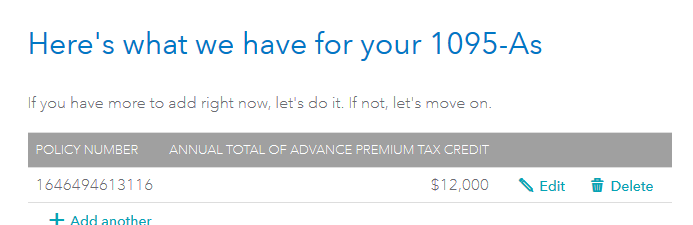
Go back to the 1095-A entry and Delete from the summary page.
**Say "Thanks" by clicking the thumb icon in a post
**Mark the post that answers your question by clicking on "Mark as Best Answer"
**Mark the post that answers your question by clicking on "Mark as Best Answer"
March 8, 2020
6:11 PM
- Mark as New
- Bookmark
- Subscribe
- Subscribe to RSS Feed
- Permalink
- Report Inappropriate Content
1095A
thank you but that option does not come up.
March 8, 2020
7:11 PM
- Mark as New
- Bookmark
- Subscribe
- Subscribe to RSS Feed
- Permalink
- Report Inappropriate Content
1095A
To delete the 1095-A form:
- Log in to your account.
- Go to Federal Taxes.
- Go to Deductions and Credits.
- Go to Medical and click show more.
- Go to Affordable Care Act (Form 1095-A) and click revisit.
- On the screen Here's what we have for your 1095-As select delete.
**Say "Thanks" by clicking the thumb icon in a post
**Mark the post that answers your question by clicking on "Mark as Best Answer"
**Mark the post that answers your question by clicking on "Mark as Best Answer"
March 9, 2020
7:09 AM
- Mark as New
- Bookmark
- Subscribe
- Subscribe to RSS Feed
- Permalink
- Report Inappropriate Content
1095A
thank you but once again, as has been mentnioned, there is no option to delete the 1095 a page and when you change your reply, it lets you make the change but it does not save it. It reverts to the original answer. Any other thoughts on how to delete the page/change the reply?
March 10, 2020
4:10 PM

- Mark as New
- Bookmark
- Subscribe
- Subscribe to RSS Feed
- Permalink
- Report Inappropriate Content
1095A
Instead of saying NO say YES (even if you do not have the form) then you will get to the summary screen where you can delete the unneeded form and continue.
March 10, 2020
4:22 PM

- Mark as New
- Bookmark
- Subscribe
- Subscribe to RSS Feed
- Permalink
- Report Inappropriate Content
1095A
I typed in that I had a 1095-A when I didn't have one by accident. How can I undue this ?
Ugh !
March 24, 2020
5:42 PM
- Mark as New
- Bookmark
- Subscribe
- Subscribe to RSS Feed
- Permalink
- Report Inappropriate Content
1095A
To delete the 1095-A form:
- Log in to your account.
- Go to Federal Taxes.
- Go to Deductions and Credits.
- Go to Medical and click show more.
- Go to Affordable Care Act (Form 1095-A) and click revisit.
- On the screen Here's what we have for your 1095-As select delete
**Say "Thanks" by clicking the thumb icon in a post
**Mark the post that answers your question by clicking on "Mark as Best Answer"
**Mark the post that answers your question by clicking on "Mark as Best Answer"
March 24, 2020
5:55 PM
Still have questions?
Questions are answered within a few hours on average.
Post a Question*Must create login to post


Unlock tailored help options in your account.


Get more help
Ask questions and learn more about your taxes and finances.
Related Content

ramosrivas
Level 1
ramosrivas
Level 1

libmaven
New Member

annaesler7
New Member

djnovacane3g
New Member