


- Community
- Topics
Turn on suggestions
Auto-suggest helps you quickly narrow down your search results by suggesting possible matches as you type.
Showing results for
- Community
- :
- Discussions
- :
- Taxes
- :
- Deductions & credits
- :
- Foreign Tax Credit Form 1116 not working
Announcements


- Mark as New
- Bookmark
- Subscribe
- Subscribe to RSS Feed
- Permalink
- Report Inappropriate Content
Foreign Tax Credit Form 1116 not working
I have passive income abroad. It is 100% interest. I input all the income in 1099-INT with box 6 checked and taxes paid abroad. FACTA checked.
I go through foreign tax credits module. Have run it 10 times. It won't decrease my due taxes. I am taxed for the same income in 2 countries. I checked my taxes last year, done by an accountant using INTUIT software, same problem.
Even when I increase or decrease taxes abroad, it has no affect. This module isn't working.
When reviewing before filing, no foreign tax credit is mentioned.
I have spent 2 days trying to figure this out
posted
February 20, 2025
6:44 PM
last updated
February 20, 2025
6:44 PM
Connect with an expert

Do you have an Intuit account?
You'll need to sign in or create an account to connect with an expert.
2 Best answer
Accepted Solutions

- Mark as New
- Bookmark
- Subscribe
- Subscribe to RSS Feed
- Permalink
- Report Inappropriate Content
Foreign Tax Credit Form 1116 not working
You need to first report the interest income and foreign tax paid, as you have done apparently, and in that section enter the associated foreign income on which it was paid:
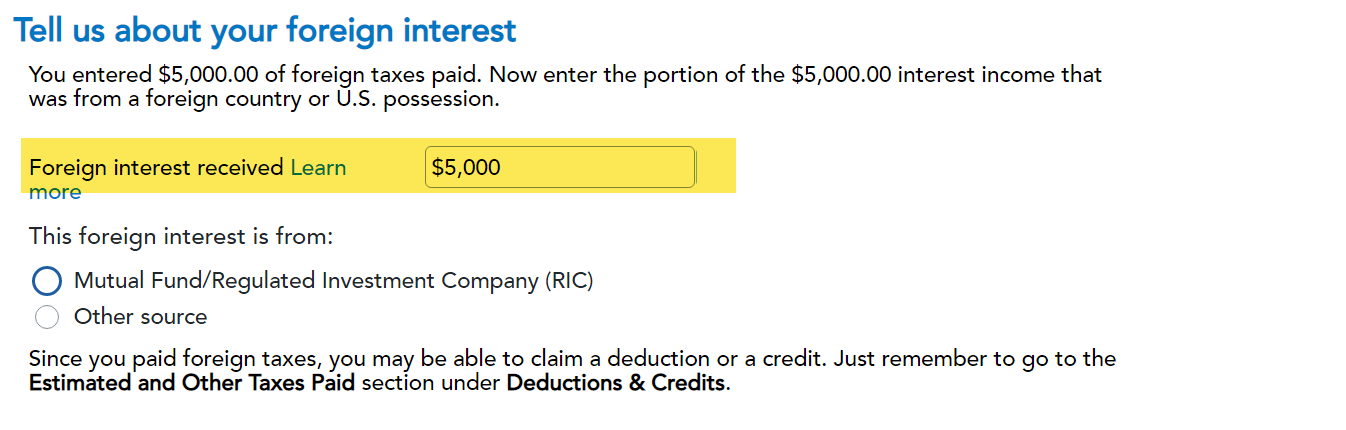
When you go through the foreign tax credit section, you need to link the interest income reported to the credit that you are working on, by checking the box that pertains to the Form 1099-INT you entered reporting the interest income:
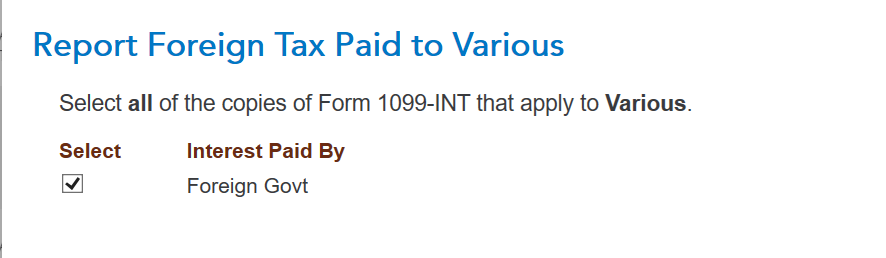
So, you need to assign the interest income to a foreign country and assign the tax paid to the foreign interest income. You can only take a credit to the extent you report foreign income in the current year. So, first you report the interest income, then you designate it as foreign income and then assign it to a foreign country.
You may be choosing the foreign tax deduction as opposed to the foreign tax credit, which would only work if you itemize your deductions, so that could be a reason you are not getting a benefit. Also, the credit could not be more than your income tax liability, so that could be a reason nothing changes when you make the foreign tax entries.
To view your form 1040 and schedule 1 to 3:
- Choose Tax Tools from your left menu bar in TurboTax Online while working in your program
- Choose Tools
- Choose View Tax Summary
- See the Preview my 1040 option in the left menu bar and click on it
- Choose the Back option in the left menu bar when you are done
**Say "Thanks" by clicking the thumb icon in a post
**Mark the post that answers your question by clicking on "Mark as Best Answer"
**Mark the post that answers your question by clicking on "Mark as Best Answer"
February 20, 2025
7:11 PM

- Mark as New
- Bookmark
- Subscribe
- Subscribe to RSS Feed
- Permalink
- Report Inappropriate Content
Foreign Tax Credit Form 1116 not working
The credit will not be greater than the US tax on the income. If the other country has a higher tax rate, you would not get the full credit. If you want to see all the intricacies of the form, see Figuring the Credit in Instructions for Form 1116. Notice your foreign income compared to your world income is part of the calculation.
Usually interest earned while a resident here is taxable to the US but each treaty is different. See United States Income Tax Treaties to see if you can exclude your income.
**Say "Thanks" by clicking the thumb icon in a post
**Mark the post that answers your question by clicking on "Mark as Best Answer"
**Mark the post that answers your question by clicking on "Mark as Best Answer"
February 23, 2025
12:39 PM
2,934
3 Replies
- Mark as New
- Bookmark
- Subscribe
- Subscribe to RSS Feed
- Permalink
- Report Inappropriate Content
Foreign Tax Credit Form 1116 not working
You need to first report the interest income and foreign tax paid, as you have done apparently, and in that section enter the associated foreign income on which it was paid:
When you go through the foreign tax credit section, you need to link the interest income reported to the credit that you are working on, by checking the box that pertains to the Form 1099-INT you entered reporting the interest income:
So, you need to assign the interest income to a foreign country and assign the tax paid to the foreign interest income. You can only take a credit to the extent you report foreign income in the current year. So, first you report the interest income, then you designate it as foreign income and then assign it to a foreign country.
You may be choosing the foreign tax deduction as opposed to the foreign tax credit, which would only work if you itemize your deductions, so that could be a reason you are not getting a benefit. Also, the credit could not be more than your income tax liability, so that could be a reason nothing changes when you make the foreign tax entries.
To view your form 1040 and schedule 1 to 3:
- Choose Tax Tools from your left menu bar in TurboTax Online while working in your program
- Choose Tools
- Choose View Tax Summary
- See the Preview my 1040 option in the left menu bar and click on it
- Choose the Back option in the left menu bar when you are done
**Say "Thanks" by clicking the thumb icon in a post
**Mark the post that answers your question by clicking on "Mark as Best Answer"
**Mark the post that answers your question by clicking on "Mark as Best Answer"
February 20, 2025
7:11 PM
- Mark as New
- Bookmark
- Subscribe
- Subscribe to RSS Feed
- Permalink
- Report Inappropriate Content
Foreign Tax Credit Form 1116 not working
Apparently, I didn't link the interest to the FTC module.
Now it is working. But I get FTC for less than 50% of the actual taxes I must pay abroad. Is that normal?
Should I use the tax treaty between the 2 countries?
By the way, I am using Android
February 23, 2025
10:45 AM
- Mark as New
- Bookmark
- Subscribe
- Subscribe to RSS Feed
- Permalink
- Report Inappropriate Content
Foreign Tax Credit Form 1116 not working
The credit will not be greater than the US tax on the income. If the other country has a higher tax rate, you would not get the full credit. If you want to see all the intricacies of the form, see Figuring the Credit in Instructions for Form 1116. Notice your foreign income compared to your world income is part of the calculation.
Usually interest earned while a resident here is taxable to the US but each treaty is different. See United States Income Tax Treaties to see if you can exclude your income.
**Say "Thanks" by clicking the thumb icon in a post
**Mark the post that answers your question by clicking on "Mark as Best Answer"
**Mark the post that answers your question by clicking on "Mark as Best Answer"
February 23, 2025
12:39 PM
2,935
Still have questions?
Questions are answered within a few hours on average.
Post a Question*Must create login to post


Unlock tailored help options in your account.


Get more help
Ask questions and learn more about your taxes and finances.
Related Content

michellegriffin01
New Member

markhowlett
New Member

Mohit
Level 3

user17645583867
New Member

djtsukasa
Level 2