
Hello,
I have a portion of 1099-K income that is a print on demand type business so I do not have any inventory. The main product expenses are recorded in the supplies category and I do not report any inventory. However, TurboTax makes me fill out this portion of my Schedule C. Would I just select "Cost" for 33 and "No" for 34?
Thank you
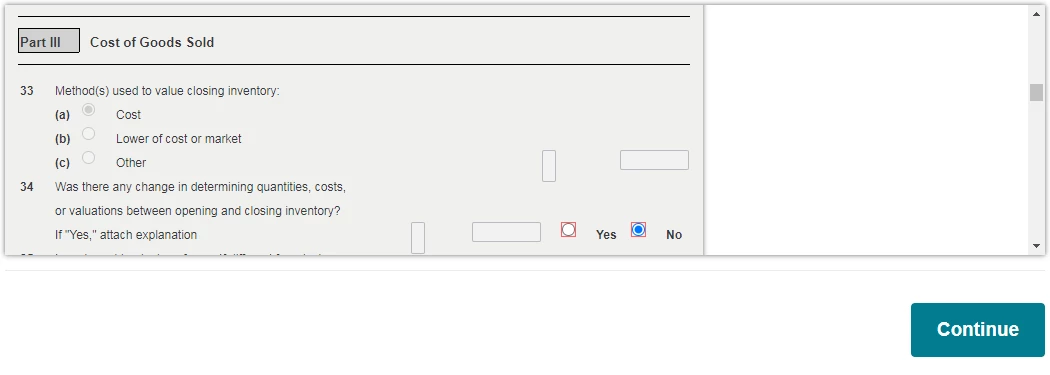
COGS
You'll need to sign in or create an account to connect with an expert.
You should not be getting asked that. You should have seen a screen before it where you marked no to inventory. Entering cash and no is fine in your case.

Thank you. Would you recommend going back and attempting to get it to not ask that question? Or is "Cash" and "No" alright even if I indicated I keep no inventory? Thanks again.
As I understand your business model, you do not maintain a sales inventory and you should not report Inventory at all.
I would return to the self-employment activity and click Edit to the right of Inventory.
At the screen Do you have inventory to report?, I would report No, I don't have any inventory to report.
Thank you. I went back and just went with "No entry". It allows me to select no entry and continue. But then it still shows "Needs review". However, it does let me continue from here on. Is this okay to leave the "Needs review" message like that? Thank you.
This "Needs review" and Schedule C review still comes up when I go back and check "No, I don't have any inventory to report" and remove inventory from the expenses with the trash can button.
'Needs review' will likely not let you electronically file.
This page asks an inventory related question. Select 33a 'Cost'.
If similar questions appear they likely also be inventory related. Answer as you are able or post here.
You want to pass Federal Review.
Thank you. I am reviewing the prepared return and I want to double check. This is how it is displayed within the Cost of Goods Sold section, generated my TurboTax. Is this okay? It says I had the $21,429 of inventory at the end of the year, which I did not but the COGS is 0 at the bottom. Is this just the way it needs to be for the calculation to work out (Subtract line 41 from 40)? Or should I go back and try something else?
@JamesG1 Thank you
This gives you $0 COGS so that is a step in the right direction!
However, the year-end Inventory of $21,429 will re-appear next January as beginning inventory.
Consider dealing with it this way.
@jevans575
Thank you. Can I directly edit the Schedule C at all, or is all of this done by going back and entering things into the TurboTax expense area?
@JamesG1 Thank you
If you are using the online version you would have to go back through the interview questions to make any changes.
If you are using the desktop version you can edit directly on the forms.
Thank you. I am using the TurboTax online. Which expense category would I enter the "Then create an expense line for $21,429 with a description that means something to you" be under?
You would enter your figure under supplies expense. If you prefer you can use Miscellaneous or Other expense category and name it. If necessary you can select 'Add expenses for this work' to find the category you choose. See the image below.

Hello, I was able to mess around with things to get the COGS to be all zeros and get the supplies to be separate. This would be how I would want it, right? Since I do not hold any inventory (and just report the cost in the Supplies section)?
@JamesG1 Thank you.
Yes, you have the information and figures in the right places. Now that your cost of goods is gone you should be able to pass the review.
Still have questions?
Questions are answered within a few hours on average.
Post a Question*Must create login to post
Ask questions and learn more about your taxes and finances.
nathstaxes
Level 3
likong88
Level 1
JMillBrand13
New Member
Raph
Community Manager
in Events
user17766276775
New Member




