
May 9, 2021
Solved

W2 Info - does it need corrected by employer

  • May 9, 2021
  • 5 replies
  • 50 views

I am full time resident of WV state and have remotely worked for 3 months in 2020 (never lived or worked in other states)


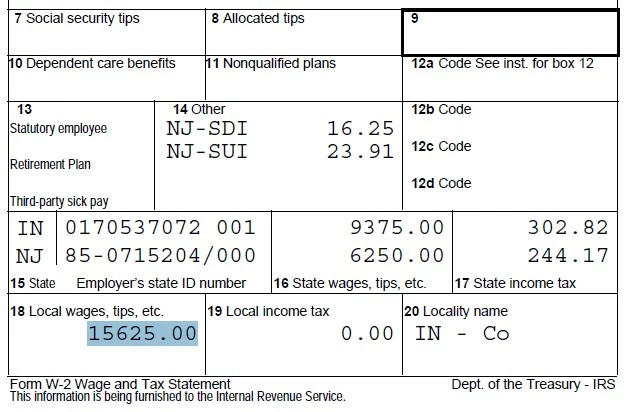
does the number in box 18 and Box 20 appear correct ? I don't see any county taxes in any of my paychecks and the amount in Box 18 is exactly the amount of State wages BOX -1. This doesn't seem right?


1) can someone please comment if box-18 is  correct ?

2) On my W-2 my employer listed the company address as employee address (where I was supposed to work) but due to covid-19 I have worked remotely all though 2020 . Does the address on my W2 need to match the address where I have lived ?


    Best answer by ErnieS0

    Boxes 18-20 are Indiana local county tax. You do not have to pay IN county tax if you did not live or work in Indiana for the whole year. You should file a nonresident IN and NJ return to get back all the income tax withheld from those states.


    Report $0 as state wages for both those returns. I suggest filing those returns by mail and enclosing copies of the other state returns along with a note explaining (1) that your employer withheld tax from the wrong states, (2) that you never lived or worked in either Indiana or New Jersey and (3) that you are filing a nonresident tax return to claim a refund for tax withheld by mistake.


    Your entire income is taxable to West Virginia because you are a West Virginia resident. You will owe a lot of tax to WV since no WV tax was withheld from your pay.


    You should complete a West Virginia income tax withholding certificate and give it to your employer to get WV tax withheld.

    5 replies

    ErnieS0Answer
    Level 15
    May 9, 2021

    Boxes 18-20 are Indiana local county tax. You do not have to pay IN county tax if you did not live or work in Indiana for the whole year. You should file a nonresident IN and NJ return to get back all the income tax withheld from those states.


    Report $0 as state wages for both those returns. I suggest filing those returns by mail and enclosing copies of the other state returns along with a note explaining (1) that your employer withheld tax from the wrong states, (2) that you never lived or worked in either Indiana or New Jersey and (3) that you are filing a nonresident tax return to claim a refund for tax withheld by mistake.


    Your entire income is taxable to West Virginia because you are a West Virginia resident. You will owe a lot of tax to WV since no WV tax was withheld from your pay.


    You should complete a West Virginia income tax withholding certificate and give it to your employer to get WV tax withheld.

    **Say "Thanks" by clicking the thumb icon in a post. **Mark the post that answers your question by clicking on "Mark as Best Answer"
    May 9, 2021

    Thank you for the reply !! much appreciated 🙂


    I don't see any IN county taxes withheld on my paycheck as well ...so can I ignore boxes 18-20 safely? 

    Also it looks like the W2 is incorrect as the total county taxes in Box 18 are exactly the same as states wages (Box 1)  ..this doesn't seem right


    Also in this case the address on my W-2 is also incorrect (listed as NJ). Will that matter much when I am filing taxes OR can I just update the address when filing taxes with TurboTax software?


    Level 15
    May 11, 2021

    @237209 You can ignore Boxes 18-20. Your employer did recognize that your were out-of-state and not subject to Indiana county tax.


    Box 18 looks like the total of Box 16 which appears incorrect. Box 18 should match the IN wages. But leave everything as is.


    The employee's address on the W-2 doesn't matter for filing. People move all the time. TurboTax will automatically enter your address from Personal Info. You can change it if you want. In TurboTax Online, go to the W-2 screen that says OK, let's update the info we have for you and your employer.


    Below the employer info you will see Show employee info. You can click on that and change the address to match the W-2. 

    **Say "Thanks" by clicking the thumb icon in a post. **Mark the post that answers your question by clicking on "Mark as Best Answer"




