turbotax icon
cancel
Showing results for 
Search instead for 
Did you mean: 
Close icon
Do you have a TurboTax Online account?

We'll help you get started or pick up where you left off.

x
Do you have an Intuit account?

Do you have an Intuit account?

You'll need to sign in or create an account to connect with an expert.

LindaS5247
Expert Alumni

incorrect NYS pension exclusion

When you initially entered the Form 1099-R in the Income Section (Federal Return), after you enter the 1099-R, you need to select the right category as to where the 1099-R was issued from, to get it to flow to your NYS return properly and be tax-exempt.  This will be one of the subsequent questions that come up right after you enter your Form 1099-R.


When you select this (see below), it will flow properly to your NYS return as nontaxable.
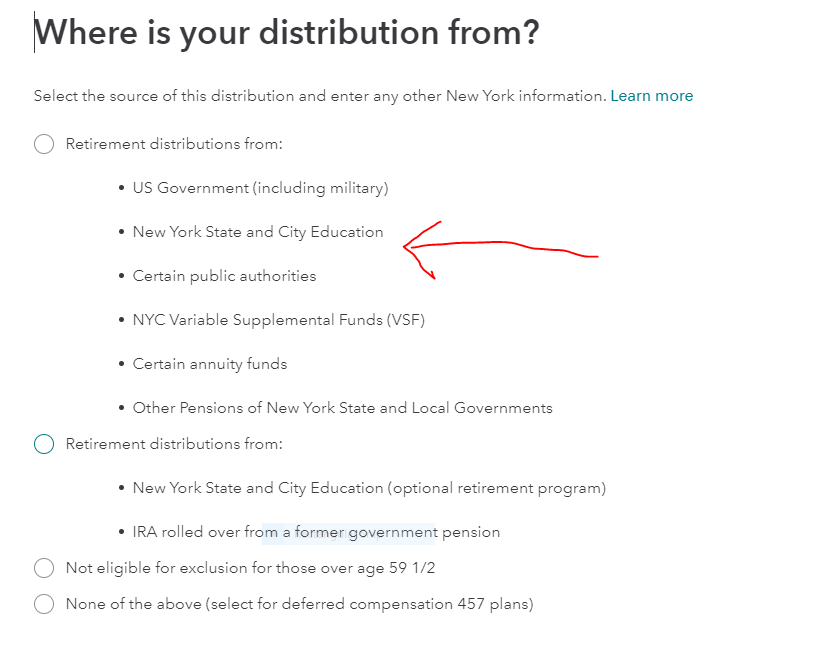


Go back to your Form 1099-R in your Income section. Try to edit it.  You may have to delete and reenter the Form 1099-R to get this question to pop back up.  


Click here for information on deleting your Form 1099-R in TurboTax

**Say "Thanks" by clicking the thumb icon in a post
**Mark the post that answers your question by clicking on "Mark as Best Answer"

IM10
Level 1

incorrect NYS pension exclusion

Three years later it still does not work correctly. I have to enter MTA pension as other state and local pension though it is not listed in the publication or as a federal government pension. If I correctly post pension as a state employee with 457 deferred compensation plan, the NY state taxes it.  

incorrect NYS pension exclusion

Thanks for your post, but I am not New York State Education, or New York City Education - which is what that questions says.  Should it say "New York State OR New York City Education"?  And if it is not worded correctly and I should pick this for ANY NYS Gov't pension, why has it still not been fixed as of March 2025?  I read this carefully and obviously didn't select it as I am not part of Education. 

We just noticed this problem in our return and new we need to go back and file amended returns for all the years the software did this incorrectly and told us to pay an extra $2,500 in taxes each year.  Insane this hasn't been fixed.

incorrect NYS pension exclusion

Following this thread for years but not sure what the status is now,  In 2021 the "solution" was to go back into your federal return and re-enter your 1099-r and tell it that the distribution was 


https://ttlc.intuit.com/community/state-taxes/discussion/incorrect-nys-pension-exclusion/00/1640826


This would in turn "fix" your state return to exclude the pension.  The section in post 1650826 that tells you to adust your 1099r no longer seems to apply.  In addition, when I go back to my state return I get a Pension Deduction Summary page that shows my pension payments (and my wife's) being applied ... saying "We automatically calculated your New York pension deductions" and the full amount of our pensions do appear to be deducted.  

If Intuit and Turbotax can certify that the entire underlying problem as fixed, maybe it would be a good idea to "close" this thread with a note to not try to apply the suggestions in it.  Something in bold text and/or closing off the option to post more here.??  If there is still a problem with State pensions amounts not being completely or properly deducted from NY State taxes, users should instead be warned about that.

incorrect NYS pension exclusion

They did "fix" the problem, but the wording for the question they ask to fix it is incorrect, so most people are probably not getting it right, and I assume lots of people like me are paying $1,000s  in extra NY taxes.  ( I have to file amended returns for the last 3 years to get back $7,500 in overpaid NY taxes. )


The thread could be confusing I guess, but it may be the only thread that really gets to the issue of how to fill it out correctly (Pick "New York State or City Education" for all NY State Gov't pensions).  And even the old fix of picking federal Gov't should still work.

Unlock tailored help options in your account.

message box icon

Get more help

Ask questions and learn more about your taxes and finances.

Post your Question
