turbotax icon
cancel
Showing results for 
Search instead for 
Did you mean: 
Close icon
Do you have a TurboTax Online account?

We'll help you get started or pick up where you left off.

multiple states, work in both and at home

We live in Rhode Island. My wife did some private contractor urban planning work for a town in Connecticut, $6,000 worth. She received a 1099-MISC from the town for $6,000. However, nearly all of the actual work was done here at home on her computer. She visited the town twice as part of the job. How should I handle this?

x
Do you have an Intuit account?

Do you have an Intuit account?

You'll need to sign in or create an account to connect with an expert.

1 Best answer

Accepted Solutions
DaveF1006
Expert Alumni

multiple states, work in both and at home

According to this Turbo Tax link, you would not need to file a Connecticut State return. Please select the link and view the details.

**Say "Thanks" by clicking the thumb icon in a post
**Mark the post that answers your question by clicking on "Mark as Best Answer"

View solution in original post

5 Replies
DaveF1006
Expert Alumni

multiple states, work in both and at home

According to this Turbo Tax link, you would not need to file a Connecticut State return. Please select the link and view the details.

**Say "Thanks" by clicking the thumb icon in a post
**Mark the post that answers your question by clicking on "Mark as Best Answer"

multiple states, work in both and at home

OK, Let's say "hypothetically" that I already paid some estimated taxes to a state that now I discover I don't have to file a return with. What's the best way to try and claw that money back?

We used to file with that state because we lived there, but we moved and didn't live there for any part of 2019. But my wife continued working as an independent contractor for the same employer in that state in 2019.

LeonardS
Expert Alumni

multiple states, work in both and at home

If your wife did not work in the state where the contractor she works for is located she will not have to file a state tax return.  However, you will need to file a state tax return to get a refund of your estimated tax payments.

**Say "Thanks" by clicking the thumb icon in a post
**Mark the post that answers your question by clicking on "Mark as Best Answer"

multiple states, work in both and at home

My wife is self-employed. She works for Philadelphia Water as an independent contractor. PW sends her a 1099-misc. We live in Rhode Island full time.

From the PA website:

"Nonresidents of Pennsylvania. PA law taxes the income you earn, receive and realize from PA sources."

This appears to say that we must file with PA even though we don't live there.

Thanks to all for your patience. I am still confused.

JotikaT2
Employee Tax Expert

multiple states, work in both and at home

That is correct.  You must file a return in Pennsylvania as a nonresident.


Pennsylvania(PA) taxes you for income generated from PA sources.  In your situation, your wife is generating income from a business that is based in PA.  How the company pays her, whether it be a W-2 or 1099, does not matter as it is sourced from PA.
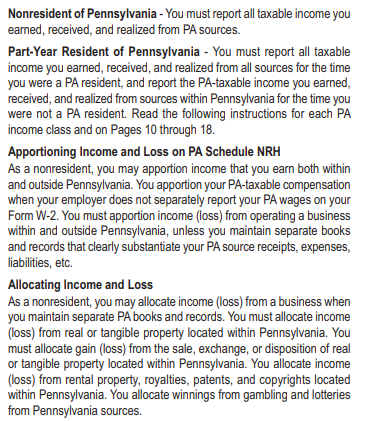
 

PA sources


Business income


You will make your entries in the "My Info" section of TurboTax.

Confirm that you have entered the correct state information:

  1. Click "Edit" to the right of your name
  2. Confirm your input under #2 "Tell us the state(s) you lived in"
  3. Do the same for your spouse if you are married filing jointly.
  4. Go back to the personal information section, and verify the mailing address and "Other state income" section.  You would enter Pennsylvania in this section.

When you complete your federal return, you will continue to the state questions. 


Prepare the Nonresident Pennsylvania state tax return first. 


Once you have entered all of the Pennsylvania information, then start your Rhode Island return.  This will ensure you receive any credits for taxes on income which may have been taxed in both states.  

**Say "Thanks" by clicking the thumb icon in a post
**Mark the post that answers your question by clicking on "Mark as Best Answer"

Unlock tailored help options in your account.

message box icon

Get more help

Ask questions and learn more about your taxes and finances.

Post your Question