
Level 2
April 21, 2022
Solved

Cannot E-file or Print CA Tax Forms - Crashing and Form Unavailable Errors

  • April 21, 2022
  • 1 reply
  • 40 views

I am using TurboTax Home & Business on Mac and I have been able to successfully file my federal and other state (VA) return, but I'm stuck trying to file my CA state return as I cannot E-File or print my return or individual CA forms.


E-filing:

When I attempt to e-file, I get this error:
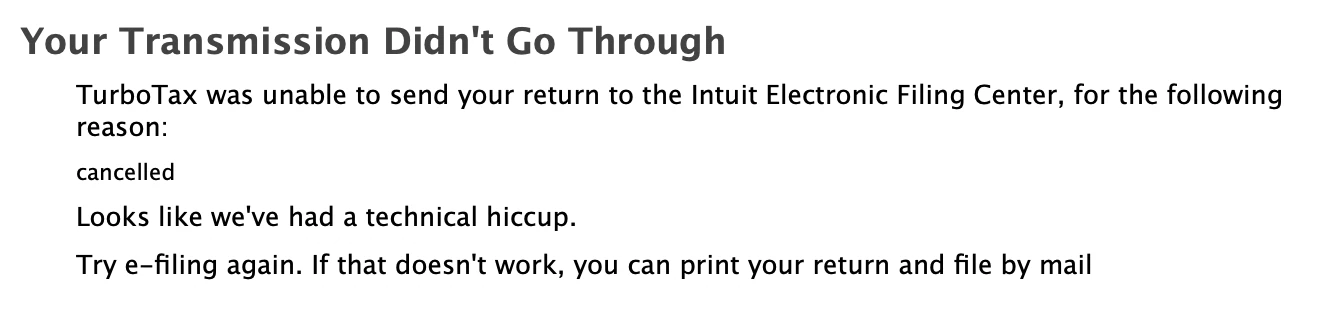
I got this same error when I initially tried to E-file my Federal and State returns together, but was able to get around it for Federal and VA by submitting those and leaving CA out. Now I see this every time I attempt to submit my CA return.


Printing:

When I attempt to print my entire return (through either the File menu, the "Print Your Returns" button while e-filing, or the "Save for Your Records" step), I get a spinning wheel for 5-10 seconds and then TurboTax crashes (I never see a print menu).


I can print individual Federal and VA forms without issue, but when I attempt to print an individual CA form, I get this error:
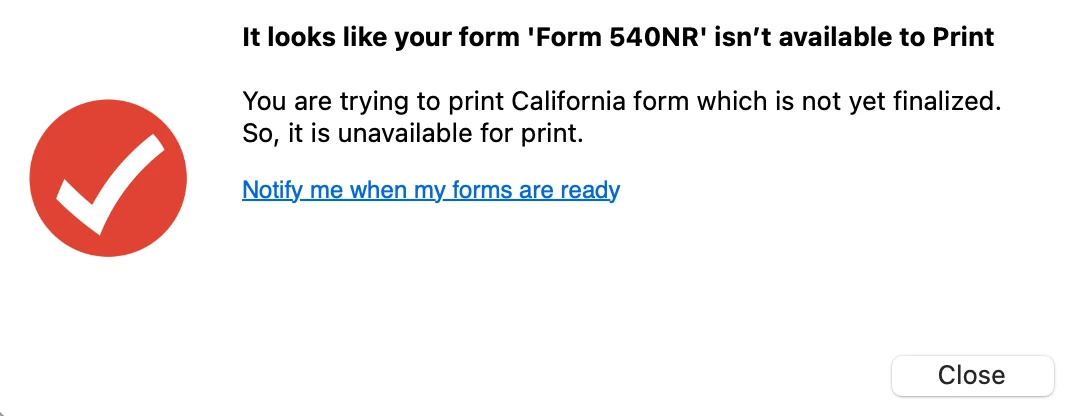
This occurs for every form (including ones listed as available in this list - https://care-cdn.prodsupportsite.a.intuit.com/forms-availability/turbotax_ca_mac_individual.html), so I do not believe this message is accurate and there's something else going on rather than a form availability issue.


Troubleshooting:

Aside from trying everything mentioned above, I've also completely removed and reinstalled TurboTax (using this guide: https://ttlc.intuit.com/community/installing/help/remove-uninstall-turbotax-for-mac/00/26050), removed California data and re-completed it, rebooted, and booted into Safe Mode. I have tried all of this on WiFi, wired ethernet, and mobile hotspot, but no matter what I try I cannot e-file or print.


I am using a MacBook Pro w/ an M1 Pro, 32GB RAM, macOS Monterey 12.1, no antivirus and only Chrome with a few tabs open, so I don't think it's a resource issue (and I don't see significant usage in Activity Monitor). I also tried using my old MacBook Pro, but when I ran into the same e-file error on that one I gave up.


I'm at a loss since I can't e-file my return or print it to file by mail, so I'm hoping that someone here can help.

    Best answer by macuser_22

    Yes I did, and did it a second time to make sure I didn’t miss a step the first time around. Also tried a fresh install on a second computer, but had the same result.


    I started a new return to test and was able to print that successfully, but my existing return continues to crash whenever I try that. Is it possible that the save is corrupted somehow? I’d like to avoid completely redoing my return if possible (especially since Federal and VA have already been submitted and I don’t want to create an inconsistency by accident), but if that’s the only solution then I guess I don’t have a choice.


    That type of crash would appear to be a program bug biased on the content of that data file.  


    First I would try to just open the tax return and while holding the option key down a File -> Save As to a new saved file and try opening that new file and see if yiu get the same crash.


    If you do, you can contact Customer support and try to escalate to a Mac technical support.   I believe that only a Mac developer who has a copy of your .tax file could pinpoint the problem and fix it.    That could take months.


    The other option is to explain the issue to customer support and ask them to provide the online version which is "Self-Employed" (online name of Home & Business)  to you.  You could upload your .tax file to the online version and print from there.


    Here is a TurboTax FAQ for contacting customer support.

    https://ttlc.intuit.com/questions/1899263-what-is-the-turbotax-phone-number


    1 reply

    macuser_22
    Alumni - Champ
    Alumni - Champ
    April 21, 2022

    Sounds like your software is not up to date.    You should be on version 26r Build date Apr 17.   Use Top menu bar -> TurboTax -> About TurboTax -> More Info to see it.


    If it will not update then:

    Corruption could have occurred in the Application or in an associated preference or support file.

    The best remedy is to totally uninstall TurboTax and all associate files and then re-install. That will not delete or change any .tax data file that had already been created with the tax data.

    To uninstall the application and all associated files need to be deleted and then the application reinstalled. If there was a state then the state must also be reinstalled.

    To remove TurboTax from your computer, you'll need administrative rights.

    Here is a FAQ for how to uninstall Mac
    https://ttlc.intuit.com/questions/1901210-remove-uninstall-turbotax-for-mac


    **Disclaimer: This post is for discussion purposes only and is NOT tax advice. The author takes no responsibility for the accuracy of any information in this post.**
    wbio3Author
    Level 2
    April 22, 2022

    Sorry should have put this in the original post, but my application is fully up-to-date. I saw there was a new release (2021.r26.090, released 4/21/22), so I just updated to that and am having the same issues.


    I have also previously followed that guide to fully uninstall TurboTax and reinstall and unfortunately that did not solve my issue.

    macuser_22
    Alumni - Champ
    Alumni - Champ
    April 22, 2022

    @wbio3 wrote:

    Sorry should have put this in the original post, but my application is fully up-to-date. I saw there was a new release (2021.r26.090, released 4/21/22), so I just updated to that and am having the same issues.


    I have also previously followed that guide to fully uninstall TurboTax and reinstall and unfortunately that did not solve my issue.


    Then what do yu mean by "crash"?   Is there a crash report in the crash log file in Applications -> Console or does it just spin?    And you force close it?


    If spin then wait it out for at least 30-45 minutes and see if it eventually prints.

    **Disclaimer: This post is for discussion purposes only and is NOT tax advice. The author takes no responsibility for the accuracy of any information in this post.**




