turbotax icon
cancel
Showing results for 
Search instead for 
Did you mean: 
Announcements
Close icon
Do you have a TurboTax Online account?

We'll help you get started or pick up where you left off.

Total income stuck at zero when using annualized income method to avoid underpayment penalty.

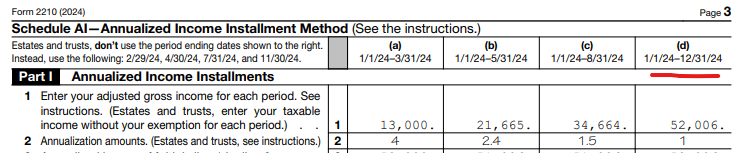
I went through the section once successfully but when I went back to make correction my total income is stuck at "zero" in Annualized Adjusted Gross Income section. I tried reloading and it didn't help. Specifically, the last row is as follows: 1/1/2024 to 12/31/2024 zero
x
Do you have an Intuit account?

Do you have an Intuit account?

You'll need to sign in or create an account to connect with an expert.

1 Reply
JamesG1
Employee Tax Expert

Total income stuck at zero when using annualized income method to avoid underpayment penalty.

Use Form 2210 to determine the amount of underpaid estimated tax and resulting penalties as well as for requesting a waiver of the penalties.


At the screen Annualized Adjusted Gross Income, the dollars reported for the period of 1/1 to 12/31 will be added by the software and will equal the income reported on the Federal 1040 income tax return.


You are able to view the annualized income on page three of IRS form 2210 Underpayment of Estimated Tax.


**Say "Thanks" by clicking the thumb icon in a post
**Mark the post that answers your question by clicking on "Mark as Best Answer"

Unlock tailored help options in your account.

message box icon

Get more help

Ask questions and learn more about your taxes and finances.

Post your Question