turbotax icon
cancel
Showing results for 
Search instead for 
Did you mean: 
Announcements
Close icon
Do you have a TurboTax Online account?

We'll help you get started or pick up where you left off.

The boxes asking for information do not match the physical boxes on the 1099-R form I am holding in my hand. What do I do?

 
x
Do you have an Intuit account?

Do you have an Intuit account?

You'll need to sign in or create an account to connect with an expert.

4 Replies
DanaB27
Employee Tax Expert

The boxes asking for information do not match the physical boxes on the 1099-R form I am holding in my hand. What do I do?

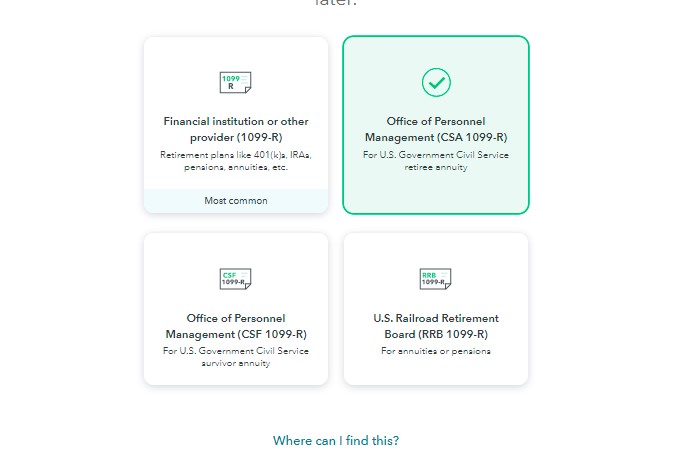
Please verify that you selected the correct option on the "Who gave you a 1099-R?" screen. For example, if you have a CSA 1099-R instead of a regular 1099-R then you will need to select "Office of Personnel Management (CSA 1099-R) For U.S. Government Civil Service retiree annuityon the "Who gave you a 1099-R?" screen.


  1. Login to your TurboTax Account 
  2. Click on "Search" on the top right and type “1099-R”
  3. Click on “Jump to 1099-R”
**Say "Thanks" by clicking the thumb icon in a post
**Mark the post that answers your question by clicking on "Mark as Best Answer"

The boxes asking for information do not match the physical boxes on the 1099-R form I am holding in my hand. What do I do?

...Now...if it IS as standard 1099-R  (and not a CSA- of CSF-1099-R from OPM)


....The IRS moved boxes 12,13,14 from the 2019 and earlier 1099-R format, and into boxes 14,15,16 respectively for 2020....BUT, a few irresponsible 1099-R providers failed to update their 1099-R forms to the new/correct 2020 box numbering format.   So if you see boxes 12,13,14 on your standard 1099-R...match the subject of each line before entering the numbers/values .  

____________*Answers are correct to the best of my knowledge when posted, but should not be considered to be legal or official tax advice.*

The boxes asking for information do not match the physical boxes on the 1099-R form I am holding in my hand. What do I do?

Not helpful, as it assumes I am an idiot and don't know how to read what kind of form I got.

The boxes asking for information do not match the physical boxes on the 1099-R form I am holding in my hand. What do I do?

This one is helpful, as it explains why the forms don't match what TurboTax is asking for. I went in and simply entered what was asked for, disregarding what the box number was. It's the only thing I could do. Thanks!

Unlock tailored help options in your account.

message box icon

Get more help

Ask questions and learn more about your taxes and finances.

Post your Question