turbotax icon
cancel
Showing results for 
Search instead for 
Did you mean: 
Announcements
Close icon
Do you have a TurboTax Online account?

We'll help you get started or pick up where you left off.

scotto613
New Member

How do I remove an extra 1099-R form for which the website is demanding completion?

I didn't ask for the form. I want it gone, but the website is requiring completion.  dumb.
x
Do you have an Intuit account?

Do you have an Intuit account?

You'll need to sign in or create an account to connect with an expert.

2 Replies
Kat
Level 15
Level 15

How do I remove an extra 1099-R form for which the website is demanding completion?

This may be what I call a "ghost" form hanging around from your 2020 return.  Essentially, it's a form that transferred over (as a convenience to the user), and it's waiting for you to fill it in.  


You may be able to identify the form by using the info I'm linking below.


How do I view and delete forms in TurboTax Online? 


If the first solution doesn't work, scroll on down to the other "Tip", and use the suggestion at the second bullet point.  You'll be looking for the vacant form, and then should be able to delete it.

*** I am NOT a tax expert. I am a seasoned TurboTax user, and volunteer to provide assistance to TT users. Nothing I post is to be considered TAX ADVICE; I bear no legal liability for responses.***

JulieS
Expert Alumni

How do I remove an extra 1099-R form for which the website is demanding completion?

You will need to delete the 1099-R that is causing the problem. Here is how to find it:

  1. Select Federal on the left side menu.
  2. Under  Wages & Income, find Retirement Plans and Social Security.
  3. Expand the section and find IRA, 401(k), Pension Plan Withdrawals (1099-R)
  4. Select Start or Update to the right.
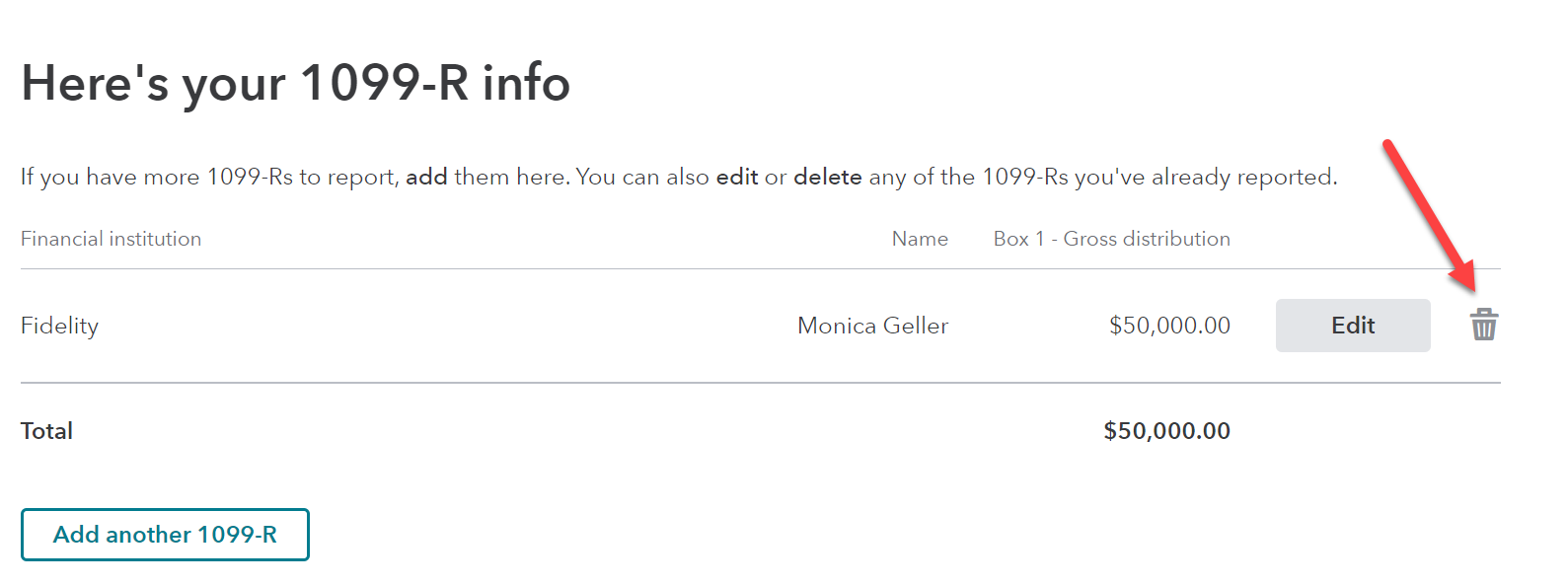
  5. On the screen titled, Here's your 1099-R info, look for the 1099-R below the gray line.
  6. Look for a trash can to right of that entry. Select the trash can and confirm that  you want to delete.


**Say "Thanks" by clicking the thumb icon in a post
**Mark the post that answers your question by clicking on "Mark as Best Answer"

Unlock tailored help options in your account.

message box icon

Get more help

Ask questions and learn more about your taxes and finances.

Post your Question